

V7 KW550BT Manual
PDF manual · 2 Pages
English



Quick check
Incorrect answer, please try again.
Chat with your V7 KW550BT manual using AI
Get instant AI answers from your V7 KW550BT manual
Ask anything about the V7 KW550BT. Answers come from this manual, with the pages they are based on.
Ask a Question
Do you recommend KW550BT?
Yes NoFrequently Asked Questions
Turn on the keyboard, press the Bluetooth button until the light blinks rapidly, then go to your device settings, select Bluetooth, and choose KW550 from the list to complete pairing.
Is this answer helpful?
Yes, the V7 KW550BT allows you to pair with up to three different devices and switch between them easily using the channel selection buttons.
Is this answer helpful?
Absolutely. You can use the included USB cable for a direct wired connection if you prefer stability over wireless freedom.
Is this answer helpful?
The keyboard typically uses standard AAA batteries which should be inserted into the compartment located on the back of the unit.
Is this answer helpful?
Yes, this model comes specifically configured with a UK layout, ensuring all symbols and characters match British standards.
Is this answer helpful?
Advantages and Disadvantages
Advantages

- Dual connectivity options via USB and Bluetooth
- Supports pairing with up to three different devices simultaneously
- UK specific key layout for local compatibility
- Clear visual LED indicators for connection status
- Compact and portable design suitable for travel
Disadvantages

- Battery life depends on usage frequency and charging habits
- No backlit keys for low-light environments
- Limited to standard typing functions without macro support
- Requires manual pairing process for new devices
- Non-replaceable battery may limit long-term usability
Product Specification
Layout
UK
Type
Rubber Dome
Lighting
N/A
Keycap Level
Regular, with frame, Chiclet
Keycap Format
Flat
Keycap Dome
Straight
Numpad
Standard
Cursor Block
Standard
Control Keys
Standard
Enter Key
Standard
Delete Key
Standard
Status Indicator
Capslock, Num, Scroll
Wrist Rest
N/A
Housing
Plastic
Housing Color
Solid, Black
Keycap Finish
Solid, Black
Key Legend
Laser engraved, solid, white
Connection
Wireless (2.4GHz), USB (USB-A receiver) or wireless (Bluetooth)
Power Supply
2x AAA
Dimensions (WxDxH)
16.14x0.75x4.72 in
Weight
1.31 lbs
Features
5 multimedia keys, FN key, laser engraved
Product Description
Discover the V7 KW550BT Bluetooth Keyboard
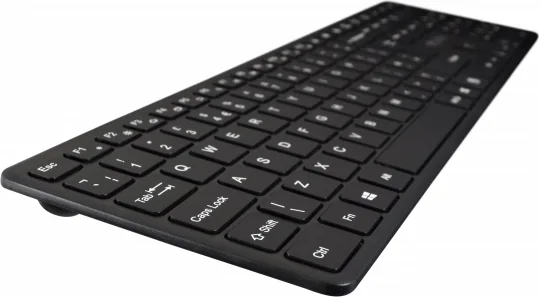
The V7 KW550BT Bluetooth Keyboard represents a seamless blend of functionality and modern connectivity. Designed for users who demand versatility, this device offers dual-mode operation, allowing you to switch effortlessly between USB and Bluetooth connections. Whether you are setting up a home office, managing a mobile workstation, or connecting multiple devices in a shared environment, the KW550BT adapts to your workflow with precision.
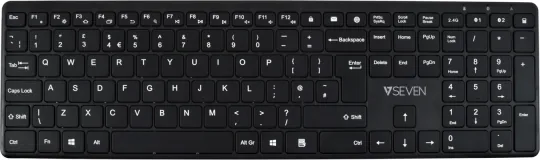
This keyboard features a compact layout tailored for UK users, ensuring that every key is positioned exactly where you expect it to be. The inclusion of dedicated function keys like Print Screen, Scroll Lock, and Pause Break provides quick access to essential commands without cluttering your screen. The physical design is sleek, making it an attractive addition to any desk setup while maintaining durability for daily use.
Connecting the V7 KW550BT is an intuitive process. Simply turn on the power switch and choose your preferred mode. For wireless freedom, navigate to your device's Bluetooth settings and pair with the KW550BT. The clear LED indicators guide you through the pairing process, lighting up green or blue to confirm a successful connection. If you prefer a wired setup, the included USB cable ensures a stable connection with zero latency, perfect for gaming or critical tasks where reliability is paramount.
The keyboard supports multi-channel Bluetooth capabilities, allowing you to save up to three different device pairings. This feature means you can toggle between your laptop, tablet, and smartphone instantly by pressing the designated channel button. It eliminates the hassle of re-pairing every time you switch devices, saving valuable time and reducing friction in your digital life.
Notes:
- Ensure batteries are charged before first use.
- Keep the USB receiver handy for backup connectivity.
- Regular cleaning maintains the tactile feel of the keys.
Search for 67,706 Manuals online


Type-in Brand or Model