
V7 HB605M Manual
PDF manual · 50 Pages
English



Quick check
Incorrect answer, please try again.
Chat with your V7 HB605M manual using AI
Get instant AI answers from your V7 HB605M manual
Ask anything about the V7 HB605M. Answers come from this manual, with the pages they are based on.
Ask a Question
Do you recommend HB605M?
Yes NoFrequently Asked Questions
Slide the power switch to the pairing position until you hear the pairing tone or see the LED flash. Then, enable Bluetooth on your phone, select 'V7 HB605M' from the list, and confirm the connection. You will hear a 'connected' prompt upon success.
Is this answer helpful?
Yes, you can use the integrated Bluetooth on your PC. However, the range may be limited to 10 meters compared to the 30 meters offered by the V7 Link USB dongle. You must ensure the headset is selected as the audio playback device in your OS settings.
Is this answer helpful?
While the headset is powered on, briefly press the Call Answer button once. You will hear a voice announcement indicating the battery percentage: 100%, 75%, 50%, or 25%.
Is this answer helpful?
Yes, the boom microphone is detachable. It plugs into a 2.5mm receptacle on the headset and can be moved to the left or right side depending on your preference. If removed, the internal microphone can be used instead.
Is this answer helpful?
First, check that the USB-C cable is undamaged and fully seated in both the headset and the charger. Try a different USB port, as some computer ports turn off when the PC is asleep. Also, ensure the wall charger is functioning correctly.
Is this answer helpful?
If you are not using the boom microphone, press and hold the Volume Down (Vol-) button for two seconds to mute the internal mic. To unmute, press and hold the same button again.
Is this answer helpful?
The headset offers up to 18 hours of talk time on a single full charge. It also supports approximately 175 hours of standby time, making it suitable for extended daily use.
Is this answer helpful?
Advantages and Disadvantages
Advantages

- Long battery life with up to 18 hours of talk time
- Detachable boom mic adjustable for left or right wear
- Includes V7 Link USB dongle for extended 30m range
- Compatible with Windows, Mac, iOS, and Android
- Voice prompts for battery status and connection
Disadvantages

- Internal microphone may be less clear than the boom mic
- Bluetooth range limited to 10m without the USB dongle
- Charging time requires approximately 3 hours
- No active noise cancellation feature included
- Single ear design limits stereo music experience
Product Specification
Type
On-Ear Headphones
Form Factor
Headband, monaural
Microphone
Detachable boom microphone
Connection
3.5mm jack, USB (adapter)
Wireless
Bluetooth 5.0
Cable
Single-sided, detachable
Controls
3-button remote
Battery Life
20h (calls), 18h (music), 175h (standby)
Charging
USB-C port, 3h charge time
Frequency Range
20Hz-20kHz (headphones), 100Hz-10kHz (microphone)
Impedance
32 ohms
Sensitivity
101dB
Drivers
30mm
Device Features
Rotatable ear cups
Software Features
Voice assistant (Apple Siri, Google Assistant, Microsoft Cortana)
Special Features
Includes USB Bluetooth adapter
Color
Black
Weight
5.09 oz
Product Description
V7 HB605M Wireless Mono Headset: Your Ultimate Communication Companion
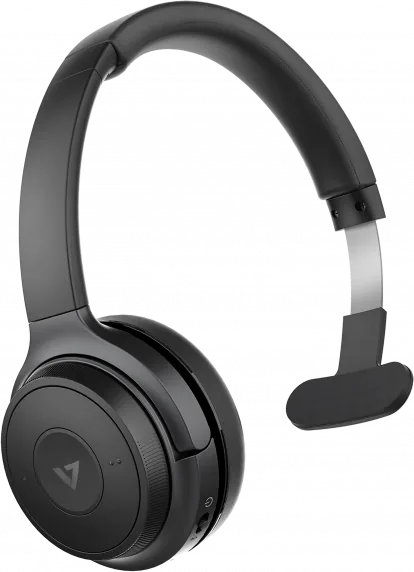
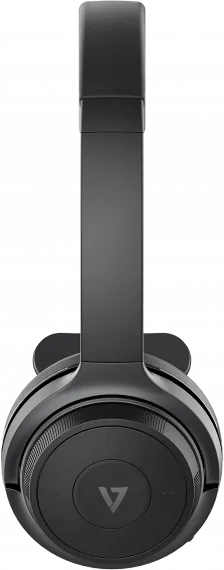
The V7 HB605M Wireless Mono Headset represents a seamless blend of professional utility and modern connectivity. Designed for clarity and comfort, this device is perfect for call centers, remote workers, or anyone needing reliable hands-free audio. With its robust Bluetooth 5.0 technology, users can enjoy a stable connection up to 30 meters when using the included V7 Link USB dongle, ensuring you stay connected without the frustration of dropped calls.
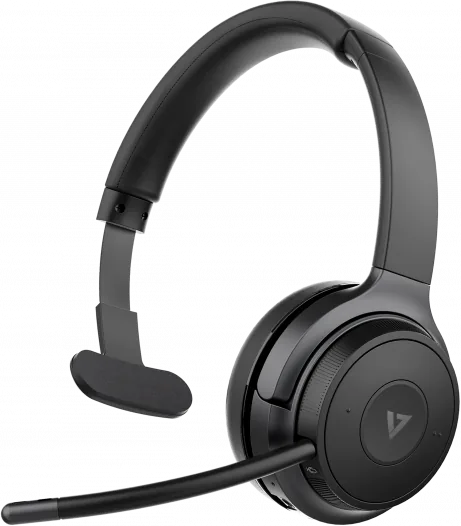
One of the standout features of the HB605M is its versatile microphone system. It comes equipped with a detachable boom microphone that can be positioned on either the left or right side to suit individual wearing preferences. This flexibility ensures optimal voice pickup whether you are taking calls in a quiet office or a bustling environment. For those who prefer not to use the boom mic, the internal microphone provides clear audio quality, complete with a dedicated mute function accessible via the volume controls.
Battery life is a major concern for wireless devices, but the HB605M delivers with an impressive capacity. The built-in lithium polymer battery supports up to 18 hours of continuous talk time and approximately 175 hours of standby time. A full charge takes only about three hours via the convenient Type-C port, keeping you productive throughout long workdays. The headset also features an intelligent LED indicator that guides you through power states, pairing modes, and charging status, while voice prompts announce battery levels at 100%, 75%, 50%, and 25%.
Compatibility extends across all major platforms including Windows 10, macOS, iOS, and Android. The inclusion of a 3.5mm AUX input offers a wired backup option, making it a truly universal solution. Whether you are managing customer support tickets or attending virtual meetings, the V7 HB605M provides the reliability and sound quality needed to succeed.
Important Notes
- Always keep the device away from water and extreme temperatures to maintain battery health.
- Use the provided storage bag to protect the headset and accessories when not in use.
- Ensure the USB dongle is fully inserted into the computer port for maximum range performance.
Search for 67,706 Manuals online


Type-in Brand or Model