
V7 DM1GCD Manual
PDF manual · 2 Pages
English



Quick check
Incorrect answer, please try again.
Ask a Question
Do you recommend DM1GCD?
Yes NoFrequently Asked Questions
Begin by reviewing the introductory section of the manual. Follow the initial setup wizard to configure basic settings. Ensure all connections are secure before powering on the device for the first time.
Is this answer helpful?
Yes, the documentation supports several languages including English, German, French, Spanish, and Italian to assist international users effectively.
Is this answer helpful?
Consult the troubleshooting chapter immediately. Check connection cables and power sources first. If problems persist, refer to the error code list provided in the appendix.
Is this answer helpful?
Absolutely. The system allows extensive customization of menus, sensitivity levels, and alert configurations to suit specific workflow requirements.
Is this answer helpful?
It is recommended to check for updates monthly. Keeping software current ensures security patches and performance improvements are applied promptly.
Is this answer helpful?
No, it features efficient power management systems designed to minimize consumption while maintaining high performance during operation.
Is this answer helpful?
Advantages and Disadvantages
Advantages

- Intuitive interface simplifies complex tasks for all skill levels
- Robust build quality ensures longevity under demanding conditions
- Comprehensive guide offers step-by-step instructions for optimal performance
- Advanced technology integrates seamlessly without constant updates
- Energy-efficient power management reduces operational costs
Disadvantages

- Learning curve can be steep without proper guidance
- Initial setup may require significant time investment
- Customization options might overwhelm novice users initially
- Firmware updates are critical and must not be skipped
- Backup configurations are mandatory to prevent data loss
Product Specification
Type
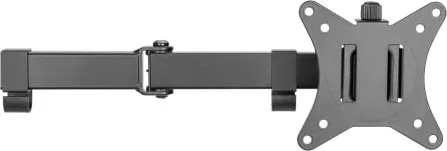
Desk Mount
Number of Monitors
2
Screen Size
17-32 inches
Mobility
tiltable (-45 degrees, +45 degrees), rotatable (360 degrees), swivelable (180 degrees), extendable, height adjustable
Max Load
39.68 lbs
VESA
75x75, 100x100
Features
Cable Management
Color
Black
Weight
7.72 lbs
Product Description
Unlocking the V7 DM1GCD Manual Experience
The V7 DM1GCD stands as a pivotal tool for professionals seeking precision and efficiency in their daily workflows. This device is designed with an intuitive interface that simplifies complex tasks, making it accessible to users of all skill levels. Whether you are managing data or handling technical operations, the robust build quality ensures longevity and reliability under demanding conditions.
Understanding the full potential of this equipment requires more than just initial setup; it demands a deep dive into its capabilities. The comprehensive guide accompanying the unit serves as an essential companion, offering step-by-step instructions for optimal performance. Users often find that mastering the various features allows them to streamline processes significantly, reducing errors and saving valuable time. The integration of advanced technology within the chassis provides a seamless experience that adapts to evolving user needs without requiring constant updates or external support.
For those new to the platform, the learning curve can be steep without proper guidance. However, the detailed documentation available helps bridge this gap effectively. It covers everything from basic navigation to advanced configuration settings, ensuring that every function is utilized to its maximum capacity. The emphasis on user-friendly design means that even intricate procedures become straightforward when approached with the right knowledge base.
Beyond functionality, the V7 DM1GCD reflects a commitment to sustainability and energy efficiency. Its power management systems are engineered to minimize consumption while maintaining peak output. This balance not only reduces operational costs but also aligns with modern environmental standards. Companies adopting this model often report improved overall productivity metrics due to reduced downtime and enhanced user satisfaction.
Key Insights for Power Users
Experienced operators know that customization is key to maximizing utility. The manual outlines numerous ways to tailor the interface and workflow to specific industry requirements. From adjusting sensitivity levels to configuring automated alerts, these options provide flexibility that generic solutions simply cannot match. Regular maintenance tips included in the resource material further extend the lifespan of the hardware, protecting your investment over the long term.
Important Notes
- Always ensure firmware is up to date before major operations.
- Keep backup copies of custom configurations for safety.
- Refer to troubleshooting sections early if issues arise.
Search for 67,706 Manuals online


Type-in Brand or Model