
V7 CKW300 Manual
PDF manual · 1 Pages
English


Quick check
Incorrect answer, please try again.
Chat with your V7 CKW300 manual using AI
Get instant AI answers from your V7 CKW300 manual
Ask anything about the V7 CKW300. Answers come from this manual, with the pages they are based on.
Ask a Question
Do you recommend CKW300?
Yes NoFrequently Asked Questions
The wireless keyboard requires two AAA batteries, while the wireless mouse uses one AA battery. These are not included in the box and must be purchased separately.
Is this answer helpful?
Insert the USB receiver into an available USB port on your computer. The devices will automatically pair and become ready for use without needing additional software or drivers.
Is this answer helpful?
The set is primarily designed for Windows systems with a German layout. While it may function on Mac, key mapping might differ, and compatibility is not guaranteed for all functions.
Is this answer helpful?
Both the keyboard and mouse operate effectively within a temperature range of 0 degrees Celsius to 50 degrees Celsius, making them suitable for standard indoor environments.
Is this answer helpful?
Yes, the product line includes wired options such as the KW300 and MW300 models if you prefer a direct connection over wireless functionality.
Is this answer helpful?
To reset the connection, remove the batteries, wait a few seconds, and reinsert them. You can also try removing and re-plugging the USB receiver to refresh the link.
Is this answer helpful?
Advantages and Disadvantages
Advantages

- Seamless wireless connectivity eliminates cable clutter
- Standard battery operation ensures easy replacement
- Ergonomic design supports comfortable long-term use
- Plug-and-play USB setup requires no drivers
- Stable connection suitable for daily office tasks
Disadvantages

- Requires AAA and AA batteries which must be purchased separately
- Limited to specific regional layouts like German
- Battery life may vary depending on usage intensity
- No rechargeable battery option included
- Basic feature set lacks advanced programmable keys
Product Specification
Package Contents
Mouse, Keyboard, Numpad
Layout
US
Connection
Wireless (2.4GHz)
Sensor (Mouse)
LED-red/IR 1600dpi, reducible to 1000dpi
Features
Number pad, 5 multimedia keys
Product Description
Elevate Your Workspace with the V7 CKW300 Professional Wireless Keyboard and Mouse Set
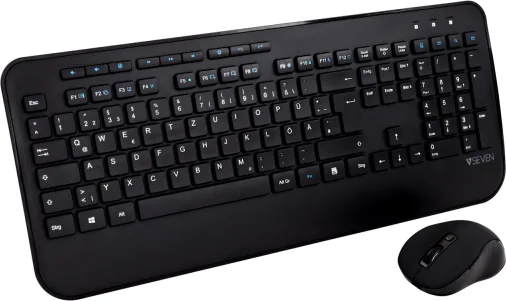
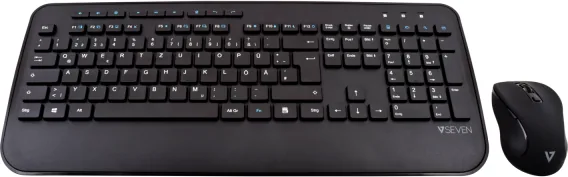
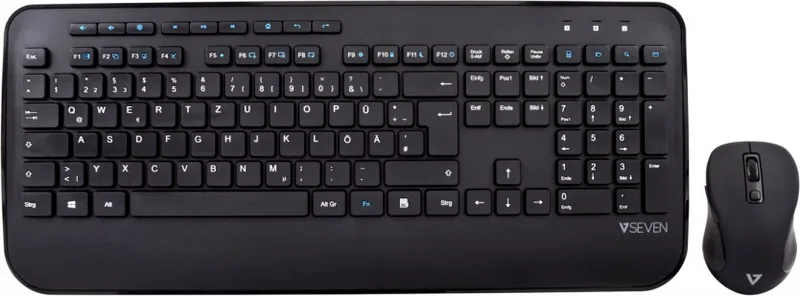
The V7 CKW300 Professional Wireless Keyboard and Mouse Set USB DE represents a seamless blend of functionality and wireless freedom designed for modern users. This set is ideal for those seeking a clutter-free desk environment without sacrificing performance. The keyboard features a standard layout optimized for German language input, ensuring that typing feels natural and responsive. Whether you are working on documents, managing spreadsheets, or browsing the web, the ergonomic design helps reduce strain during long sessions.
Complementing the keyboard is the matching wireless mouse, engineered for precision and comfort. The receiver connects easily via USB to your computer, establishing a stable connection that allows you to move freely across your workspace. The system operates on standard batteries, making it easy to power up and start working immediately. The device supports a wide range of operating temperatures, ensuring reliability in various office conditions. With a supply voltage tailored for efficient energy use, this set offers a practical solution for everyday computing needs.
Users will appreciate the straightforward setup process. Simply insert the batteries into the designated slots and plug the USB receiver into an available port. The devices are ready to use almost instantly, requiring no complex software installations. This plug-and-play approach saves time and reduces technical friction. The combination of a wireless keyboard and mouse provides flexibility, allowing you to position your peripherals exactly where they feel most comfortable. This adaptability is crucial for maintaining good posture and productivity throughout the workday.
The V7 CKW300 is more than just a peripheral set; it is a tool designed to enhance your digital workflow. By eliminating cables, you create a cleaner aesthetic while retaining full control over your computer. The robust build quality ensures longevity, making it a smart investment for both home offices and professional environments. Experience the convenience of wireless technology combined with the reliability of wired performance standards.
Note: Ensure batteries are inserted correctly according to polarity markings before use. Keep the receiver in a safe place to avoid loss.
Pros and Cons
Pros
- Seamless wireless connectivity eliminates cable clutter
- Standard battery operation ensures easy replacement
- Ergonomic design supports comfortable long-term use
- Plug-and-play USB setup requires no drivers
- Stable connection suitable for daily office tasks
Cons
- Requires AAA and AA batteries which must be purchased separately
- Limited to specific regional layouts like German
- Battery life may vary depending on usage intensity
- No rechargeable battery option included
- Basic feature set lacks advanced programmable keys
Search for 67,706 Manuals online


Type-in Brand or Model