
V7 APAC1200 Manual
PDF manual · 84 Pages
English



Quick check
Incorrect answer, please try again.
Chat with your V7 APAC1200 manual using AI
Get instant AI answers from your V7 APAC1200 manual
Ask anything about the V7 APAC1200. Answers come from this manual, with the pages they are based on.
Ask a Question
Do you recommend APAC1200?
Yes NoFrequently Asked Questions
It can be powered through a PoE switch using the Ethernet cable, or with the included 12V DC power adapter when PoE is not available.
Is this answer helpful?
It supports both 2.4GHz and 5GHz wireless bands, which helps balance range, speed, and performance across different devices and environments.
Is this answer helpful?
Yes. The package includes a ceiling mount bracket and mounting kit, and the compact design is well suited to overhead installation.
Is this answer helpful?
It supports multiple security methods, including WPA/WPA2, WEP, IEEE 802.1x/EAP, RADIUS authentication, MAC filtering, hidden SSID settings, and client isolation.
Is this answer helpful?
Yes. You can enable multiple SSIDs and assign VLAN IDs to separate traffic for guests, staff, or different departments.
Is this answer helpful?
You can reboot it from the web interface or hold the reset button for about 10 seconds to restore normal operation. A factory default reset is also available if needed.
Is this answer helpful?
Advantages and Disadvantages
Advantages

- Dual-band Wi-Fi supports both broad coverage and faster nearby connections.
- PoE+ support reduces cable clutter and simplifies ceiling mounting.
- Advanced controls include VLANs, WDS, RADIUS, WMM, and client isolation.
- Browser-based management makes setup, monitoring, and updates convenient.
Disadvantages

- Initial setup may feel complex for users unfamiliar with network configuration.
- Indoor-only design limits where the access point can be installed.
- Default credentials must be changed right away for better security.
- Advanced features may be more than some small home users need.
Product Specification
LAN
1x 1000Base-T (PoE PD)
Wireless
WLAN 802.11a/b/g/n/ac (Wi-Fi 5), simultaneous
Transfer Rate
300Mbps (2.4GHz), 867Mbps (5GHz)
Security
64/128bit WEP, WPA, WPA2
Antennas
internal
Ports
N/A
Power Consumption
Not specified (consumption, operation), not specified (max. power supply output)
Dimensions
11.22x8.46x2.64in
Features
VLAN
Band Capability
Dual Band (simultaneous)
Manufacturer Warranty
two years
Product Description
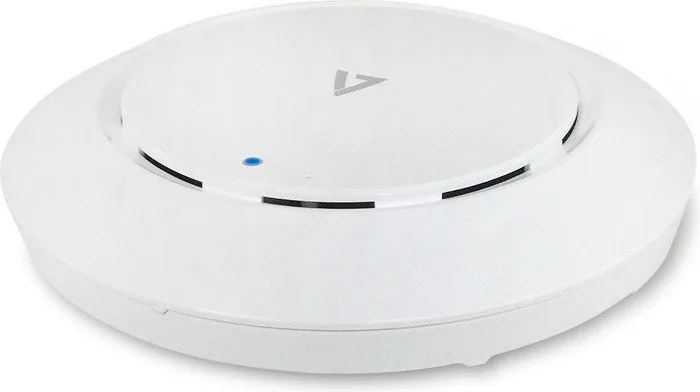
V7 Dual-Band POE+ Access Point Manual: Smarter Wireless Coverage for Everyday Networks
The V7 Dual-Band POE+ Access Point is designed for users who want stronger Wi-Fi coverage, cleaner installation, and better control over their network environment. With support for both 2.4GHz and 5GHz bands, it can handle a mix of long-range connectivity and faster nearby performance, making it a solid fit for homes, offices, shops, and other indoor spaces that need reliable wireless access.
One of its most practical strengths is flexibility. Power over Ethernet lets the device receive both data and power through a single cable, which reduces clutter and makes ceiling mounting much easier. If PoE is not available, the included power adapter provides another simple way to get started. The mounting kit, ceiling bracket, and compact form factor make it a natural choice for neat, professional-looking installations.
The V7 Dual-Band POE+ Access Point Manual also highlights a strong set of network controls. Administrators can manage SSIDs, VLANs, WMM priorities, wireless security, client isolation, WDS links, and RADIUS-based authentication through a browser interface. That means the access point is not just about coverage; it is also about shaping traffic, separating users, and keeping access organized. For businesses, guest networks and internal networks can be segmented more effectively.
Security and monitoring tools add even more value. Features such as MAC filtering, hidden SSID support, WPS, logging, and syslog integration help maintain visibility and control. Wireless monitoring tools can scan nearby networks, while the client table makes it easier to review connected devices, signal quality, and traffic activity. Firmware updates, backup and restore options, and factory reset tools round out the management experience for long-term use.
At the hardware level, the access point keeps things focused on dependable performance rather than unnecessary extras. Gigabit Ethernet, internal antennas, and support for standard wireless management functions make it well suited to structured indoor networking. For anyone seeking a balanced mix of setup convenience, wireless flexibility, and administrative control, this access point offers a practical and capable solution.
Notes
- Best suited for indoor use and clean ceiling installation.
- Change the default admin login during first setup.
- Use VLANs and client isolation for better traffic separation.
- PoE can simplify deployment in locations without nearby outlets.
- Firmware updates help keep performance and security current.
Search for 67,706 Manuals online


Type-in Brand or Model