
Urbanears Boo Manual
PDF manual · 37 Pages
English



Quick check
Incorrect answer, please try again.
Chat with your Urbanears Boo manual using AI
Get instant AI answers from your Urbanears Boo manual
Ask anything about the Urbanears Boo. Answers come from this manual, with the pages they are based on.
Ask a Question
Do you recommend Boo?
Yes NoFrequently Asked Questions
Place both earbuds in the open case, press and hold the button until the LED blinks blue, then select Urbanears Boo from your device's Bluetooth menu.
Is this answer helpful?
Blue blinking means ready for pairing. Red indicates a low battery in the case, while green means the case is fully charged.
Is this answer helpful?
No, never rinse the product under running water or use compressed air, as this can damage the internal electronics and speaker mesh.
Is this answer helpful?
Put earbuds in the case with the lid open, press the button until the LED turns purple, remove the device from Bluetooth settings, and pair again.
Is this answer helpful?
Ensure both are charged, remove the device from Bluetooth, put them in the case with the lid open, triple-press the button until it blinks green, then wait for blue light.
Is this answer helpful?
Simply tap both earbuds simultaneously to wake them up and resume playback or call handling.
Is this answer helpful?
Advantages and Disadvantages
Advantages

- Intuitive single, double, and triple tap touch controls for music and calls
- Clear LED indicators for pairing status and battery levels
- Convenient USB-C charging compatibility
- Automatic sleep mode saves battery when earbuds are stored
- Simple factory reset procedure for troubleshooting connection issues
Disadvantages

- USB-C charging cable is not included in the package
- Requires careful cleaning to avoid damaging speaker meshes
- Touch controls may be accidentally triggered by hair or adjustments
- Case must be opened fully for successful pairing process
- No waterproof rating mentioned, requiring caution around moisture
Product Specification
Type
Earbuds
Form Factor
True Wireless, Neckband-free
Microphone
Integrated
Wireless
Bluetooth 5.2, AAC
Controls
Touch Control
Battery Life
4.5h, 30h (with charging case)
Charging
USB-C port, Charging case, 1.5h charge time
Frequency Range
20Hz-20kHz
Impedance
32 Ohms
Sensitivity
127dB
Drivers
12mm
Device Features
Water-resistant (IPX4)
Weight
0.14oz (per earbud), 1.30oz (charging case)
Product Description
Urbanears Boo: Your Perfect Wireless Companion
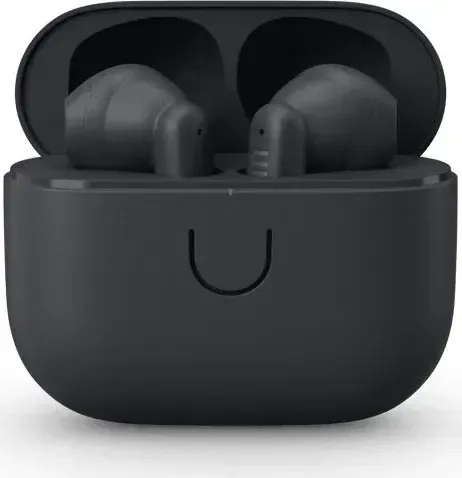
The Urbanears Boo represents a seamless blend of Scandinavian design and practical functionality, tailored for the modern listener on the go. These wireless earbuds are designed to fit comfortably in your ears while delivering crisp audio quality that enhances your daily routine, whether you are commuting, working out, or relaxing at home. The sleek aesthetic is matched by intuitive controls that make managing your music and calls effortless.
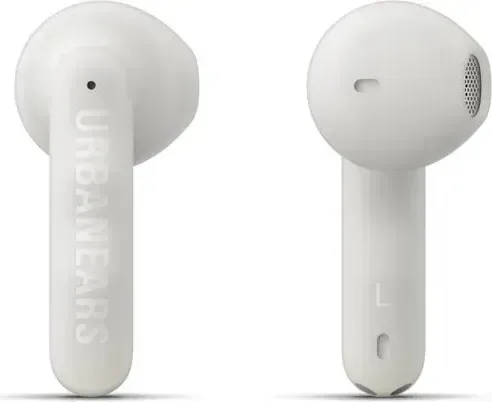
One of the standout features of the Urbanears Boo is its straightforward touch control system. Located on both the left and right earbuds, these surfaces allow you to tap once to play or pause music and answer or end calls. A double tap skips tracks forward or rejects incoming calls, while three taps move you back to the previous song. This tactile interface ensures you stay connected without fumbling with your device.
Charging is equally simple. Placing the earbuds into the case automatically powers them down and begins charging. The case itself charges via a USB-C cable, providing ample power for multiple uses. An LED indicator on the case offers clear visual feedback: blue light signals readiness for Bluetooth pairing, while the color shifts from red to green to indicate the battery status from low to full. When not in use, the earbuds enter standby mode to conserve energy, waking up instantly upon tapping either bud.
Maintaining your Urbanears Boo is easy but requires care. Regular cleaning with a soft, slightly damp lint-free cloth and mild soap keeps the device performing optimally. It is crucial to avoid sharp objects, running water, compressed air, or harsh chemicals like alcohol and bleach, as these can damage the sensitive speaker mesh and internal components. By following these simple maintenance tips, your earbuds will remain reliable companions for years to come.
Search for 67,706 Manuals online


Type-in Brand or Model