
Ubiquiti UniFi Video UVC-G3-PRO Manual
PDF manual · 40 Pages
English



Quick check
Incorrect answer, please try again.
Chat with your Ubiquiti UniFi Video UVC-G3-PRO manual using AI
Get instant AI answers from your Ubiquiti UniFi Video UVC-G3-PRO manual
Ask anything about the Ubiquiti UniFi Video UVC-G3-PRO. Answers come from this manual, with the pages they are based on.
Ask a Question
Do you recommend UniFi Video UVC-G3-PRO?
Yes NoFrequently Asked Questions
The UVC-G3-PRO supports IEEE 802.3af/802.3at PoE and can be powered by any compliant PoE switch or injector. Use shielded cabling and ground properly for outdoor installations and to meet warranty conditions.
Is this answer helpful?
Manage the camera with UniFi Video version 3.9 or newer. UniFi Video auto-discovers cameras, handles firmware updates, and provides preview and configuration tools. A UniFi Video mobile app is available for iOS and Android.
Is this answer helpful?
It records 1080p Full HD at up to 30 FPS using a Sony IMX290 sensor, offers IR LEDs with a mechanical IR cut filter for night mode, and provides image controls like WDR, brightness, contrast, saturation, denoise, and flicker reduction.
Is this answer helpful?
Yes. The camera is built for outdoor use with UV-stabilized and die-cast materials. Use shielded Cat5 or better, create a drip loop for cable runs, seal the cable gland securely, and use Ethernet surge protectors near the camera and at building entry points.
Is this answer helpful?
The G3 Pro supports wall, ceiling, and pole mounting. Hardware for wall/ceiling and a pole mount bracket are included; pole mounting requires two metal straps (not included). Follow the provided steps to route and seal cabling correctly.
Is this answer helpful?
Ubiquiti provides a one-year limited warranty covering defects under normal use. Warranty exclusions include modifications, improper cabling, lightning damage, and missing original labels. Returns require an RMA and prepaid shipment to Ubiquiti.
Is this answer helpful?
No. The UVC-G3-PRO features a 10/100 Ethernet port only, so it does not support Gigabit speeds; plan network capacity accordingly.
Is this answer helpful?
Advantages and Disadvantages
Advantages

- 1080p Full HD with Sony IMX290 sensor and mechanical IR cut filter for clear day/night imaging.
- Powered 3–9 mm optical zoom lens offering flexible fields of view from 108° to 37° horizontal.
- Auto-sensing 802.3af/802.3at PoE simplifies wiring—single cable for power and data.
- Rugged polycarbonate and die-cast aluminum enclosure suitable for outdoor installations.
- Seamless integration with UniFi Video (v3.9+) and mobile apps for centralized management.
Disadvantages

- Requires shielded Cat5 (or above) and proper grounding for warranty compliance on outdoor installs.
- Limited one-year warranty with exclusions for modification, lightning, or improper cabling.
- 10/100 Ethernet only; lacks Gigabit port for higher bandwidth needs.
- Potential heat during operation; caution required when handling the device.
- Class A device may cause interference in residential environments and require mitigation.
Product Specification
Image Sensor
2/8" CMOS
Resolution
1920x1080 Pixels (30fps)
Lens
0.12-0.35in (F2.1)
Light Sensitivity
0 Lux (IR)
Viewing Angle
108° (horizontal), 58° (vertical), 125° (diagonal)
Pan
N/A
Tilt
N/A
Zoom Function
3x optical
Compression/Codecs
H.264
Connections
1x RJ-45 100Mb LAN
Microphone
integrated
Illumination
IR illumination
Power Supply
PoE (Type 1)
Protection Class
IP67
Housing
suitable for outdoor use
Zone & Analysis Functions
IR filter
Product Description
Ubiquiti UVC-G3-PRO Manual Overview
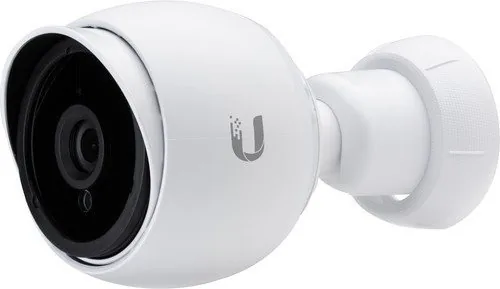
The Ubiquiti UVC-G3-PRO is a robust 1080p indoor/outdoor IP camera designed for professional surveillance with infrared night vision and a 3–9 mm optical zoom lens. Featuring a Sony IMX290 sensor, wide dynamic range controls, and a mechanical IR cut filter, the G3 Pro delivers clear full HD video at up to 30 FPS in a variety of lighting conditions. Housed in UV-stabilized polycarbonate and die-cast aluminum, it tolerates outdoor environments and supports operating temperatures from -20 to 50°C.
Key Features and Setup
This camera uses auto-sensing IEEE 802.3af/802.3at PoE for power and data over a single Ethernet cable, simplifying installations. It provides a 10/100 RJ45 interface, integrated microphone, and a powered 3–9 mm zoom lens that lets you adjust field of view from a wide 108° to a tele 37° horizontally. Recommended installation includes shielded Cat5 (or above) cable and surge protection for outdoor deployments. Mounting options include wall, ceiling, and pole mounts; the package includes a pole bracket and mounting hardware to streamline installation.
Management and Software
The G3 Pro integrates with UniFi Video (v3.9+), which auto-discovers cameras, manages firmware updates, and provides live previews and configuration tools. A mobile UniFi Video app is available for iOS and Android for remote monitoring. Configuration options include image adjustments (brightness, contrast, WDR, saturation, denoise), flip, infrared settings, and flicker reduction.
Durability and Safety
Designed for professional use, the camera supports weather-sealed cable glands and advises creating a drip loop for outdoor cable runs. The enclosure materials and mounting design help protect against ESD and environmental stress when installed with shielded cable and proper grounding. Safety warnings cover heat during operation, avoidance of submersion, and cautions during electrical storms.
Warranty and Compliance
Ubiquiti offers a one-year limited warranty with conditions that require correct installation, use of approved cabling, and adherence to return procedures (RMA). The device complies with FCC, CE, ISED Canada, and various regional directives and recycling (RoHS/WEEE) regulations.
Notes
- Use shielded Cat5 or better and follow grounding best practices for outdoor installs.
- Employ Ethernet surge protectors near the camera and at building entry points.
- Ensure firmware and UniFi Video are updated to the recommended versions before final positioning.
Search for 67,706 Manuals online


Type-in Brand or Model