
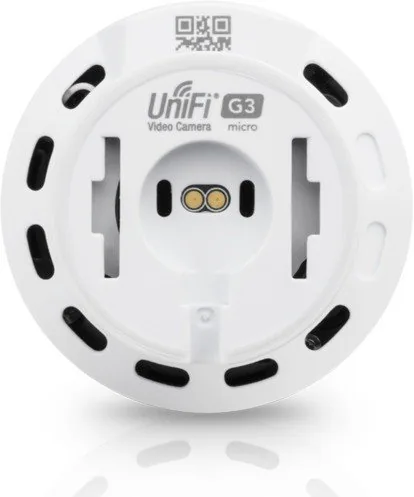
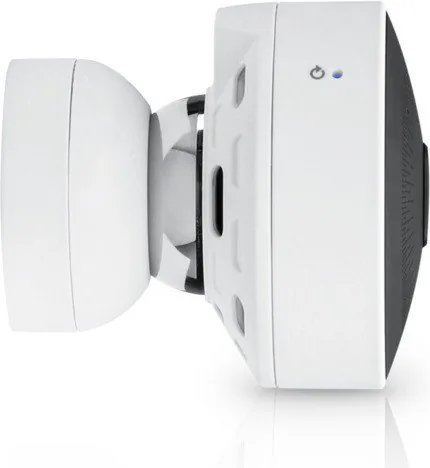
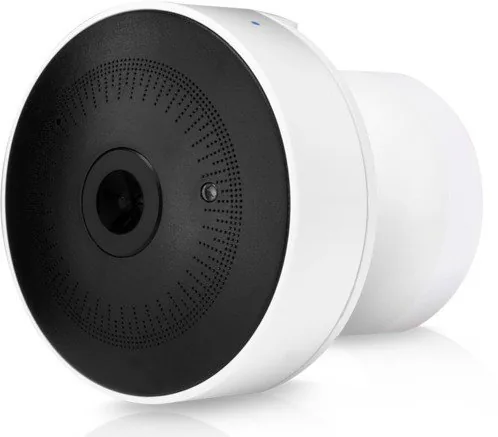
Ubiquiti UniFi Video UVC-G3-Micro Manual
PDF manual · 60 Pages
English



Quick check
Incorrect answer, please try again.
Chat with your Ubiquiti UniFi Video UVC-G3-Micro manual using AI
Get instant AI answers from your Ubiquiti UniFi Video UVC-G3-Micro manual
Ask anything about the Ubiquiti UniFi Video UVC-G3-Micro. Answers come from this manual, with the pages they are based on.
Ask a Question
Do you recommend UniFi Video UVC-G3-Micro?
Yes NoFrequently Asked Questions
Yes. The camera supports standalone mode allowing direct browser access via https://<camera_IP>. Standalone mode provides configuration, RTSP streaming, and image controls without the UniFi Video software. Ensure camera firmware is updated to the required version.
Is this answer helpful?
Connect your NVR to your Ubiquiti account and enable cloud access, then sign in at https://video.ubnt.com or use the UniFi Video mobile app (iOS/Android). Alternatively, configure port forwarding or VPN to reach your local NVR/camera if cloud access isn’t used.
Is this answer helpful?
UVC-G3-Micro supports Always record, Record on motion, Record on schedule, and Don’t record. You can create custom schedules and set pre/post recording buffers for motion events to capture context around triggers.
Is this answer helpful?
Yes. RTSP streaming is available and can be enabled per resolution. You can copy the RTSP URL and use media players or NVRs that support RTSP. Optional RTSP authentication can be enabled to protect streams.
Is this answer helpful?
Define precise motion detection zones and adjust the sensitivity slider. Use minimum motion duration, and set alert schedules so notifications are only sent during relevant periods to minimize unwanted alerts.
Is this answer helpful?
The UniFi Video apps offer live view, multi‑view, recordings playback, camera detail and image settings, recent recordings filters, lock/delete controls, and certain camera‑specific options like motion alert sound and LED control on supported models.
Is this answer helpful?
NVR settings let you configure the recording path, time‑based purging (retain for specified hours/days/weeks), and how much free disk space to keep. Locked recordings are preserved from automatic deletion, and admins can manually delete unlocked clips.
Is this answer helpful?
Advantages and Disadvantages
Advantages

- Compact form factor ideal for discreet installs while supporting UniFi Video features.
- Flexible recording modes and motion zones reduce storage and false alerts.
- Easy cloud integration for remote access via video.ubnt.com and mobile apps.
- Per‑resolution FPS and bitrate controls let you balance quality, bandwidth, and storage.
- Standalone mode and RTSP support enable direct access and third‑party integrations.
Disadvantages

- Some advanced features (like Enhance) only available on select G3 models.
- Audio and specific controls depend on camera model capabilities (not universal).
- Requires periodic firmware updates to ensure compatibility and standalone features.
- Full functionality often depends on using a UniFi NVR or UniFi Video controller.
- Initial setup and network configuration can be technical for non‑experienced users.
Product Specification
Image Sensor
1/3" CMOS 4.0 MP
Resolution
1920x1080 Pixel (30fps)
Lens
0.11 in (F2.2)
Viewing Angle
124° (horizontal), 65° (vertical), 150° (diagonal)
Pan
N/A
Tilt
N/A
Compression/Codecs
H.264
Wireless
Wi-Fi 4 (WLAN 802.11a/b/g/n)
Illumination
IR Illumination
Protection Class
N/A
Zone & Analysis Functions
IR Filter
Product Description
Ubiquiti UVC-G3-Micro Manual: Compact Power for Everyday Surveillance
The Ubiquiti UVC-G3-Micro is a compact, versatile IP camera that brings powerful UniFi Video features into a small form factor ideal for homes, small offices, and retail spaces. Designed to integrate seamlessly with Ubiquiti’s UniFi Video ecosystem, the G3‑Micro supports high-quality video streaming, motion detection, flexible recording modes, and mobile access, making it a practical choice when discreet, reliable monitoring is required.
Overview and Key Features
Despite its diminutive size, the UVC-G3-Micro offers impressive capabilities: configurable video resolution and bitrate settings, adjustable frame rates, and basic audio support for devices that include a microphone. The camera works with UniFi Video software (v3.2 and later) and can be managed via a UniFi NVR or directly in standalone mode through a browser. Integration with cloud access enables remote management via video.ubnt.com and iOS/Android mobile apps for live monitoring and playback.
Installation & Setup
Setup is straightforward. The camera supports DHCP or static IP addressing and can be discovered automatically by the UniFi Video NVR when device discovery is enabled. For non‑NVR setups, the UniFi Video application installs on Windows or Linux (Debian/Ubuntu) and walks users through NVR creation, admin account setup, and camera adoption. Firmware updates and recording path/time retention settings are managed from the NVR Settings panel. Standalone mode provides direct browser access to configure networking, video quality, and system settings when NVR management is not desired.
Video, Recording & Motion Detection
Video quality is adjustable across High/Medium/Low presets with per‑resolution FPS and bitrate overrides. Recording modes include Always, Motion‑only, Schedule, or Off. Motion zones can be defined per camera with sensitivity and pre/post‑record buffers, allowing focused monitoring and reduced false triggers. Recorded clips can be searched, filtered, downloaded as MP4, locked to prevent deletion, or purged based on retention policies.
Live View, Maps & Mobile Access
Live View supports multi‑camera layouts and custom views, enabling up to 26 feeds across predefined templates. Maps (image or Google Maps) let you place camera thumbnails and adjust fields of view visually. The UniFi Video mobile apps (iOS/Android) provide camera detail, multi‑view, recordings, and camera controls including image adjustments, enhance zoom (on supported models), and local settings like LED or motion alert sound where applicable.
Administration & Security
Admin features include user and group management with role‑based access, API key generation for integrations, alert configuration (connection or motion emails), system logs, firmware update tools, and options to connect/disconnect the NVR to a Ubiquiti account for cloud access. RTSP streaming and optional RTSP authentication are supported for third‑party playback.
Notes:
- Ensure firmware is current for full standalone and UniFi Video compatibility.
- Use motion zones and sensitivity tuning to minimize false positives.
- Consider retention and disk‑space settings on the NVR to manage storage usage.
Most important results
- Easy integration with UniFi Video NVR and cloud access for remote management and mobile viewing.
- Configurable recording modes (Always, Motion, Schedule) with motion zones and pre/post buffers.
- Adjustable video resolution, FPS, and bitrate per camera for bandwidth and storage optimization.
- Standalone browser access and RTSP streaming (with optional authentication) for direct camera use.
- Mobile apps provide live view, multi‑view, recordings playback, and camera image controls on iOS/Android.
Search for 67,706 Manuals online


Type-in Brand or Model