
Ubiquiti UniFi Switch 8 US-8-60W Manual
PDF manual · 24 Pages
English



Quick check
Incorrect answer, please try again.
Chat with your Ubiquiti UniFi Switch 8 US-8-60W manual using AI
Get instant AI answers from your Ubiquiti UniFi Switch 8 US-8-60W manual
Ask anything about the Ubiquiti UniFi Switch 8 US-8-60W. Answers come from this manual, with the pages they are based on.
Ask a Question
Do you recommend UniFi Switch 8 US-8-60W?
Yes NoFrequently Asked Questions
Ports 5 through 8 support IEEE 802.3af PoE with a maximum of 15.4W per port and a total PoE budget of 60W for the switch.
Is this answer helpful?
Yes — to adopt, configure, and monitor the UniFiSwitch you should use UniFi Controller v5.3.x or newer. The controller can run on a Cloud Key, on-site server, or off-site management server accessible over Layer 2 (or via UniFi cloud).
Is this answer helpful?
Both. The manual provides wall-mount instructions with included screws and anchors. For safe operation keep at least 20 mm clearance around ventilation holes and avoid stacking units.
Is this answer helpful?
Use CAT5 or better Ethernet cabling for all runs. For outdoor installations use shielded Ethernet and follow local wiring codes and standards to ensure reliable operation and compliance.
Is this answer helpful?
Flashing white = initializing; steady white = factory default; alternating white/blue = busy (e.g., firmware upgrade); steady blue = integrated and working; flashing blue = locate mode from the UniFi Controller.
Is this answer helpful?
The switch requires an external 48V DC adapter (48V, 1.25A). Max power consumption is listed as 12W (excluding PoE output); PoE output depends on attached devices up to the 60W budget.
Is this answer helpful?
No — the US-8-60W provides eight RJ45 Gigabit ports only and does not include SFP or fiber uplink ports.
Is this answer helpful?
Advantages and Disadvantages
Advantages

- Compact desktop/wall-mount form factor ideal for small offices and home labs.
- Four auto-sensing IEEE 802.3af PoE ports with 60W total PoE budget for access points and cameras.
- Managed via UniFi Controller for centralized monitoring, adoption, and firmware updates.
- Non-blocking 8 Gbps switching fabric and Gigabit ports for full-throughput performance.
- Low idle power consumption (12W excluding PoE) and quiet operation for office use.
Disadvantages

- 60W total PoE budget limits simultaneous high-draw devices compared with midspan injectors.
- Requires UniFi Controller (Cloud Key or host) for full feature set and adoption workflow.
- External power adapter design may be less convenient than integrated supplies for some installs.
- No SFP or uplink fiber port — limited to copper Gigabit RJ45 only.
- 4 PoE ports only (ports 5–8), leaving half the ports non-PoE for mixed environments.
Product Specification
Function
Switch
Type
Standalone
Network ports
8x RJ-45
Speeds
8x RJ-45 (10/100/1000Base-T)
PoE
4x RJ-45 PoE (4x 15.4W), total: 60W
Backplane
16Gb/s, 11.9Mp/s
Officially supported standards
802.1X, 802.3af
Configuration
Web interface, Configuration software (Windows, Linux, MacOS), Console (via configuration software), via control unit, via Cloud
Cooling
passive
Dimensions (WxHxD)
5.83x1.22x3.94in
Weight
0.95lb
Color
silver
Special features
Metal housing, external power supply, Anti-theft protection (Kensington Lock)
Manufacturer's warranty
one year
Product Description
Ubiquiti UniFiSwitch 8 Desktop Gigabit Managed Switch, 8x RJ-45, 60W PoE Manual
The Ubiquiti UniFiSwitch 8 (US-8-60W) is a compact, desktop-managed Gigabit switch built for small offices, home labs, and edge deployments. With eight 10/100/1000 RJ-45 ports and four auto-sensing 802.3af PoE ports (5–8), it supplies up to 60W total PoE power while offering non-blocking 8 Gbps switching performance. Its small footprint, metal enclosure, and quiet operation make it an unobtrusive choice for desktops or wall-mounted installations.
Design and Hardware Highlights
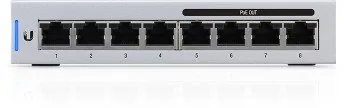
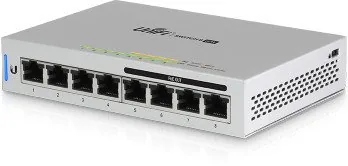
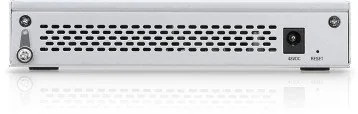
Physically, the US-8-60W measures 148 x 99.5 x 30.7 mm and weighs about 432 g. The front panel presents eight Gigabit RJ45 ports with per-port LEDs for link, speed and activity plus PoE status. The rear features the power jack, optional grounding point, and a multi-function Reset button for reboot or factory restore. Vent cutouts and side-clearance requirements are called out for safe operation.
Internally the unit runs an ARM Cortex-A9 CPU with 256 MB DDR3 and 32 MB flash, enough to integrate into the UniFi management ecosystem. The external 48V DC power adapter supplies power to the switch and PoE devices; each PoE port supports up to 15.4W (IEEE 802.3af).
Software and Management
The switch is managed through the UniFi Controller software (v5.3.x or newer recommended). The controller provides device discovery, adoption, firmware upgrades, topology mapping, and network statistics. A UniFi Cloud Key or on-site controller on the same Layer 2 network (or an off-site controller) is required for centralized management and monitoring. The System LED indicates status states such as provisioning, adoption, firmware activity, and locate mode.
Installation and Safety
Mounting options include simple desktop placement or wall mounting with included anchors and screws. The manual details grounding recommendations, power connection, and Ethernet hookup — including the requirement to use CAT5 or better cabling. Several warnings emphasize ventilation (20 mm clearance), avoiding stacking units, moisture protection, and electrical safety.
Specifications Summary
Key specs include eight Gigabit RJ45 ports, four 802.3af PoE ports (ports 5–8), 60W total PoE budget, 8 Gbps non-blocking switching capacity, operating temperature -5 to 45°C, ESD protection, and various regulatory certifications (CE, FCC, IC). The unit’s modest power consumption (12W excluding PoE) and compact size suit constrained environments.
Notes:
- Requires UniFi Controller (local or cloud) for full management.
- Use CAT5 or better cabling; shielded cable for outdoor runs.
- Keep at least 20 mm ventilation clearance; do not stack units.
Search for 67,706 Manuals online


Type-in Brand or Model
maria_k
11 months ago
Does this UniFi PoE switch run too hot and what do I need for setup (UniFi Controller/CloudKey)? Also, can it provide passive PoE?
Manual.ly
11 months ago
Users report the switch runs noticeably warm during normal PoE operation, and on the US-8-60W in particular it can get close to hot to the touch, though it still operates reliably. For management, you typically need a UniFi Controller (or UniFi CloudKey, or install the controller software on a Raspberry Pi) to configure VLANs, monitoring, and LACP. Regarding PoE, it supports standard (802.3af/802.3at depending on model) PoE for UniFi devices, but it does not offer passive PoE. If you need passive PoE for non-UniFi hardware, you will likely require an external injector or compatible solution.