


Ubiquiti UniFi Switch 24 US-24-250W Manual
PDF manual · 24 Pages
English



Quick check
Incorrect answer, please try again.
Chat with your Ubiquiti UniFi Switch 24 US-24-250W manual using AI
Get instant AI answers from your Ubiquiti UniFi Switch 24 US-24-250W manual
Ask anything about the Ubiquiti UniFi Switch 24 US-24-250W. Answers come from this manual, with the pages they are based on.
Ask a Question
Do you recommend UniFi Switch 24 US-24-250W?
Yes NoFrequently Asked Questions
It is designed to connect and manage multiple wired devices in a rack-based network while also supplying PoE power to compatible hardware such as access points, cameras, and phones.
Is this answer helpful?
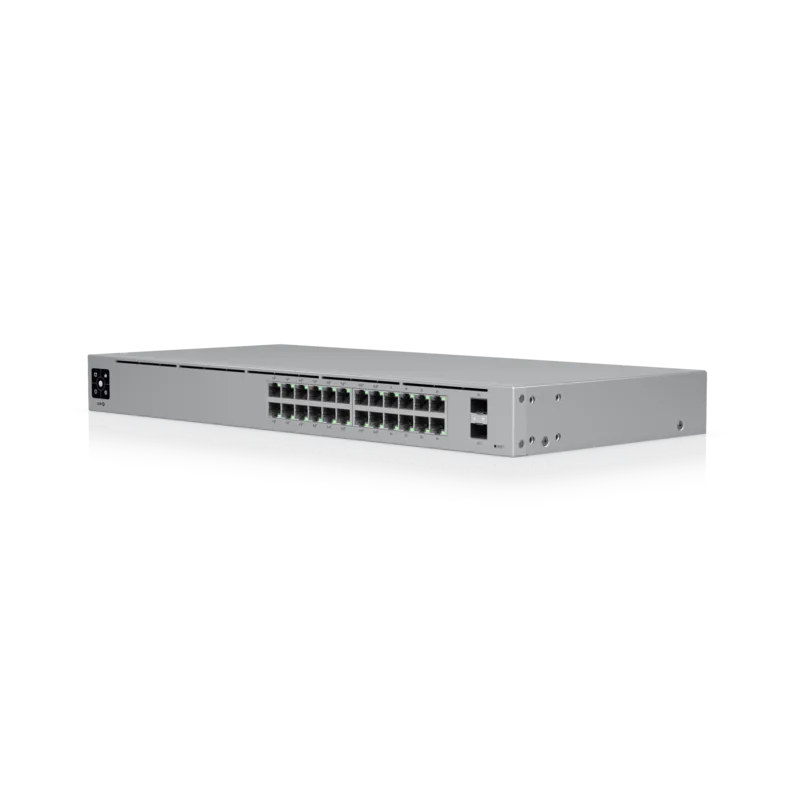
The switch includes 24 Gigabit RJ-45 Ethernet ports and 2 SFP ports for fiber or uplink connections.
Is this answer helpful?
Yes. The RJ-45 ports support PoE+ by default, and the switch can also provide 24V passive PoE when configured manually for supported devices.
Is this answer helpful?
Yes. The two SFP ports support hot-swappable fiber modules, making them suitable for 1 Gbps uplinks or longer-distance network links.
Is this answer helpful?
It is managed through UniFi Controller software. The switch is adopted into the controller, where you can monitor status, configure ports, and adjust PoE settings.
Is this answer helpful?
Yes. It is a 1U rackmount switch built for standard 19-inch racks, making it a good fit for network cabinets and server rooms.
Is this answer helpful?
Yes. Use proper cabling, maintain ventilation clearance, and keep the unit indoors or inside a protective enclosure if cabling runs are exposed to outdoor conditions.
Is this answer helpful?
Advantages and Disadvantages
Advantages

- 24 Gigabit RJ-45 ports plus 2 SFP uplinks provide strong connectivity and expansion options.
- 250W PoE+ budget supports powered devices like access points, cameras, and phones.
- UniFi Controller integration allows centralized management and easy device adoption.
- 1U rackmount design fits standard network racks cleanly and efficiently.
Disadvantages

- Setup depends on UniFi Controller software and a DHCP-enabled network.
- 24V passive PoE must be enabled manually and only for compatible devices.
- Proper ventilation is required, so the unit is not ideal for tight or poorly cooled spaces.
Product Specification
Function
Switch
Type
Standalone, Rackmount (via mounting brackets)
Network ports
24x RJ-45, 2x SFP
Speeds
24x RJ-45 (10/100/1000Base-T), 2x SFP (1Gb/s)
PoE
24x RJ-45 PoE+ or 24x RJ-45 passive PoE (24x 34.2W or 24x 17W/24V), total: 250W
Backplane
52Gb/s, 38.69Mp/s, 16k Mac addresses
Officially supported standards
802.1X, 802.3x, 802.3af, 802.3at
Configuration
Web interface, Configuration software (Windows, Linux, MacOS), Console (via Configuration software), Network (RJ-45, dedicated, rear), via control unit, via Cloud
Cooling
active, 2x fans (1.57in)
Dimensions (WxHxD)
19.09x1.73x11.22in, 1U
Weight
10.36 lb
Color
silver
Special features
Metal housing, Firmware updates possible
Manufacturer's warranty
one year
Product Description
Ubiquiti UniFiSwitch 24 Rackmount Gigabit Managed Switch, 24x RJ-45, 2x SFP, 250W PoE+ Manual: A Practical Choice for Modern Networks
The Ubiquiti UniFiSwitch 24 is built for environments that need reliable switching, clean rack integration, and simple centralized control. With 24 Gigabit RJ-45 ports and 2 SFP uplinks, it offers the kind of flexibility that small offices, surveillance setups, and expanding network closets often need. Its managed design makes it easier to keep traffic organized, monitor performance, and adjust settings as the network grows.
One of the standout features is the PoE+ support across the main copper ports. The switch can deliver power to compatible devices such as access points, IP cameras, and VoIP phones, reducing cable clutter and eliminating the need for separate power adapters. The 250W power budget gives it enough headroom for many real-world deployments, while the auto-sensing behavior helps streamline installation for 802.3af and 802.3at equipment.
The rackmount 1U form factor makes it a natural fit for standard 19-inch cabinets, and the front-panel indicators provide quick status checks for both system health and port activity. The inclusion of SFP ports is especially useful when longer-distance or fiber-based uplinks are required, giving administrators more options when connecting switches across rooms or floors.
Management is handled through the UniFi Controller software, which is ideal for teams that prefer a single dashboard for adoption, port configuration, and network visibility. This makes the switch feel less like a standalone device and more like part of a coordinated infrastructure. For many users, that is the real value: dependable hardware backed by a familiar management ecosystem.
Installation is straightforward, but proper cabling, airflow, and compatible power planning matter. The switch is designed for indoor use and performs best when mounted securely with adequate ventilation. For growing networks, it delivers a strong balance of power, speed, and control.
Notes
- Use CAT5 or better cabling for best results.
- Check PoE compatibility before enabling 24V passive power.
- Keep airflow clear when mounting in a rack.
- SFP ports are ideal for fiber-based expansion and uplinks.
Search for 67,706 Manuals online


Type-in Brand or Model
Michaela Weber
9 months ago
With the newer firmware, the manual fan control seems removed. Is the switch still too loud for SOHO (idle), and are there any ways to quiet it or lower power consumption?
Manual.ly
9 months ago
Several reviewers report that the active cooling can be very loud, even at idle, which makes the switch better suited for a rack or dedicated tech room than for home desks. If you run firmware 3.9.42, manual fan control appears to be available; you can lower fan speed using the command like "swctrl fan set level". Newer firmware versions switch to automatic fan behavior based on load/temperature, and some users still saw fans staying on high at low temperatures, so the fans may not quiet down as expected. For lower load, disable PoE if you do not need it. If your unit does not reduce fan noise on current firmware, please reach out to support for firmware guidance or a hardware check. Some newer model variants (GEN2) are expected to address noise with reduced/optimized cooling.