


Ubiquiti UniFi Switch 16 US-16-150W Manual
PDF manual · 28 Pages
English



Quick check
Incorrect answer, please try again.
Chat with your Ubiquiti UniFi Switch 16 US-16-150W manual using AI
Get instant AI answers from your Ubiquiti UniFi Switch 16 US-16-150W manual
Ask anything about the Ubiquiti UniFi Switch 16 US-16-150W. Answers come from this manual, with the pages they are based on.
Ask a Question
Do you recommend UniFi Switch 16 US-16-150W?
Yes NoFrequently Asked Questions
It can power compatible PoE and PoE+ devices such as wireless access points, IP cameras, and VoIP phones. The RJ-45 ports auto-sense supported equipment and deliver power when needed.
Is this answer helpful?
It includes 16 Gigabit RJ-45 ports and 2 SFP ports. The RJ-45 ports are used for standard Ethernet connections, while the SFP ports are intended for fiber uplinks.
Is this answer helpful?
Basic connectivity works once the switch is installed, but UniFi Controller software is needed to adopt, manage, and configure the switch properly. It is the main interface for monitoring and settings.
Is this answer helpful?
Yes. It is designed for 1U rack mounting and comes with rack brackets and the required screws. It can also be placed on a flat surface if needed.
Is this answer helpful?
Yes. The SFP ports support hot-swappable modules, which makes it easier to add or replace compatible fiber transceivers without shutting down the switch.
Is this answer helpful?
The switch itself should be kept indoors or inside a protective enclosure. Outdoor cabling may be used only if it follows the proper shielding, grounding, and installation requirements.
Is this answer helpful?
Advantages and Disadvantages
Advantages

- 16 Gigabit RJ-45 ports support fast connections for multiple wired devices.
- PoE+ on the copper ports can power access points, cameras, and phones.
- Two SFP ports add flexible fiber uplinks for backbone or longer runs.
- UniFi Controller integration simplifies monitoring, adoption, and port control.
Disadvantages

- Requires UniFi Controller software for full management and configuration.
- Outdoor cabling and installation must follow stricter shielding and grounding rules.
- Proper rack space and ventilation are important for safe, stable operation.
- Advanced features may be more than needed for very small home networks.
Product Specification
Function
Switch
Type
Standalone, Rackmount (via mounting brackets)
Network ports
16x RJ-45, 2x SFP
Speeds
16x RJ-45 (10/100/1000Base-T), 2x SFP (1Gb/s)
PoE
16x RJ-45 PoE+ or 16x RJ-45 passive PoE (16x 34.2W or 16x 17W/24V), total: 130W
Backplane
36Gb/s, 26.78Mp/s, 9KB Jumboframes, 16k Mac addresses
Officially supported standards
802.1X, 802.3x
Configuration
Web interface, Configuration software (Windows, Linux, MacOS), Console (via configuration software), Network (RJ-45, dedicated, rear), via control unit, via Cloud
Cooling
active, 2x fans (1.57in)
Dimensions (WxHxD)
17.44x1.69x8.70in, 1U
Weight
6.17 lb
Color
silver
Special features
Metal housing, removable mounting brackets, firmware updates possible
Manufacturer's warranty
one year
Product Description
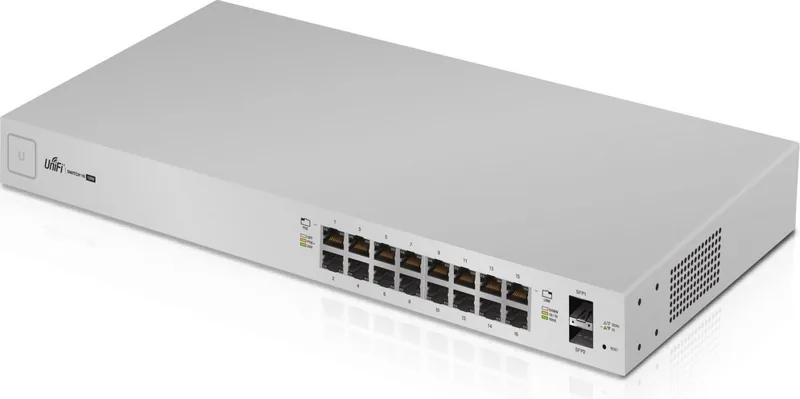
Ubiquiti UniFi Switch 16 Rackmount Gigabit Managed Switch, 16x RJ-45, 2x SFP, PoE+
The Ubiquiti UniFi Switch 16 Rackmount Gigabit Managed Switch, 16x RJ-45, 2x SFP, PoE+ is built for networks that need reliable performance, clean rack integration, and centralized control. Designed as a managed PoE+ gigabit switch, it combines 16 RJ-45 Ethernet ports with 2 SFP uplinks, making it a practical choice for offices, surveillance setups, wireless deployments, and growing small business networks.
What makes this model stand out is its balance of simplicity and flexibility. The RJ-45 ports support 10/100/1000 Mbps connections and can automatically deliver PoE or PoE+ to compatible devices such as access points, IP cameras, and VoIP phones. The two hot-swappable SFP ports add fiber connectivity for longer-distance links or resilient backbone connections, helping network builders mix copper and fiber without replacing the whole switch.
This switch is also designed with the UniFi ecosystem in mind. Once connected to a UniFi Controller, it can be adopted, monitored, and configured from a single interface. That makes it easier to manage port behavior, check link status, and adjust PoE settings without relying on complex local configuration. For administrators who want visibility and control, this centralized model is a major advantage.
Physically, the unit is ready for rack deployment in a standard 1U space, and the included mounting hardware supports straightforward installation. The internal 150W power supply and PoE+ output make it suitable for environments where several devices need power over Ethernet. With a strong feature set, the switch serves well in structured network builds where uptime and organization matter.
The accompanying Ubiquiti UniFi Switch 16 Rackmount Gigabit Managed Switch, 16x RJ-45, 2x SFP, PoE+ Manual emphasizes proper cabling, ventilation, and controller-based setup, which reflects the product’s professional focus. It is not just about plugging in devices; it is about building a dependable network foundation.
Notes
- Use Cat5 or better cabling for all Ethernet runs.
- Keep airflow clear around the chassis for safe operation.
- A UPS is recommended to help protect against power instability.
- Best results come from pairing it with UniFi management tools and compatible PoE devices.
Search for 67,706 Manuals online


Type-in Brand or Model
aut_explicabo
9 months ago
Is this UniFi PoE switch quiet enough for use on a desk, and will the fans keep cycling due to heat?
Manual.ly
9 months ago
Based on customer feedback, the switch can be used on a desk without constant fan cycling. One user replaced a much louder model and reports that under load the unit reached about 66 C on their workstation, while the fans stayed off during normal operation and only ran at startup. They had also seen online complaints about higher temperatures (around 75-80 C) causing annoying on-off fan cycles every few minutes, but they could not confirm that behavior so far. If you are sensitive to noise, it is still reasonable to monitor thermals in your setup, but the reported experience indicates it can be very quiet for SOHO use.