


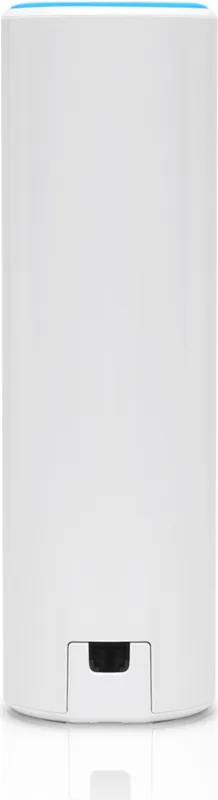
Ubiquiti UniFi FlexHD UAP-FlexHD Manual
PDF manual · 29 Pages
English



Quick check
Incorrect answer, please try again.
Chat with your Ubiquiti UniFi FlexHD UAP-FlexHD manual using AI
Get instant AI answers from your Ubiquiti UniFi FlexHD UAP-FlexHD manual
Ask anything about the Ubiquiti UniFi FlexHD UAP-FlexHD. Answers come from this manual, with the pages they are based on.
Ask a Question
Do you recommend UniFi FlexHD UAP-FlexHD?
Yes No
martin73
4 months ago
Is the reset button easily accessible and does the device function properly as a standalone unit without external controllers?
Frequently Asked Questions
The device supports up to 1733 Mbps on the 5 GHz band and 300 Mbps on the 2.4 GHz band, ensuring fast data transfer for demanding applications.
Is this answer helpful?
Yes, the UAP-FlexHD is designed for both indoor and outdoor use, provided you attach the optional outdoor mount and install it upright to protect against moisture.
Is this answer helpful?
Yes, the single-pack version includes a 48V Gigabit PoE adapter, allowing you to power the device without needing a PoE switch immediately.
Is this answer helpful?
Press and hold the Reset button for more than five seconds until the LED changes state, which restores the device to its original factory configuration.
Is this answer helpful?
The UniFi Controller software is available for download and can be installed on Linux, Mac OS X, or Windows machines to manage your network effectively.
Is this answer helpful?
It supports WEP, WPA-PSK, and WPA-Enterprise (WPA/WPA2 with TKIP/AES) to ensure secure wireless communications across your network.
Is this answer helpful?
You will need a Phillips screwdriver for most mounting tasks, and Cat5/6 UTP cable for indoor or shielded cable for outdoor wired connections.
Is this answer helpful?
Advantages and Disadvantages
Advantages

- Versatile mounting options for ceiling, wall, pole, and desktop
- High throughput with 802.11ac Wave 2 technology
- Includes PoE adapter for flexible power solutions
- Clear LED status indicators for easy diagnostics
- Mobile app support for remote network management
Disadvantages

- Ceiling mount assembly sold separately
- Requires upright outdoor installation to prevent water damage
- Limited browser functionality outside of Google Chrome
- Requires specific UniFi Controller software version
- Outdoor cabling must be shielded and grounded
Product Specification
LAN
1x 1000Base-T (PoE PD)
Wireless
WLAN 802.11a/b/g/n/ac/h (Wi-Fi 5), simultaneous
Data Rate
300Mbps (2.4GHz), 1733Mbps (5GHz)
Security
WEP, WPA, WPA2, WPA3
Antennas
Internal
Ports
N/A
Power Consumption
11W (operational), no specification (max. power supply output)
Dimensions
6.26x1.93x1.93 inches
Features
MU-MIMO, TPC/DFS, VLAN, Outdoor, Mesh (split band)
Band Capability
Dual Band (simultaneous), Mesh (split band)
Manufacturer Warranty
One year
Note
Configuration only via configuration software or via control unit. WPA3 after firmware update (5.43+ FW).
Note #2
Open-DD-WRT may only be available for certain revisions, please refer to further links!
Product Description
Ubiquiti UniFi AP FlexHD: Enterprise Wi-Fi Redefined
The Ubiquiti UniFi AP FlexHD stands as a pinnacle of modern wireless networking, designed to deliver exceptional performance for both indoor and outdoor enterprise environments. As an 802.11ac Wave 2 access point, it offers robust connectivity that adapts seamlessly to diverse installation needs, whether mounted on a ceiling, wall, pole, or desktop. This device is engineered to handle high-density networks, providing reliable throughput for businesses requiring consistent coverage without the hassle of complex cabling setups.
One of the standout features of the UAP-FlexHD is its versatility in mounting options. The sleek design allows for unobtrusive placement in professional settings while maintaining durability against the elements when used outdoors. The inclusion of an optional outdoor mount ensures that the device remains protected from water and dust, making it ideal for patios, warehouses, or campus perimeters. The hardware overview reveals a user-friendly interface with clear LED indicators that guide users through status updates, from factory defaults to successful network integration.
Powering the device is straightforward thanks to its support for 802.3af PoE, allowing it to draw power directly from a compatible switch or the included Gigabit PoE adapter. This eliminates the need for separate power outlets near the installation site, simplifying deployment significantly. The software ecosystem complements the hardware perfectly; using the UniFi Controller or the mobile app, administrators can manage the entire network with ease. The mobile app is particularly useful for quick provisioning and remote management, ensuring that network oversight is always within reach.
With speeds reaching up to 1733 Mbps on the 5 GHz band and 300 Mbps on the 2.4 GHz band, the FlexHD handles heavy data loads effortlessly. Its advanced antenna gain and optimized TX power ensure strong signal penetration even in challenging environments. Security is paramount, supported by WPA-Enterprise and WPA-PSK protocols to keep data safe. Whether you are upgrading an existing network or building one from scratch, the Ubiquiti UniFi AP FlexHD Manual serves as an essential companion, though the device itself speaks volumes through its intuitive design and powerful capabilities.
Key Installation Notes
- Always use shielded cabling for outdoor Ethernet connections to prevent interference.
- Ensure the device is mounted upright when placed outdoors to avoid water ingress.
- Use RJ45 connectors without strain-relief boots for pole installations to reduce tension.
Pros and Cons
Pros
- Supports versatile mounting including ceiling, wall, pole, and desktop.
- Delivers high throughput with 802.11ac Wave 2 technology.
- Includes PoE adapter for easy power connection without switches.
- Intuitive LED status indicators simplify troubleshooting.
- Compatible with mobile apps for remote management.
Cons
- Ceiling mount assembly is sold separately and not included.
- Outdoor operation requires specific mounting orientation to prevent water damage.
- Some browser functionalities may be limited compared to Google Chrome.
- Requires UniFi Controller software v5.11.31 or newer for full features.
Frequently Asked Questions
What is the maximum throughput of the UAP-FlexHD? The device supports up to 1733 Mbps on the 5 GHz band and 300 Mbps on the 2.4 GHz band, ensuring fast data transfer for demanding applications.
Can I install this access point outdoors? Yes, the UAP-FlexHD is designed for both indoor and outdoor use, provided you attach the optional outdoor mount and install it upright to protect against moisture.
Does the package include a PoE adapter? Yes, the single-pack version includes a 48V Gigabit PoE adapter, allowing you to power the device without needing a PoE switch immediately.
How do I reset the device to factory settings? Press and hold the Reset button for more than five seconds until the LED changes state, which restores the device to its original factory configuration.
Is the UniFi Controller software free? The UniFi Controller software is available for download and can be installed on Linux, Mac OS X, or Windows machines to manage your network effectively.
What security protocols does the AP support? It supports WEP, WPA-PSK, and WPA-Enterprise (WPA/WPA2 with TKIP/AES) to ensure secure wireless communications across your network.
Do I need special tools for installation? You will need a Phillips screwdriver for most mounting tasks, and Cat5/6 UTP cable for indoor or shielded cable for outdoor wired connections.
Search for 67,706 Manuals online


Type-in Brand or Model
Anna Baker
4 months ago
Does this access point work with non-Ubiquiti UniFi environments or does it require specific hardware/software integration?
Manual.ly
4 months ago
This access point functions optimally within a Ubiquiti UniFi environment, where MIMO performance is notably enhanced. For use outside of this ecosystem, it requires either specific software configuration or dedicated hardware integration to operate correctly. Please ensure your network setup supports the necessary protocols for seamless connectivity.