


Ubiquiti UFiber OLT UF-OLT Manual
PDF manual · 24 Pages
English



Quick check
Incorrect answer, please try again.
Chat with your Ubiquiti UFiber OLT UF-OLT manual using AI
Get instant AI answers from your Ubiquiti UFiber OLT UF-OLT manual
Ask anything about the Ubiquiti UFiber OLT UF-OLT. Answers come from this manual, with the pages they are based on.
Ask a Question
Do you recommend UFiber OLT UF-OLT?
Yes NoFrequently Asked Questions
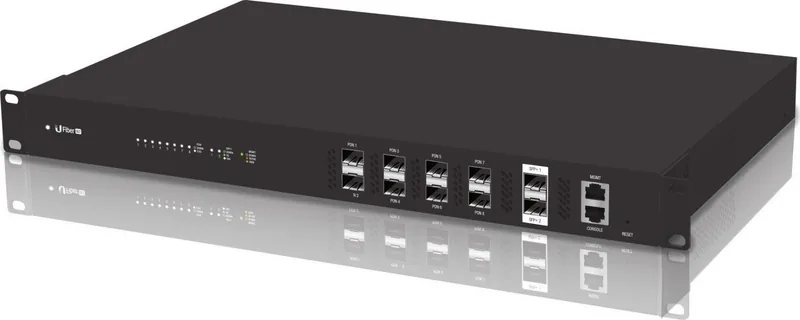
The UF-OLT features eight GPON PON ports (PON1–PON8), two hot-swappable SFP+ ports (1G/10G), one RJ45 MGMT port (10/100/1000), and an RJ45 console port for CLI access.
Is this answer helpful?
Each GPON port supports up to 128 ONT/ONU clients, allowing a high subscriber density per port when paired with appropriate passive optical splitters and compatible SFP transceivers.
Is this answer helpful?
The package includes the UF-OLT unit, mounting brackets and screws, one UF-GP-B+ SC/UPC GPON SFP transceiver (20 km), a power cord, rubber feet, and a quick start guide. Additional SFP/SFP+ transceivers are required for all ports you plan to populate.
Is this answer helpful?
Connect a PC to the MGMT port, set the PC to a static IP on 192.168.1.x, then open https://192.168.1.1 in a browser. Default login is ubnt/ubnt; accept the license agreement to access the web UI. CLI access is via the console port at 57600 baud.
Is this answer helpful?
Maintain at least 20 mm clearance for ventilation, use proper grounding and approved power cords, avoid exposure to moisture, follow fiber laser-safety precautions (do not look into powered fiber ends), and use CAT5 or better for Ethernet cabling.
Is this answer helpful?
Yes. The UF-OLT integrates with Ubiquiti’s UNMS (Ubiquiti Network Management System) for centralized provisioning, monitoring, and firmware management. Refer to UNMS documentation for installation and compatibility details.
Is this answer helpful?
Advantages and Disadvantages
Advantages

- High subscriber density: 8 GPON ports, each supporting up to 128 clients.
- Flexible uplinks: Two SFP+ ports support 1G/10G aggregation or backbone links.
- Hot-swappable modules and PSU facilitate maintenance and upgrades.
- Rackmount 1U design with dedicated MGMT port and console for easy provisioning.
- Includes UF-GP-B+ GPON SFP for immediate deployment and UNMS integration for centralized management.
Disadvantages

- Limited warranty: 1-year coverage with strict RMA conditions.
- Requires compatible SFP/SFP+ transceivers per port, adding to deployment cost.
- Operating noise/ventilation: requires 20 mm clearance and rack cooling considerations.
- No bundled multi-PSU redundancy by default; single PSU model may need replacement planning.
- CLI/web management defaults require initial static IP setup and credential change for security.
Product Specification
Function
Switch
Type
Standalone, Rackmount (via mounting brackets), Wall mount (via mounting brackets)
Network ports
8x SFP (GPON), 2x SFP+
Speeds
8x SFP (GPON, Tx 1.25Gb/s/Rx 2.5Gb/s, Tx 1490nm/Rx 1310nm 12.43mi), 2x SFP+ (1G/10Gb/s)
PoE
N/A
Configuration
Web interface, Console, Configuration software (Linux, Android, iOS), serial (RJ-45), Network (RJ-45, dedicated, 10/100/1000Base-T)
Dimensions (WxHxD)
17.44x1.73x11.26in, 1U
Weight
9.70lb
Color
black
Features
Metal housing, removable mounting brackets, optional redundant power supply, redundant power supply, Firmware updates possible, GPON
Manufacturer's warranty
one year
Product Description
Ubiquiti UFiber OLT Rackmount Gigabit Managed Switch, 8x SFP, 2x SFP+, GPON Manual
The Ubiquiti UFiber OLT (UF-OLT) is an 8-port GPON Optical Line Terminal designed for dense fiber deployments, combining GPON PON ports with dual SFP+ uplinks in a 1U rackmount form factor. Built for ISPs, enterprises, and service providers, the unit offers hot-swappable SFP/SFP+ support, out-of-band management, and a compact, ventilated chassis with redundant-friendly power options. Each GPON port supports up to 128 ONT/ONU clients, enabling high subscriber counts per port, while the two SFP+ ports deliver flexible 1G/10G aggregation or backbone connectivity.
Key features and hardware
The UF-OLT includes eight GPON SFP ports (PON1–PON8), two SFP+ ports for 1G/10G uplinks, and a dedicated RJ45 MGMT port for configuration. A front-panel RJ45 console and reset button allow CLI access and factory resets. LEDs indicate system, PON, SFP+, and management link/activity status. The unit ships with one UF-GP-B+ GPON SFP transceiver (single-fiber, SM, 20 km) and supports compatible third-party SFP/SFP+ modules for diverse link profiles.
Installation and management
Mountable in a standard 19" rack (1U) or deployable on a shelf or wall, the UF-OLT requires minimal tools and provides mounting brackets and screws. Connect GPON SFP transceivers to passive optical splitters and pair SFP+ uplinks to aggregation switches. The MGMT port defaults to 192.168.1.1; browse via HTTPS after setting your host IP to the 192.168.1.x subnet and logging in with default credentials (ubnt/ubnt). For centralized control, the device integrates with Ubiquiti’s UNMS (Ubiquiti Network Management System).
Performance and safety
Powered by a dual-core MIPS CPU and 512 MB DDR3 memory, the UF-OLT consumes up to 40W (excluding SFP modules) and accepts 100–240VAC with a hot-swappable PSU. Operating environmental ranges and CE/FCC certifications make it suitable for commercial deployments. Follow ventilation, grounding, and fiber-safety precautions (CLASS 1 LASER) and adhere to cabling standards (CAT5+ for Ethernet, appropriate fiber for PON links).
Practical notes
The UF-OLT’s modular SFP approach simplifies upgrades and maintenance; one included GPON SFP enables immediate deployment but plan for additional compatible modules per PON port. Reset procedures include runtime and power-on methods. Warranty coverage is limited to one year with RMA procedures required for returns.
Notes
- Includes one UF-GP-B+ GPON SFP (SC/UPC, 20 km).
- Ensure 20 mm clearance near ventilation and follow grounding instructions.
- Use CAT5 or better for Ethernet; shielded cable for outdoor runs.
Search for 67,706 Manuals online


Type-in Brand or Model