
Ubiquiti UFiber Loco UF-Loco Manual
PDF manual · 24 Pages
English



Quick check
Incorrect answer, please try again.
Chat with your Ubiquiti UFiber Loco UF-Loco manual using AI
Get instant AI answers from your Ubiquiti UFiber Loco UF-Loco manual
Ask anything about the Ubiquiti UFiber Loco UF-Loco. Answers come from this manual, with the pages they are based on.
Ask a Question
Do you recommend UFiber Loco UF-Loco?
Yes NoFrequently Asked Questions
The UFiber Loco supports ITU G.984 GPON with up to 2.488 Gbps downstream and 1.244 Gbps upstream, providing full GPON throughput for typical fiber-to-the-premises deployments.
Is this answer helpful?
You can power the UF-LOCO using the included Micro-USB 5V/1A adapter, via 24V passive PoE from a compatible PoE injector or switch, or through the WAN 24V PoE OUT on a Ubiquiti airCube for combined CPE and Wi‑Fi setups.
Is this answer helpful?
Connect a host to the LAN port, set the host IP to the 192.168.1.x subnet, then open a browser to http://192.168.1.1 and log in with the default credentials (username: ubnt, password: ubnt) to access the U Fiber configuration UI.
Is this answer helpful?
Yes. The UF-LOCO includes four OLT compatibility profiles (Profile 1–4). It defaults to Ubiquiti OLT profile but you can manually select profiles 2–4 for many third-party OLT vendors; verify compatibility on Ubiquiti’s supported OLT list.
Is this answer helpful?
The UF-LOCO operates between -10 to 45° C (14 to 113° F) and supports 10% to 90% noncondensing relative humidity, suitable for typical indoor customer premises environments.
Is this answer helpful?
Amber or no signal can indicate low optical power, excessive power, connector or fiber issues, or lack of authorization with the OLT; inspect fiber connectors, confirm OLT settings/passwords, and measure optical loss or add attenuators/splitters as needed.
Is this answer helpful?
The UF-LOCO has a one-year limited warranty covering defects in material and workmanship. Returns require an RMA from Ubiquiti and must be shipped freight prepaid; warranty exclusions apply for modifications, third-party firmware, and cabling-related damage.
Is this answer helpful?
Advantages and Disadvantages
Advantages

- High GPON throughput: 2.488 Gbps downstream and 1.244 Gbps upstream for fast fiber access.
- Flexible power options: Micro-USB 5V adapter, 24V passive PoE, or airCube integration for versatile deployments.
- Small, lightweight form factor (76.5 x 76.5 x 26.4 mm; 77 g) ideal for tight spaces and easy mounting.
- OLT compatibility profiles to support major vendors and simplify interoperability.
- Intuitive LEDs and web UI (192.168.1.1) for straightforward setup and signal troubleshooting.
Disadvantages

- Limited warranty: one-year coverage with several exclusions (modifications, third-party firmware, cabling damage).
- Passive PoE only: requires compatible PoE or airCube; not compatible with all active PoE standards.
- Basic hardware resources: MIPS-32 240 MHz CPU and 128 MB RAM may limit advanced features or heavy workloads.
- Class A device: may cause radio interference in residential environments and require mitigation.
- No integrated Wi‑Fi: wireless connectivity requires pairing with a separate access point like airCube.
Product Specification
Type
GPON Terminal (Subscriber Station)
Ports
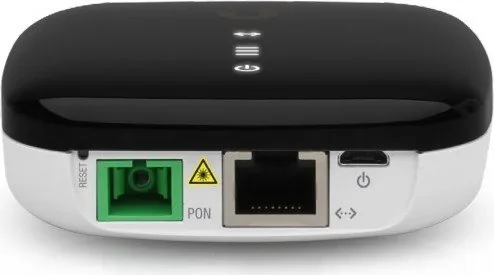
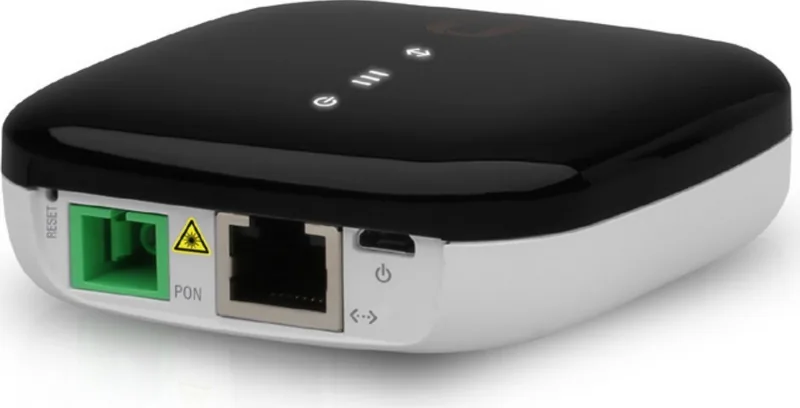
1x SC-Simplex (GPON), 1x RJ-45 (10/100/1000Base-T, PoE-PD), 1x USB Micro-B
Features
GPON, CPE
Power Consumption
3.5W (Operation), not specified (max. power supply output)
Dimensions
3.03x3.03x1.06in
Product Description
Ubiquiti UFiber Loco — Compact GPON CPE for Fast Fiber Access
The Ubiquiti UFiber Loco (UF-LOCO) is a compact GPON customer-premises device designed to bring high-speed fiber broadband into homes and small offices. Lightweight and easy to mount, it supports ITU G.984 GPON speeds with up to 2.488 Gbps downstream and 1.244 Gbps upstream, delivering reliable fiber access where space and simplicity matter.
Featuring an SC/APC GPON WAN port and a Gigabit RJ45 LAN port with passive 24V PoE support, the UF-LOCO is flexible for different deployment scenarios. You can power it via the included Micro-USB 5V/1A adapter, a compatible PoE switch, or pair it with Ubiquiti’s airCube for an integrated CPE plus Wi‑Fi solution. The device includes multiple OLT compatibility profiles to ensure interoperability with major OLT vendors and offers a simple web-based configuration interface at 192.168.1.1 for quick setup.
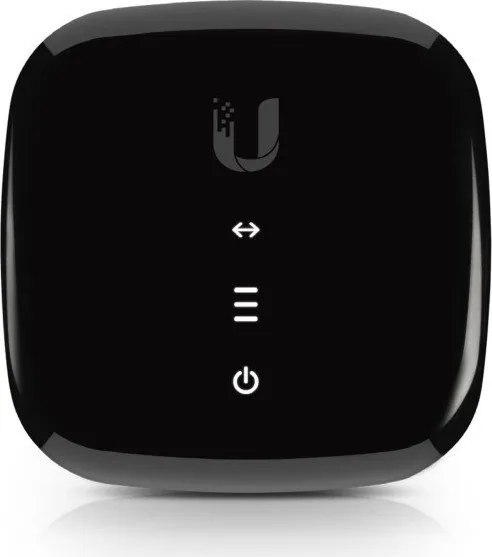
The unit’s front panel LEDs indicate power, Ethernet status, and signal strength in an intuitive manner—helpful during installation and troubleshooting. A multifunction Reset button allows quick restart or a factory reset when held for more than five seconds. Mounting is straightforward: wall bracket, anchors, and screws are provided, and it can also sit on a desktop.
The UF-LOCO is built with practical safety and regulatory compliance in mind: it’s a Class 1 laser product with CE/FCC/ISED certifications and RoHS/WEEE disposal guidance. Operating conditions span -10 to 45° C and noncondensing humidity up to 90%. The device is small (76.5 x 76.5 x 26.4 mm) and lightweight (77 g), making it unobtrusive in most customer environments.
With 128 MB DDR3 memory and a MIPS-32 240 MHz processor, the UF-LOCO handles standard GPON CPE tasks efficiently. The product comes with a one-year limited warranty subject to Ubiquiti’s terms and RMA process; warranty exclusions include physical modification, third-party firmware, cabling damage, and noncompliant installations.
Notes:
- Use CAT5 or better for all Ethernet cabling; follow local regulations for outdoor/indoor cabling and power limits.
- Avoid exposing the device to moisture or electrical storms; do not look into fiber ends when powered.
- Switch OLT profile if your OLT is not Ubiquiti by changing the profile in the System settings.
Search for 67,706 Manuals online


Type-in Brand or Model