


Ubiquiti EdgeSwitch Lite ES-48-Lite Manual
PDF manual · 24 Pages
English



Quick check
Incorrect answer, please try again.
Chat with your Ubiquiti EdgeSwitch Lite ES-48-Lite manual using AI
Get instant AI answers from your Ubiquiti EdgeSwitch Lite ES-48-Lite manual
Ask anything about the Ubiquiti EdgeSwitch Lite ES-48-Lite. Answers come from this manual, with the pages they are based on.
Ask a Question
Do you recommend EdgeSwitch Lite ES-48-Lite?
Yes NoFrequently Asked Questions
It is best suited for offices, labs, classrooms, and other networks that need many Gigabit Ethernet ports plus a few high-speed uplinks for backbone connections.
Is this answer helpful?
It includes 48 RJ-45 Gigabit ports, 2 SFP ports, and 2 SFP+ ports, giving it strong access-layer density with flexible fiber expansion options.
Is this answer helpful?
Yes. It is a 1U rackmount switch and includes rack brackets and mounting hardware for standard 19-inch racks.
Is this answer helpful?
The SFP ports support 1 Gbps connections, and the SFP+ ports support 1 Gbps or 10 Gbps connections depending on the module used.
Is this answer helpful?
The switch tries to obtain an address through DHCP first. If that fails, it falls back to 192.168.1.2. Log in through a web browser with the default credentials, then adjust the settings as needed.
Is this answer helpful?
Yes. It has a DC input that can be connected to a separate redundant power source. That source is not included, but it can serve as a hot spare if the main supply fails.
Is this answer helpful?
The switch itself should remain in a protected indoor environment or enclosure. Outdoor cabling may be used only with the proper shielding and grounding requirements.
Is this answer helpful?
Advantages and Disadvantages
Advantages

- 48 Gigabit RJ-45 ports provide high device density for wired endpoints, cameras, and access points.
- Two SFP+ and two SFP ports add flexible fiber and uplink options, including 10 Gbps connectivity.
- 1U rackmount design with included hardware makes deployment clean and straightforward.
- Managed access, console support, and DHCP fallback simplify setup and ongoing administration.
Disadvantages

- A redundant DC power source is supported, but it is not included with the switch.
- The device is intended for indoor use or protective enclosures, not exposed outdoor placement.
- Advanced management features may be more than casual home users need.
- Warranty coverage is limited to one year under specific conditions.
Product Specification
Function
Switch
Type
Standalone, Rackmount (via mounting brackets), Wall mount (via mounting brackets)
Network ports
48x RJ-45, 2x SFP, 2x SFP+
Speeds
48x RJ-45 (10/100/1000Base-T), 2x SFP (1Gb/s), 2x SFP+ (1G/10Gb/s)
PoE
N/A
Backplane
140Gb/s, 104.16Mp/s, 8k MAC addresses
Officially supported standards
802.1AX, 802.1AB, 802.1D, 802.1Q, 802.1S, 802.1w, 802.1X, 802.1ak, 802.1p, 802.3, 802.3ab, 802.3ac, 802.3u, 802.3x, IGMPv3
Configuration
Web interface, Console, serial (RJ-45, rear)
Cooling
active
Dimensions (WxHxD)
17.44x1.69x11.26in, 1U
Weight
7.85 lbs
Color
black
Special features
Metal housing, optional external redundant power supply, firmware updates possible
Manufacturer's warranty
one year
Note
For this device, "link aggregation" was officially specified with the obsolete standard IEEE802.3ad. Since 2008, the function is no longer managed by IEEE "Working Group 3" (IEEE 802.3, CSMA/CD - Ethernet), but by "Working Group 1" (IEEE 802.1, High Level Interface - Internetworking) and technically defined unchanged via IEEE 802.1AX.
Product Description
Ubiquiti EdgeSwitch Lite 48: Built for Fast, Flexible Network Growth
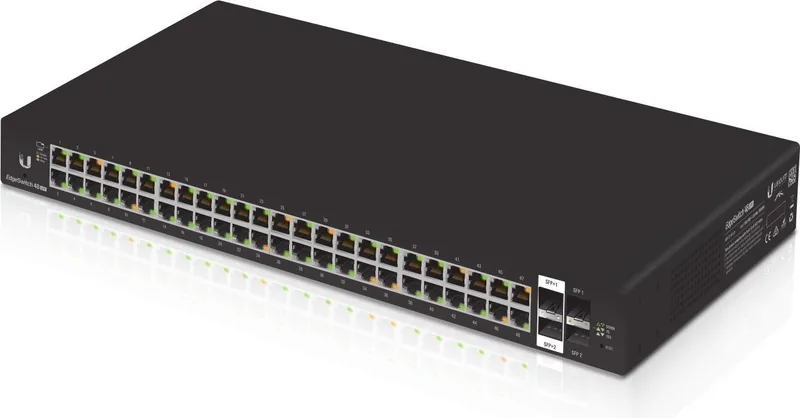
The Ubiquiti EdgeSwitch Lite 48 Rackmount Gigabit Managed Switch, 48x RJ-45, 2x SFP, 2x SFP+ Manual points to a switch built for networks that need density, control, and room to grow. With 48 Gigabit RJ-45 ports on the front panel, it offers a strong foundation for offices, studios, classrooms, and other environments where many wired devices must stay connected and responsive.
This managed switch blends copper access with high-speed uplinks. The two SFP+ ports can run at 1 Gbps or 10 Gbps, while the two SFP ports are ready for 1 Gbps fiber connections. That mix makes it easy to link access points, servers, storage, and upstream switches without redesigning the whole network. For installations that need a cleaner backbone, the fiber options also help keep long-distance or inter-rack connections efficient.
The EdgeSwitch Lite also feels practical from an installation standpoint. It can rest on a flat surface, mount to a wall, or fit into a standard 1U rack using the included brackets and hardware. Front-panel status LEDs provide quick feedback on system state, link speed, and activity, which is helpful when troubleshooting in a busy rack. A rear RJ45 console port adds another management path for administrators who prefer CLI access.
Power flexibility is another useful detail. The unit includes an internal AC power supply, and the DC input can be connected to a separate redundant source for backup operation. That does not replace proper planning, but it can help reduce disruption in environments that cannot afford a sudden outage. The switch also supports DHCP by default and falls back to 192.168.1.2 if needed, making first-time access easier during staging or replacement projects.
In real-world use, this model fits teams that want enterprise-style features without unnecessary complexity. It is especially appealing when you need a large number of Gigabit access ports and only a few fast uplinks to aggregate traffic. The result is a compact but capable platform that supports steady growth, organized cabling, and easier network maintenance over time.
For administrators, the combination of browser-based configuration and console access makes it approachable whether you're deploying a new rack or replacing a legacy switch. It's a straightforward choice for people who value stability, manageable uplinks, and a design that is easy to rack, label, and maintain.
Notes
- Use CAT5 or better cabling for Ethernet runs.
- Keep airflow clear around the ventilation holes.
- The switch should be housed indoors or inside a protective enclosure.
- A unique management IP should be set before production use.
Search for 67,706 Manuals online


Type-in Brand or Model
Laura Schneider
10 months ago
Is the Ubiquiti switch reliable enough for production networks, or do frequent failures make it unsuitable?
Manual.ly
10 months ago
Most customers report stable long-term performance, but any network device can fail in individual cases. If you plan to use it in production, we recommend updating to the latest stable firmware, using proper power and cable quality, and avoiding overloads (ports, bandwidth, and power budget). Also consider adding redundancy (for example, a backup uplink and monitoring) and testing under your workload before deployment. If you experience repeated failures, contact support with your model, firmware version, and event logs so we can help isolate whether it is a configuration, power, or hardware issue and arrange warranty replacement if needed.