

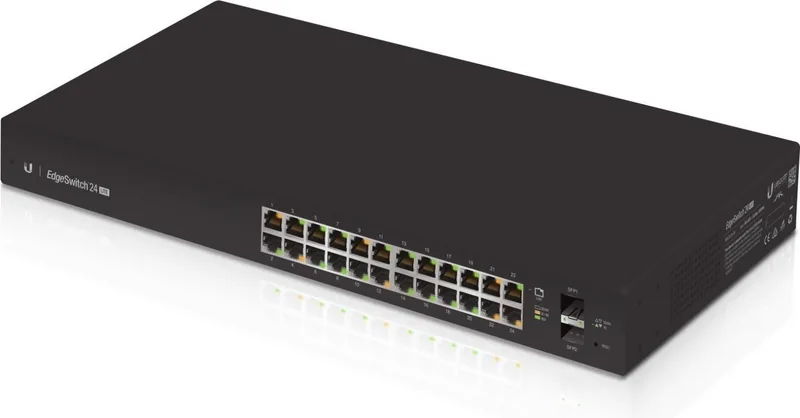

Ubiquiti EdgeSwitch Lite ES-24-Lite Manual
PDF manual · 24 Pages
English



Quick check
Incorrect answer, please try again.
Chat with your Ubiquiti EdgeSwitch Lite ES-24-Lite manual using AI
Get instant AI answers from your Ubiquiti EdgeSwitch Lite ES-24-Lite manual
Ask anything about the Ubiquiti EdgeSwitch Lite ES-24-Lite. Answers come from this manual, with the pages they are based on.
Ask a Question
Do you recommend EdgeSwitch Lite ES-24-Lite?
Yes NoFrequently Asked Questions
It is designed to provide managed Gigabit switching for networks that need many wired connections, plus a couple of fiber uplinks for backbone or expansion use.
Is this answer helpful?
It includes 24 RJ-45 Gigabit Ethernet ports and 2 SFP ports, giving users both copper access and fiber uplink flexibility.
Is this answer helpful?
Yes. It supports 1U rack mounting and includes the brackets, screws, and cage nuts needed for installation in a standard 19-inch rack.
Is this answer helpful?
The switch usually gets an IP address through DHCP. If that fails, you can use the fallback address 192.168.1.2 and log in through a web browser.
Is this answer helpful?
The guide indicates the default username and password are both "ubnt." You must also accept the license agreement before entering the management interface.
Is this answer helpful?
Yes. The two SFP ports support 1 Gbps fiber modules, allowing you to connect compatible optical transceivers and fiber cabling for uplinks or extended runs.
Is this answer helpful?
Yes. In addition to AC power, it can accept a 25VDC input as a redundant or standby source, which can help keep the switch running if the primary supply fails.
Is this answer helpful?
Advantages and Disadvantages
Advantages

- 24 Gigabit RJ-45 ports support high-density wired networking for offices and small business setups.
- 2 SFP ports add flexible fiber uplink options for backbone links or longer-distance connections.
- Managed switch features plus console access give administrators better control and troubleshooting options.
- Rackmount, wall-mount, and tabletop installation support make deployment easy in different environments.
Disadvantages

- No PoE support is mentioned, so it may not power access points, phones, or cameras directly.
- The switch should be housed indoors in a protective enclosure, even when cabling runs outdoors.
- Initial access may require DHCP discovery or fallback IP setup, which can slow first-time configuration.
- The warranty is limited to one year and excludes many types of damage or misuse.
Product Specification
Function
Switch
Type
Standalone, Rackmount (via mounting brackets), Wall mount (via mounting brackets)
Network ports
24x RJ-45, 2x SFP
Speeds
24x RJ-45 (10/100/1000Base-T), 2x SFP (1Gb/s)
PoE
N/A
Backplane
52Gb/s, 38.69Mp/s, 8k MAC addresses
Officially supported standards
802.1AX, 802.1AB, 802.1D, 802.1Q, 802.1S, 802.1w, 802.1X, 802.1ak, 802.1p, 802.3, 802.3ab, 802.3ac, 802.3u, 802.3x, IGMPv3
Configuration
Web interface, Console, serial (RJ-45, rear)
Dimensions (WxHxD)
17.44x1.69x8.70in, 1U
Weight
5.53 lb
Color
black
Special features
Metal housing, optional external redundant power supply, Firmware updates possible
Manufacturer's warranty
one year
Note
For this device, "link aggregation" was officially specified with the obsolete standard IEEE802.3ad. Since 2008, the function is no longer managed by IEEE "Working Group 3" (IEEE 802.3, CSMA/CD - Ethernet), but by "Working Group 1" (IEEE 802.1, High Level Interface - Internetworking) and technically defined unchanged via IEEE 802.1AX.
Product Description
Ubiquiti EdgeSwitch Lite 24: Practical Switching for Growing Networks
The Ubiquiti EdgeSwitch Lite 24 Rackmount Gigabit Managed Switch, 24x RJ-45, 2x SFP Manual highlights a device built for dependable network expansion with a clean, rack-ready design. It combines 24 Gigabit Ethernet ports with 2 SFP uplinks, making it a solid fit for offices, labs, and small business environments that need flexible wired connectivity without adding unnecessary complexity.
Built for Everyday Network Control
What makes the EdgeSwitch Lite appealing is its balance of speed and management. The switch supports standard 10/100/1000 Mbps RJ-45 connections across all 24 copper ports, while the two SFP ports add fiber-ready uplink options for longer-distance or high-quality backbone links. The managed nature of the device means administrators can fine-tune connectivity, monitor port activity, and access the configuration interface through a web browser or console connection.
Flexible Installation and Reliable Operation
The unit is designed to adapt to different setups. It can sit on a surface, mount on a wall, or fit into a 1U rack space, which helps it blend into structured IT environments. The included mounting hardware and clear installation steps make deployment straightforward. On the connectivity side, the switch defaults to DHCP for quick network discovery, but it also provides a fallback IP for direct access when needed, which is especially helpful during initial setup or troubleshooting.
A Strong Fit for Structured Cabling
From a practical standpoint, the switch supports clean integration into modern cabling plans. It expects CAT5 or better wiring, supports hot-swappable SFP modules, and includes status LEDs for fast visual checks of link speed, activity, and system state. That makes it easy to confirm whether ports are active and operating at the expected speed. For environments that need dependable wired distribution, the EdgeSwitch Lite offers a focused feature set without unnecessary extras.
Notes
- Best suited for indoor use in a protected enclosure
- Outdoor cabling should be shielded and properly grounded
- Reset, console access, and dual-power options improve serviceability
Overall, this switch delivers a practical mix of management, performance, and installation flexibility. It is a smart choice for users who want a compact Gigabit switch with fiber expansion options and a professional rackmount design.
Search for 67,706 Manuals online


Type-in Brand or Model