
Ubiquiti EdgeSwitch 8 ES-8-150W Manual
PDF manual · 28 Pages
English



Quick check
Incorrect answer, please try again.
Chat with your Ubiquiti EdgeSwitch 8 ES-8-150W manual using AI
Get instant AI answers from your Ubiquiti EdgeSwitch 8 ES-8-150W manual
Ask anything about the Ubiquiti EdgeSwitch 8 ES-8-150W. Answers come from this manual, with the pages they are based on.
Ask a Question
Do you recommend EdgeSwitch 8 ES-8-150W?
Yes NoFrequently Asked Questions
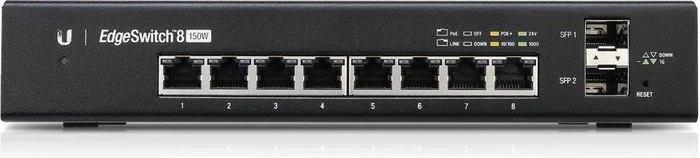
It includes 8 RJ-45 Gigabit Ethernet ports for standard devices and 2 SFP ports for fiber uplinks or other compatible modules. This gives it solid flexibility for both short-range and extended network connections.
Is this answer helpful?
Yes. It supports PoE+ on the RJ-45 ports, which allows the switch to power compatible devices like wireless access points, IP cameras, and VoIP phones directly through Ethernet cables.
Is this answer helpful?
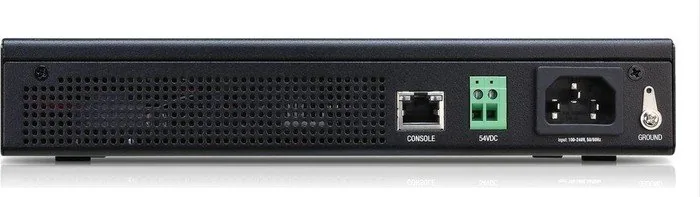
Yes. In addition to AC power, it can accept 42 to 56VDC input for standalone operation or redundant backup. If both sources are connected, the higher-voltage input is used first.
Is this answer helpful?
The switch can be accessed through a web browser. It typically obtains an IP address through DHCP, and if that fails, it falls back to 192.168.1.2. A console port is also available for CLI access.
Is this answer helpful?
The switch itself should stay indoors or inside a protective enclosure. Outdoor Ethernet cabling may be used, but it should be shielded and properly grounded to reduce risk and interference.
Is this answer helpful?
It combines managed switching, PoE+, SFP uplinks, and backup power support in a compact unit. That mix is ideal for offices that need reliable device power and a cleaner, more scalable wired network.
Is this answer helpful?
Advantages and Disadvantages
Advantages

- Eight Gigabit RJ-45 ports provide plenty of wired connections for small networks, workstations, and IP devices.
- Two SFP ports add flexible uplink options for fiber links or long-distance network expansion.
- 150W PoE+ support can power cameras, access points, and phones without extra adapters.
- Dual AC/DC power input improves deployment flexibility and can support backup power setups.
Disadvantages

- Designed for indoor use, so it needs protection from moisture and harsh environments.
- The unit must not be stacked, and it needs clear ventilation space to avoid overheating.
- Managed features may be more than casual users need and require some networking knowledge.
- PoE power is shared across ports, so heavy loads may require careful planning.
Product Specification
Function
Switch
Type
Standalone, Rackmount (via mounting brackets), Wall mount (via mounting brackets)
Network ports
8x RJ-45, 2x SFP
Speeds
8x RJ-45 (10/100/1000Base-T), 2x SFP (1Gb/s)
PoE
8x RJ-45 PoE+ or 8x RJ-45 passive PoE (8x 34W or 8x 17W/24V), total: 150W
Backplane
20Gb/s, 14.88Mp/s, 8k MAC addresses
Officially supported standards
802.1AX, 802.1AB, 802.1D, 802.1D-2004, 802.1Q, 802.1Q-2003, 802.1S, 802.1w, 802.1X, 802.1ak, 802.1p, 802.3, 802.3ab, 802.3ac, 802.3af, 802.3at, 802.3u, 802.3x, IGMPv3
Configuration
Web interface, Console, serial (RJ-45, rear)
Dimensions (WxHxD)
8.03x1.69x9.25in, 1U
Weight
3.79 lb
Color
black
Special features
Metal housing, removable mounting brackets, screw terminals (42-56V), remote power supply, redundant power supply, firmware updates possible
Manufacturer warranty
one year
Note
For this device, "link aggregation" was officially specified with the obsolete standard IEEE802.3ad. Since 2008, the function is no longer managed by the IEEE "Working Group 3" (IEEE 802.3, CSMA/CD - Ethernet), but by "Working Group 1" (IEEE 802.1, High Level Interface - Internetworking) and technically defined unchanged via IEEE 802.1AX.
Product Description
Ubiquiti EdgeSwitch 8 Desktop Gigabit Managed Switch Review
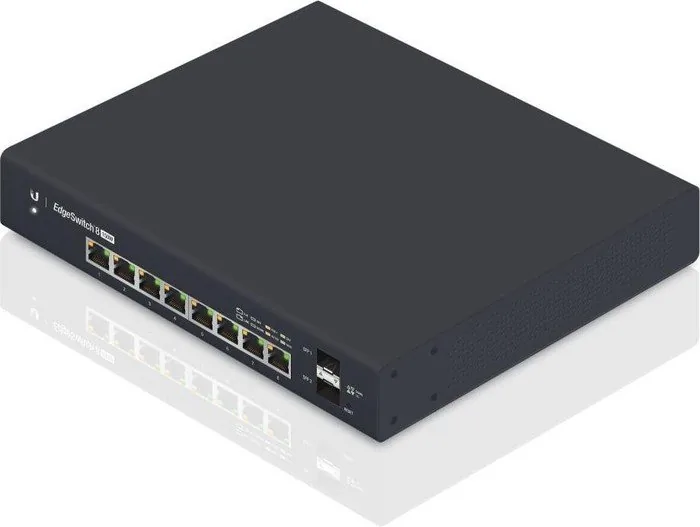
The Ubiquiti EdgeSwitch 8 Desktop Gigabit Managed Switch, 8x RJ-45, 2x SFP, 150W PoE+ Manual points to a compact but capable network switch built for small offices, labs, and advanced home setups that need reliable wired connectivity. With eight Gigabit RJ-45 ports and two SFP uplinks, it gives you a flexible mix of copper and fiber options while keeping the footprint small enough for a desk, shelf, or wall mount.
What makes this switch especially appealing is its managed feature set. Instead of acting like a simple plug-and-play device, it offers more control over traffic, power delivery, and network behavior. That makes it a strong choice for users who want better visibility into their infrastructure, along with the ability to expand a network without sacrificing stability. The PoE+ support is a major advantage as well, since it can power compatible devices such as access points, IP cameras, and VoIP phones directly through the Ethernet cable.
The ES-8-150W also stands out for its dual power flexibility. It can run from AC power using the included cord, or accept a 42 to 56VDC input for standalone use or backup power. That extra option is useful in environments where uptime matters. Combined with hot-swappable SFP ports and a non-blocking 10 Gbps line rate, the switch is designed to keep traffic moving efficiently across multiple devices.
Setup is straightforward for experienced users. The switch can be reached through a web browser, and it defaults to DHCP with a fallback IP address if needed. A console port is also available for CLI management, which adds another layer of control for troubleshooting and advanced configuration. For many buyers, this balance of usability and flexibility is exactly what makes the device useful in real-world deployments.
In practice, the EdgeSwitch 8 is best suited for people who need a compact managed switch with power delivery, uplink expansion, and dependable performance. It is not meant for casual, unmanaged use, but for those building a more structured network, it offers a practical and professional foundation.
Notes
- Keep ventilation clearance around the unit.
- Use the switch indoors and protect it from moisture.
- For outdoor cabling, shielded CAT5 or better is recommended.
- The device should not be stacked with other equipment.
Search for 67,706 Manuals online


Type-in Brand or Model