


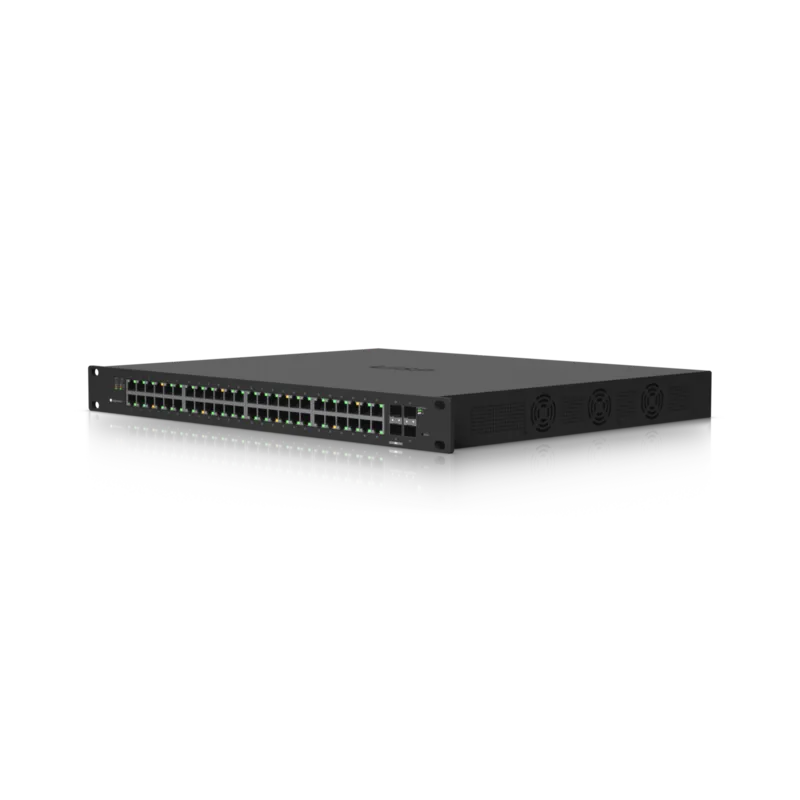
Ubiquiti EdgeSwitch 48 ES-48-500W Manual
PDF manual · 24 Pages
English



Quick check
Incorrect answer, please try again.
Chat with your Ubiquiti EdgeSwitch 48 ES-48-500W manual using AI
Get instant AI answers from your Ubiquiti EdgeSwitch 48 ES-48-500W manual
Ask anything about the Ubiquiti EdgeSwitch 48 ES-48-500W. Answers come from this manual, with the pages they are based on.
Ask a Question
Do you recommend EdgeSwitch 48 ES-48-500W?
Yes NoFrequently Asked Questions
It is built to centralize wired networking, deliver PoE power to compatible devices, and provide fiber uplinks for faster core connections. It fits dense professional environments well.
Is this answer helpful?
It offers 48 RJ-45 Gigabit Ethernet ports, so up to 48 wired devices can be connected directly, depending on your network design and power needs.
Is this answer helpful?
The switch can power supported endpoints over Ethernet, reducing the need for separate power adapters. That is especially helpful for cameras, phones, and wireless access points.
Is this answer helpful?
The SFP+ ports support 1 Gbps and 10 Gbps modules, while the SFP ports support 1 Gbps modules. They are intended for uplinks and fiber connections.
Is this answer helpful?
You can access it through the web interface or the RJ45 console port. It typically gets an IP address from DHCP, and a fallback IP is available if needed.
Is this answer helpful?
Make sure the connected device supports 24V passive PoE and can safely accept the supplied voltage. Using the wrong mode can damage equipment.
Is this answer helpful?
Advantages and Disadvantages
Advantages

- 48 Gigabit RJ-45 ports provide dense wired connectivity for offices and network-heavy installations.
- 500W PoE+ budget supports many powered devices such as cameras, phones, and access points.
- SFP and SFP+ uplinks make fiber expansion and high-speed backbone links easy to add.
- Managed access through web UI and CLI gives administrators flexible control and troubleshooting options.
Disadvantages

- Requires proper rack space and ventilation, so it is less convenient for casual or open-air setups.
- 24V passive PoE must be enabled carefully to avoid incompatibility with connected devices.
- Outdoor use is not recommended unless the switch is protected in an enclosure.
- Initial configuration may feel complex for users who only need a basic unmanaged switch.
Product Specification
Function
Switch
Type
Standalone, Rackmount (via mounting brackets)
Network ports
48x RJ-45, 2x SFP, 2x SFP+
Speeds
48x RJ-45 (10/100/1000Base-T), 2x SFP (1Gb/s), 2x SFP+ (1G/10Gb/s)
PoE
48x RJ-45 PoE+ or 48x RJ-45 passive PoE (48x 34W or 48x 17W/24V), total: 500W
Backplane
140Gb/s, 104.16Mp/s, 8k MAC addresses
Officially supported standards
802.1AX, 802.1AB, 802.1D, 802.1D-2004, 802.1Q, 802.1Q-2003, 802.1S, 802.1w, 802.1X, 802.1ak, 802.1p, 802.3, 802.3ab, 802.3ac, 802.3af, 802.3at, 802.3u, 802.3x, IGMPv3
Configuration
Web interface, Console, serial (RJ-45, rear)
Cooling
active
Dimensions (WxHxD)
19.09x1.73x14.76in, 1U
Weight
13.45lb
Color
black
Special features
Metal housing, Firmware updates possible
Manufacturer warranty
one year
Note
For this device, "link aggregation" was officially specified with the obsolete standard IEEE802.3ad. Since 2008, this function is no longer managed by IEEE "Working Group 3" (IEEE 802.3, CSMA/CD - Ethernet), but by "Working Group 1" (IEEE 802.1, High Level Interface - Internetworking) and technically defined unchanged via IEEE 802.1AX.
Product Description
Ubiquiti EdgeSwitch 48 Rackmount Gigabit Managed Switch: A Practical Power Hub for Modern Networks
The Ubiquiti EdgeSwitch 48 Rackmount Gigabit Managed Switch is designed for environments that need both speed and scale. With 48 Gigabit RJ-45 ports, 2 SFP uplinks, 2 SFP+ uplinks, and a generous 500W PoE+ budget, it brings wired devices, cameras, access points, and other endpoints into one organized, rack-ready platform. The Ubiquiti EdgeSwitch 48 Rackmount Gigabit Managed Switch, 48x RJ-45, 2x SFP, 2x SFP+, 500W PoE+ Manual highlights how this model is built for straightforward deployment and dependable day-to-day use.
At the front, the switch combines flexible copper and fiber connectivity in a single 1U chassis. The RJ-45 ports support 10/100/1000 Mbps links and default to PoE+ auto, so compatible 802.3af/at devices can receive power without extra configuration. That makes the switch especially useful for access points, VoIP phones, and surveillance gear. The SFP and SFP+ ports add a clean path for uplinks, allowing faster connections to servers, core switches, or long-distance fiber runs.
Management is another strong point. The switch can be reached through a web interface or by using the serial console port for CLI access, giving administrators options for setup and troubleshooting. It also uses DHCP by default, with a fallback IP available if no address is assigned. This helps speed up first-time access while still keeping recovery simple.
Installation is designed with rack environments in mind. The switch mounts in a standard 19-inch rack, and the hardware notes stress proper airflow, indoor protection, and the use of CAT5 or better cabling. Those details matter because the unit is built for professional deployments where reliability, cable quality, and ventilation directly affect performance. The 500W PoE capacity also makes it a strong fit for busy edge networks that need to power many devices from a single source.
Overall, this switch balances port density, PoE flexibility, and fiber expansion in a compact managed design. For offices, labs, and network closets, it offers a solid mix of power delivery and connectivity without overcomplicating the setup.
Notes
- Keep at least 20 mm of clearance near ventilation areas.
- Use compatible modules for SFP and SFP+ ports.
- Avoid exposing the switch to moisture or outdoor conditions.
- Check PoE mode carefully before enabling 24V passive output.
Search for 67,706 Manuals online


Type-in Brand or Model