


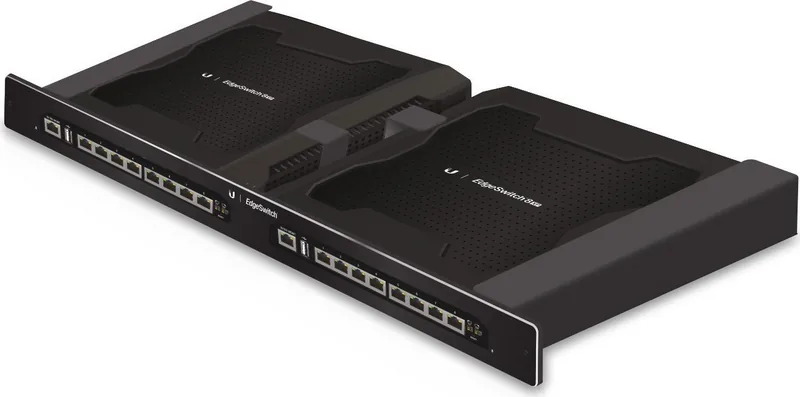
Ubiquiti EdgeSwitch 16XP ES-16XP Manual
PDF manual · 20 Pages
English



Quick check
Incorrect answer, please try again.
Chat with your Ubiquiti EdgeSwitch 16XP ES-16XP manual using AI
Get instant AI answers from your Ubiquiti EdgeSwitch 16XP ES-16XP manual
Ask anything about the Ubiquiti EdgeSwitch 16XP ES-16XP. Answers come from this manual, with the pages they are based on.
Ask a Question
Do you recommend EdgeSwitch 16XP ES-16XP?
Yes NoFrequently Asked Questions
It is a managed Gigabit switch for organized network expansion. It combines 16 RJ-45 ports with passive PoE support, making it useful for powering compatible devices while handling normal network traffic.
Is this answer helpful?
Connect a computer to the management port, set a static IP in the 192.168.1.x range, then open https://192.168.1.20 in a browser. The default login is ubnt for both username and password.
Is this answer helpful?
No. PoE is off by default on numbered ports, and it is not available on the management port. You must enable it manually in the Ports tab of the web interface.
Is this answer helpful?
The switch itself should be kept inside a protective enclosure. Outdoor cabling should use shielded CAT5 or better and be properly grounded to reduce risk and meet installation requirements.
Is this answer helpful?
Check that the connected device supports passive PoE and the supplied voltage. This is important because passive PoE does not negotiate power the same way as active PoE systems.
Is this answer helpful?
Yes. The data ports can be used as uplink ports, and Ubiquiti recommends connecting port 8 of one unit to port 1 of the other if you want to daisy-chain two switches.
Is this answer helpful?
Advantages and Disadvantages
Advantages

- 16 Gigabit RJ-45 ports provide solid wired connectivity for small to midsize network builds.
- Passive PoE on data ports helps power compatible devices without adding separate injectors.
- Dedicated management access and per-port control simplify setup and administration.
- 1U rack-mount design with included hardware supports neat, professional installation.
Disadvantages

- Passive PoE requires careful voltage matching, so incompatible devices should not be connected.
- PoE is disabled by default, which means each port must be configured before use.
- Outdoor cabling needs shielding and grounding, and the switch itself must stay protected.
- Class A compliance may make it less suitable for quiet residential settings with strict interference concerns.
Product Specification
Function
Switch
Type
Standalone, Rackmount (via pair bracket), Bundle
Network ports
8x RJ-45
Speeds
8x RJ-45 (10/100/1000Base-T)
PoE
8x RJ-45 passive PoE or 8x RJ-45 passive PoE (8x 11.5W/24V or 8x 23W/48V), total: 150W
Configuration
Web interface, Console, serial (USB-A 2.0), Network (RJ-45, dedicated, 10/100Base-T)
Cooling
active
Dimensions (WxHxD)
18.90x1.77x7.32in, 1U
Weight
8.71 lb
Color
black
Special features
Metal housing, external power supply, extended operating range (Temperature: -13F to 131F, Humidity: 5% to 90%), Firmware updates possible
Manufacturer's warranty
one year
Note
consisting of 2x Ubiquiti 8-Port EdgeSwitch 8 XP (ES-8XP) and pair bracket. 2x power supply needed. PoE total power 300W (150W each)
Product Description
Ubiquiti EdgeSwitch 16 XP: Managed Gigabit Networking with Passive PoE
The Ubiquiti EdgeSwitch 16 XP is a compact managed switch designed for reliable network expansion in professional environments. With 16 RJ-45 Gigabit ports and passive PoE support, it brings together switching and power delivery in one clean, rack-friendly unit. That makes it a practical fit for offices, surveillance systems, wireless deployments, and other setups where simplicity and control matter.
One of the most notable qualities of this model is its structured design. The chassis contains two 8-port EdgeSwitch sections, which helps keep traffic and administration organized. A dedicated management port is included for configuration, while the numbered ports handle switching and PoE duties. Because every data port supports 10/100/1000 Mbps speeds, the switch can handle mixed traffic loads without forcing users into a more complex platform than they need.
Installation is straightforward for standard 19-inch racks, and the 1U form factor keeps the setup efficient. Ubiquiti also includes mounting accessories and power cords, which helps speed up deployment. For networks that may grow over time, the switch supports daisy-chaining, allowing two units to be linked through the data ports for a more flexible layout.
The PoE design is especially useful for powered endpoints such as access points or cameras, but it does require attention. Since PoE is passive, matching the voltage and device requirements is essential before enabling it on a port. Once configured, PoE can be controlled individually, giving administrators a practical balance between convenience and safety.
Management is browser-based, with access through a static IP setup and a simple login flow. For teams that want broader oversight, Ubiquiti’s network management software can be used for monitoring, upgrades, and backups. That makes the EdgeSwitch 16 XP more than just hardware; it becomes part of a manageable ecosystem.
In short, this switch is built for users who want dependable Gigabit performance, flexible passive PoE, and a clean managed experience in a compact rack-mounted package. The Ubiquiti EdgeSwitch 16 XP Industrial Desktop Gigabit Managed Switch, 16x RJ-45, passive PoE Manual reflects a solution focused on practical deployment, control, and professional network organization.
Notes
- Use shielded CAT5 or better for outdoor cabling.
- Keep the unit in a protected enclosure if installed outdoors.
- Verify passive PoE voltage before connecting powered devices.
Search for 67,706 Manuals online


Type-in Brand or Model