
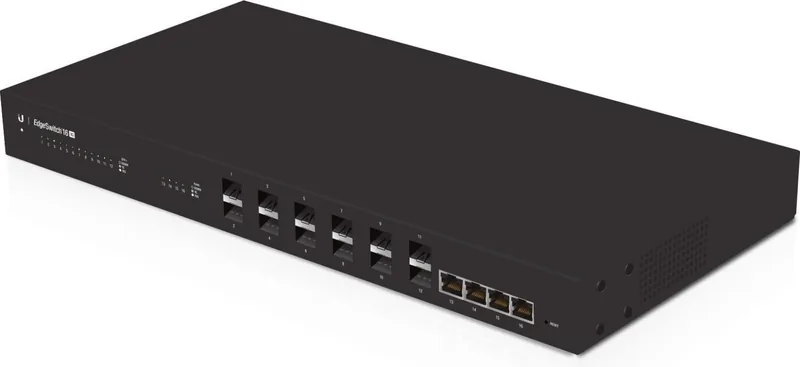


Ubiquiti EdgeSwitch 16 XG ES-16-XG Manual
PDF manual · 24 Pages
English



Quick check
Incorrect answer, please try again.
Chat with your Ubiquiti EdgeSwitch 16 XG ES-16-XG manual using AI
Get instant AI answers from your Ubiquiti EdgeSwitch 16 XG ES-16-XG manual
Ask anything about the Ubiquiti EdgeSwitch 16 XG ES-16-XG. Answers come from this manual, with the pages they are based on.
Ask a Question
Do you recommend EdgeSwitch 16 XG ES-16-XG?
Yes NoFrequently Asked Questions
It is used as a high-speed managed aggregation switch for connecting servers, storage, uplinks, and other network devices at 1G and 10G speeds. It is ideal for performance-focused networks that need flexible fiber and copper connectivity.
Is this answer helpful?
The switch includes 12 SFP+ ports and 4 RJ-45 ports. All ports support 1 Gbps and 10 Gbps connections, giving administrators a flexible mix of fiber and copper options.
Is this answer helpful?
Yes. It is designed for 1U rack installation and includes rack-mount brackets and hardware. It can also be placed on a flat surface or mounted on a wall when needed.
Is this answer helpful?
CAT6A or better is required for Ethernet cabling. For fiber connections, compatible SFP+ modules and matching fiber optic cables should be used to ensure proper performance.
Is this answer helpful?
The switch typically gets an IP address from DHCP. If that fails, you can use the fallback address 192.168.1.2. Access it through a web browser or use the console port for CLI management.
Is this answer helpful?
Yes. Besides AC power, it supports a redundant DC input that can act as a hot spare. If the internal AC/DC supply fails, the switch can continue running from the DC source without interruption.
Is this answer helpful?
Advantages and Disadvantages
Advantages

- 12 SFP+ and 4 RJ-45 ports provide flexible 10G connectivity for mixed network environments.
- 1U rackmount design makes it a practical fit for compact network cabinets and aggregation points.
- Hot-swappable SFP+ ports simplify upgrades and maintenance with minimal disruption.
- Dual power options, including DC backup, improve reliability in critical setups.
Disadvantages

- Only four RJ-45 ports are available, so copper-heavy environments may need additional hardware.
- Proper CAT6A or better cabling is required, which can raise installation cost.
- The switch is intended for indoor protected use, so it is not suited for exposed outdoor placement.
- Advanced setup may require networking knowledge, especially when using the console or IP configuration.
Product Specification
Function
Switch
Type
Standalone, Rackmount (via mounting brackets), Wall mount (via mounting brackets)
Network ports
4x RJ-45, 12x SFP+
Speeds
4x RJ-45 (1000/10GBase-T), 12x SFP+ (1G/10Gb/s)
PoE
N/A
Backplane
320Gb/s, 238.10Mp/s, 8k Mac addresses
Officially supported standards
802.1AX, 802.1AB, 802.1D, 802.1Q, 802.1S, 802.1w, 802.1X, 802.1ak, 802.1p, 802.3, 802.3ab, 802.3ac, 802.3an, 802.3u, 802.3x
Configuration
Web interface, Console, serial (RJ-45, rear)
Cooling
active
Dimensions (WxHxD)
17.44x1.69x8.70in, 1U
Weight
5.78lb
Color
black
Special features
Metal housing, removable mounting brackets, optional external redundant power supply, firmware updates possible
Manufacturer's warranty
one year
Note
For this device, "link aggregation" was officially specified with the obsolete standard IEEE802.3ad. Since 2008, the function is no longer managed by the IEEE "Working Group 3" (IEEE 802.3, CSMA/CD - Ethernet), but by "Working Group 1" (IEEE 802.1, High Level Interface - Internetworking) and technically defined unchanged via IEEE 802.1AX.
Product Description
Ubiquiti EdgeSwitch 16 XG: A Compact 10G Powerhouse for Growing Networks
The Ubiquiti EdgeSwitch 16 XG is built for environments that need fast, reliable switching without adding unnecessary complexity. Designed as a rackmount 10G managed aggregation switch, it combines high-capacity fiber connectivity with a small number of multi-speed RJ-45 ports, making it a strong fit for offices, studios, labs, and network backbones where performance matters.
At the core of this switch are 12 SFP+ ports and 4 RJ-45 ports, all supporting 1 Gbps and 10 Gbps connections. That mix gives administrators flexibility when connecting servers, storage, wireless uplinks, and core network devices. Whether the goal is low-latency backbone switching or high-throughput aggregation, the ES-16-XG is designed to keep traffic moving efficiently.
One of its biggest strengths is versatility. It can be mounted in a 1U rack space, placed on a flat surface, or installed on a wall, which helps it adapt to different deployment styles. The unit also supports both AC and DC power input, including a redundant DC option for added resilience. For networks that cannot afford unexpected downtime, that extra power flexibility is a practical advantage.
Management is equally straightforward. The switch uses a default DHCP setup, with a fallback IP address available if needed, and it can be accessed through a web browser or an RJ45 serial console port. For admins who prefer controlled setup and detailed switching behavior, the Ubiquiti EdgeSwitch 16 XG Rackmount 10G Managed Switch, 4x RJ-45, 12x SFP+ Manual provides the essential guidance needed to get started quickly and configure the device properly.
In daily use, the EdgeSwitch XG stands out for its clean front-panel layout, clear LED status indicators, and hot-swappable SFP+ ports. Those details make it easier to monitor links, identify activity, and manage connections during upgrades or maintenance. It is also built with commercial deployment in mind, including Class A compliance and strong ESD/EMP protection.
If you need a compact managed switch that bridges fiber and copper at 10G speeds, this model delivers a balanced mix of speed, control, and installation flexibility.
Notes
- Use CAT6A or better cabling for Ethernet connections.
- Keep proper ventilation clearance during installation.
- Place the switch in an enclosure if used in exposed environments.
- Confirm compatible SFP+ modules before deployment.
Search for 67,706 Manuals online


Type-in Brand or Model
Hans Müller
9 months ago
How loud is this switch during operation, and what should I watch for regarding heat and fan noise?
Manual.ly
9 months ago
From customer feedback, the switch can be a bit noisy in normal rooms, mainly due to the fans. If you place it in a separate room, basement, or any ventilated area away from your desk, it is usually manageable. The key point is thermal management: make sure there is enough airflow around the switch, do not block the vents, and keep it out of enclosed cabinets without proper ventilation. If the temperature rises, the fans will ramp up and the noise will increase. With good ventilation, the loudness stays acceptable, while maintaining stable performance.