


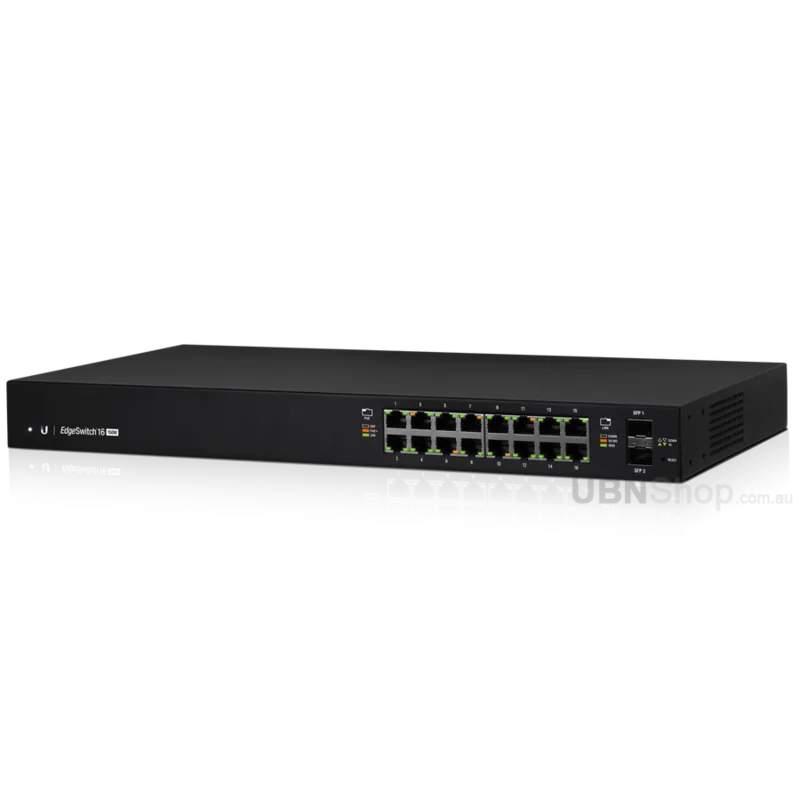
Ubiquiti EdgeSwitch 16 ES-16-150W Manual
PDF manual · 24 Pages
English



Quick check
Incorrect answer, please try again.
Chat with your Ubiquiti EdgeSwitch 16 ES-16-150W manual using AI
Get instant AI answers from your Ubiquiti EdgeSwitch 16 ES-16-150W manual
Ask anything about the Ubiquiti EdgeSwitch 16 ES-16-150W. Answers come from this manual, with the pages they are based on.
Ask a Question
Do you recommend EdgeSwitch 16 ES-16-150W?
Yes NoFrequently Asked Questions
It is designed to connect multiple wired devices, provide Gigabit network access, and power compatible equipment through PoE or PoE+ in a managed environment.
Is this answer helpful?
It includes 16 RJ-45 Gigabit Ethernet ports and 2 SFP ports for fiber uplinks or additional network connectivity.
Is this answer helpful?
Yes. It supports PoE+ for devices that follow IEEE 802.3af/at, and it also supports 24V passive PoE for compatible hardware.
Is this answer helpful?
Yes. It is a 1U rackmount switch and comes with mounting accessories for standard 19-inch rack installation.
Is this answer helpful?
You can manage it through the web interface, DHCP-assigned IP access, fallback IP access, or via the console port using CLI tools.
Is this answer helpful?
Access points, IP cameras, VoIP phones, and other network devices that need stable Gigabit connections and centralized power are good matches.
Is this answer helpful?
Advantages and Disadvantages
Advantages

- 16 Gigabit RJ-45 ports provide solid wired expansion for offices, labs, and surveillance networks.
- 2 SFP uplinks add fiber connectivity for longer runs and cleaner backbone links.
- 150W PoE+ support powers devices like access points, cameras, and IP phones from the switch.
- Managed features and CLI access give admins strong control over network configuration and monitoring.
Disadvantages

- PoE budget is limited, so many high-demand devices may require power planning.
- The switch is designed for indoor use and needs good ventilation for safe operation.
- Advanced setup may be less friendly for beginners unfamiliar with managed networking gear.
- Rackmount installation is ideal in structured environments but less convenient for casual desktop use.
Product Specification
Function
Switch
Type
Standalone, Rackmount (via mounting brackets)
Network ports
16x RJ-45, 2x SFP
Speeds
16x RJ-45 (10/100/1000Base-T), 2x SFP (1Gb/s)
PoE
16x RJ-45 PoE+ or 16x RJ-45 passive PoE (16x 34W or 16x 17W/24V), total: 150W
Backplane
36Gb/s, 26.78Mp/s, 8k Mac addresses
Officially supported standards
802.1AX, 802.1AB, 802.1D, 802.1D-2004, 802.1Q, 802.1Q-2003, 802.1S, 802.1w, 802.1X, 802.1ak, 802.1p, 802.3, 802.3ab, 802.3ac, 802.3af, 802.3at, 802.3u, 802.3x, IGMPv3
Configuration
Web interface, Console, serial (RJ-45, rear)
Cooling
active, 2x fans (1.57in)
Dimensions (WxHxD)
17.44x1.69x8.70in, 1U
Weight
6.17lb
Color
black
Special features
Metal housing, Firmware updates possible
Manufacturer's warranty
one year
Note
For this device, "link aggregation" was officially specified with the obsolete standard IEEE802.3ad. Since 2008, the function has no longer been managed by the IEEE "Working Group 3" (IEEE 802.3, CSMA/CD - Ethernet), but by "Working Group 1" (IEEE 802.1, High Level Interface - Internetworking) and is technically defined unchanged via IEEE 802.1AX.
Product Description
Ubiquiti EdgeSwitch 16 Rackmount Gigabit Managed Switch, 16x RJ-45, 2x SFP, 150W PoE+ Manual
The Ubiquiti EdgeSwitch ES-16-150W is a compact yet capable managed switch designed for networks that need reliable Gigabit connectivity and flexible power delivery. With 16 RJ-45 ports, 2 SFP uplinks, and up to 150W of PoE+ support, it fits well in offices, surveillance setups, and small business environments where clean rackmount installation and centralized control matter.
This switch combines performance with practical design. Its 1U rackmount format makes it easy to place in standard 19-inch racks, while the internal power supply and included mounting accessories simplify deployment. The managed feature set gives administrators room to fine-tune traffic, monitor ports, and connect fiber devices through the SFP slots when longer-distance links are needed.
The 16 Gigabit Ethernet ports support both data and power, making the EdgeSwitch a strong choice for access points, VoIP phones, and IP cameras. PoE+ support follows common standards, and the hardware also includes passive PoE options for compatible devices. That flexibility helps reduce cable clutter and can lower the need for separate power injectors in mixed-device networks.
Beyond the front-panel connections, the EdgeSwitch offers multiple management paths. Administrators can access it through a web interface, DHCP-based addressing, or a fallback IP if automatic assignment fails. A console port is also available for CLI management, which is useful during initial setup or troubleshooting. This makes the switch appealing to users who want both convenience and deeper control.
Why it stands out
The combination of 16 copper ports, dual SFP uplinks, and PoE output makes this model versatile for expanding wired networks. It is especially useful when you need dependable switching, room for fiber uplinks, and power for edge devices in one unit. The build is straightforward, the installation options are flexible, and the management tools are practical for everyday administration.
Notes
- Best suited for indoor use with proper ventilation and cabling.
- Rack, wall, or tabletop placement is possible depending on the setup.
- Use CAT5 or better cabling for reliable performance.
- For PoE-heavy deployments, plan the power budget carefully.
Search for 67,706 Manuals online


Type-in Brand or Model
Lena Koster
10 months ago
Does this PoE+ switch let me set a custom fan curve or more fan speed levels than Jet and Silent?
Manual.ly
10 months ago
This model only provides two fan profiles: Jet and Silent. It does not offer a user-configurable fan curve or additional adjustable speed steps. Internally, the switch manages fan behavior based on temperature within the selected profile. If you want quieter operation, choose Silent mode and make sure the device has enough airflow in its mounting/enclosure (for example, in a Quickcase).