


Ubiquiti EdgeSwitch 12 Fiber ES-12F Manual
PDF manual · 24 Pages
English



Quick check
Incorrect answer, please try again.
Chat with your Ubiquiti EdgeSwitch 12 Fiber ES-12F manual using AI
Get instant AI answers from your Ubiquiti EdgeSwitch 12 Fiber ES-12F manual
Ask anything about the Ubiquiti EdgeSwitch 12 Fiber ES-12F. Answers come from this manual, with the pages they are based on.
Ask a Question
Do you recommend EdgeSwitch 12 Fiber ES-12F?
Yes NoFrequently Asked Questions
It is designed to combine fiber and copper networking in one managed device. The switch is suitable for environments that need flexible uplinks, Gigabit switching, and centralized control in a rack-friendly form.
Is this answer helpful?
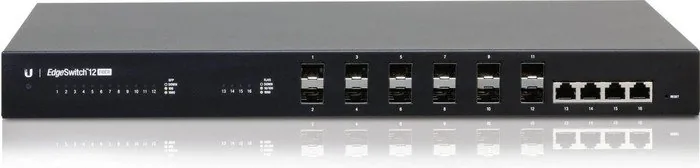
It includes 12 SFP ports and 4 RJ-45 Ethernet ports. The SFP ports are used for fiber connections, while the RJ-45 ports support standard Gigabit copper networking.
Is this answer helpful?
The switch tries to obtain an IP address through DHCP first. If that fails, it uses the fallback IP 192.168.1.2. Open a browser, enter the address, and log in with the default credentials.
Is this answer helpful?
Yes. It is designed for 1U rack installation and includes rack-mount brackets, screws, and cage nuts. It can also be placed on a flat surface or mounted on a wall.
Is this answer helpful?
It supports AC power through the included cord and also offers DC input for redundant or standalone power. The redundant option can help keep the switch running if the main supply fails.
Is this answer helpful?
You can perform a runtime reset by holding the reset button until the system LED flashes blue, or use a power-on reset by holding the button while reconnecting power.
Is this answer helpful?
Advantages and Disadvantages
Advantages

- 12 hot-swappable SFP ports provide flexible fiber connectivity for scalable network designs.
- 4 RJ-45 Gigabit ports support standard copper devices without needing extra hardware.
- Managed features and console access make configuration and troubleshooting easier.
- Rackmount, wall-mount, and desktop placement options simplify installation in different environments.
Disadvantages

- SFP modules are not included, so compatible optics must be purchased separately.
- The unit is intended for protected indoor use and should not be exposed to moisture.
- Proper ventilation and cabling practices are required to avoid performance or safety issues.
- Initial setup may require manual IP configuration if DHCP does not assign an address.
Product Specification
Function
Switch
Type
Standalone, Rackmount (via mounting brackets), Wall mount (via mounting brackets)
Network ports
4x RJ-45, 12x SFP
Speeds
4x RJ-45 (10/100/1000Base-T), 8x SFP (100M/1Gb/s), 4x SFP (1Gb/s)
PoE
N/A
Backplane
32Gb/s, 23.81Mp/s, 8k MAC addresses
Officially supported standards
802.1AX, 802.1AB, 802.1D, 802.1Q, 802.1S, 802.1w, 802.1X, 802.1ak, 802.1p, 802.3, 802.3ab, 802.3ac, 802.3u, 802.3x, IGMPv3
Configuration
Web interface, Console, serial (RJ-45, rear)
Dimensions (WxHxD)
17.44x1.69x8.70in, 1U
Weight
5.71 lb
Color
black
Special features
Metal housing, removable mounting brackets, optional external redundant power supply, firmware updates possible
Manufacturer's warranty
one year
Note
For this device, "link aggregation" was officially specified with the obsolete standard IEEE802.3ad. Since 2008, the function is no longer managed by the IEEE "Working Group 3" (IEEE 802.3, CSMA/CD - Ethernet), but by "Working Group 1" (IEEE 802.1, High Level Interface - Internetworking) and technically unchanged via IEEE 802.1AX.
Product Description
Ubiquiti EdgeSwitch 12 Fiber Rackmount Gigabit Managed Switch, 4x RJ-45, 12x SFP Manual
The Ubiquiti EdgeSwitch 12 Fiber Rackmount Gigabit Managed Switch, 4x RJ-45, 12x SFP is built for networks that need a strong mix of fiber and copper connectivity in a compact rack-friendly format. It combines managed switching, flexible port options, and straightforward deployment, making it a practical fit for offices, labs, and growing infrastructure setups.
At the heart of this switch are 12 hot-swappable SFP ports and 4 RJ-45 Gigabit Ethernet ports. That combination gives you room to expand fiber links while still supporting standard Ethernet devices. The SFP ports are ideal for high-speed uplinks and long-distance runs, while the RJ-45 ports make it easy to connect local equipment without extra adapters. For network teams that value both speed and adaptability, this layout is a major advantage.
Another strength of the EdgeSwitch line is its managed functionality. The switch is designed to be accessed through a web interface and can also be managed through a serial console connection. It defaults to DHCP, but if no address is assigned, it falls back to 192.168.1.2, which helps simplify first-time setup. That means administrators can quickly get to the configuration screen, adjust IP settings, and fine-tune the switch for their environment.
Installation is equally versatile. The unit can sit on a horizontal surface, mount to a wall, or be installed in a standard 1U rack space. The included rack brackets, screws, and cage nuts help streamline setup. The manual also highlights careful cabling practices, proper ventilation, and the use of compatible fiber modules, all of which are important for stable long-term performance.
For users comparing hardware options, this model stands out because it balances enterprise-style flexibility with a relatively simple deployment path. It supports indoor network builds well, and its DC power input adds another layer of resilience for environments that want redundancy. In short, it is a solid choice for anyone looking for a dependable switch that can bridge fiber and copper in one efficient unit.
Notes
- Use compatible SFP modules for the fiber side.
- Keep adequate airflow around the ventilation holes.
- If DHCP is unavailable, use the fallback IP to begin setup.
- For outdoor cabling runs, use shielded Ethernet cable and proper grounding.
Search for 67,706 Manuals online


Type-in Brand or Model