
Ubiquiti EdgeRouter X Manual
PDF manual · 104 Pages
English



Quick check
Incorrect answer, please try again.
Chat with your Ubiquiti EdgeRouter X manual using AI
Get instant AI answers from your Ubiquiti EdgeRouter X manual
Ask anything about the Ubiquiti EdgeRouter X. Answers come from this manual, with the pages they are based on.
Ask a Question
Do you recommend EdgeRouter X?
Yes NoVideo Manual
How I Recovered A Ubiquiti EdgeRouter X Using TFTP Manual Recovery
Frequently Asked Questions
EdgeRouter X is managed via the EdgeOS browser-based configuration interface and also supports a full Command Line Interface (CLI) and config tree for advanced configurations. The GUI organizes functions across Dashboard, Routing, Firewall/NAT, Services, VPN, QoS, Users, Wizards, and Toolbox.
Is this answer helpful?
Yes. You can create and manage VLANs, configure switch interfaces (platform-specific behavior), set MTU values per interface, and enable per-port VLAN awareness on supported EdgeOS versions. The GUI provides Add VLAN and switch configuration screens for these tasks.
Is this answer helpful?
Use the Services > DHCP Server tab to create DHCP pools by subnet with start/stop ranges, DNS servers, gateway, and UniFi controller IP. Static MAC/IP mappings can be added within the DHCP server configuration to reserve addresses for specific devices.
Is this answer helpful?
EdgeRouter X supports ordered firewall rulesets with default actions (accept/drop/reject), advanced match criteria (state, recent, IPsec, application categories), time-based rules, and firewall/NAT groups (address, network, port). NAT supports source (masquerade or specific address/port) and destination NAT with inbound interface mapping and exclusion options.
Is this answer helpful?
DPI-based Traffic Analysis is available on EdgeRouter X with EdgeOS starting at certain firmware versions (EdgeOS v1.8.5+ for ER-X). DPI identifies top hosts and applications, supports custom application categories, and can integrate with firewall policies for application-aware rules.
Is this answer helpful?
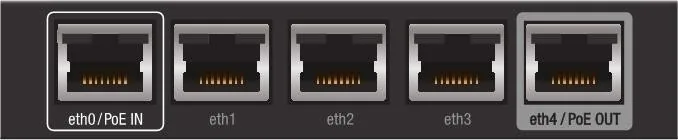
EdgeRouter X supports PoE passthrough only on eth4. PoE settings are controlled from the interface PoE configuration. Note that PoE support and voltage options vary by model; verify device compatibility and use appropriate power adapters.
Is this answer helpful?
Always back up your current system configuration using the Backup Config option. Firmware upgrades preserve configuration but backing up prevents loss. Be cautious: some keys and passwords may be stored in plain text inside the config file, so store backups securely.
Is this answer helpful?
Advantages and Disadvantages
Advantages

- Compact, cost-effective hardware with robust routing, firewall, and VPN features for small offices and homes.
- EdgeOS offers both a user-friendly GUI and a full CLI/config-tree for advanced configuration.
- Deep Packet Inspection (DPI) for traffic analysis and custom application categories to inform firewall policies.
- Flexible interface modes: Ethernet, VLAN, PPPoE, switch modes, plus PoE passthrough on eth4.
- Comprehensive features: DHCP, DNS forwarding, dynamic DNS, QoS queues, OSPF/RIP routing, and NAT controls.
Disadvantages

- Some advanced IPv6 options are only available through CLI or config tree, not the GUI.
- PoE features vary by model and port; ensure correct power adapters and compatibility.
- Configuration file may store some passwords/keys in plain text—requires careful handling.
- DPI and certain features depend on EdgeOS firmware version; updates may be required.
- Not ideal for very large enterprise networks—designed for SOHO and light enterprise.
Product Specification
Modem
N/A
WAN
1x 1000Base-T
LAN
4x 1000Base-T
Power Consumption
5W (consumption, operation), no data (max. power supply output)
Dimensions
4.33x2.95x0.87in
Features
IPv6, VPN passthrough (IPSec, PPTP, L2TP)
Note
Open-/DD-WRT may only be available for certain revisions, please observe further links!
Product Description
Ubiquiti EdgeRouter X — Powerful, compact routing with EdgeOS
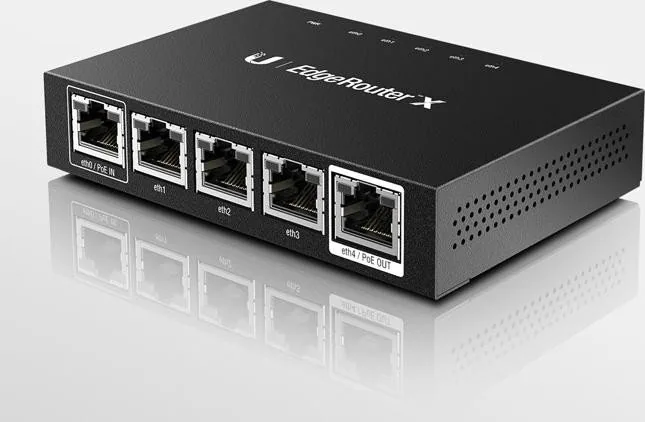
The Ubiquiti EdgeRouter X is an affordable, feature-rich router designed for small offices, home networks, and light enterprise use. Running EdgeOS, the EdgeRouter X brings advanced routing, firewalling, NAT, VLANs, DHCP, QoS, and VPN capabilities in a small footprint. Its flexible interface options (Ethernet, VLAN, PPPoE, and switch modes) and PoE passthrough on eth4 make it suitable for varied deployments—from simple SOHO setups to more complex service provider and corporate scenarios.
EdgeOS provides a polished browser-based configuration interface plus a full Command Line Interface for advanced administration. The GUI organizes functionality across Dashboard, Traffic Analysis (DPI), Routing, Firewall/NAT, Services, VPN, QoS, Users, Config Tree, Wizards, and Toolbox. The Dashboard consolidates hardware and service status, interface throughput, and quick access to common management tools. Traffic Analysis uses Deep Packet Inspection to identify top hosts and applications, enabling application-aware firewalling and custom categories.
Routing features include IPv4/IPv6 support, static routes, OSPF configuration with areas and authentication, RIP, and mechanisms for route redistribution. The firewall and NAT system is granular: rulesets with ordered rules, advanced match criteria (states, recent/p2p, IPsec), time-based conditions, and integration with custom firewall/NAT groups (address, network, port). Port forwarding supports hairpin NAT and auto-firewalling for common scenarios.
Services include flexible DHCP server configuration (multiple pools, static mappings, DNS options, UniFi controller support), DNS forwarding and dynamic DNS, and a PPPoE server. QoS options offer Smart Queue, Basic, and Advanced queues to manage bandwidth and prioritize traffic. The EdgeRouter X supports IPv6 in many key areas and allows further IPv6 configuration via the CLI or config tree. Administrative features include SSH, syslog forwarding, SNMP, firmware upgrade and backup/restore, and the ability to restart or reset to defaults.
For users who want hands-on control, the EdgeRouter X combines an easy GUI with powerful CLI/config-tree tools. Wizards accelerate common configurations (SOHO, load balancing, feature wizards), while the Toolbox provides utilities like ping, trace, packet capture, discovery, bandwidth testing, and log monitoring. Whether you’re setting up a multi-subnet office, securing services with firewall/NAT policies, or analyzing bandwidth-hungry applications, the EdgeRouter X and the EdgeRouter X Manual-focused configuration approach give a balance of simplicity and advanced control.
Notes
- The EdgeRouter X supports PoE passthrough on eth4; ensure compatible devices and power specifications.
- EdgeOS DPI and traffic analysis availability depends on firmware version and model; keep EdgeOS updated.
- Back up configurations before firmware upgrades or factory resets; sensitive keys may be stored in plain text within config files.
Search for 67,706 Manuals online


Type-in Brand or Model
Daniel Simpson
8 months ago
Is the Ubiquiti EdgeRouter X easy to set up for someone new to VLANs and routing? I saw reviews about configuration errors like a fatal error - how can I avoid ending up with a router that will not run?
Manual.ly
7 months ago
It is a capable router, but it is not aimed at complete beginners. For reliable setup, follow Ubiquiti's EdgeRouter beginner guides and configure step by step (start with WAN/Internet first, then VLANs/routing). Many issues come from outdated firmware, incorrect settings, or trying to load an advanced config without the required prerequisites. If you hit a fatal error or the config will not load: 1) check your current firmware and update to the latest supported version, 2) do a factory reset and confirm basic connectivity, 3) re-apply settings using the supported GUI/CLI workflow (avoid mixing partial configs), 4) reboot after changes. If you are still stuck, share the exact error text and your WAN/VLAN settings for targeted help.