

Ubiquiti EdgeRouter Infinity ER-8-XG Manual
PDF manual · 20 Pages
English



Quick check
Incorrect answer, please try again.
Chat with your Ubiquiti EdgeRouter Infinity ER-8-XG manual using AI
Get instant AI answers from your Ubiquiti EdgeRouter Infinity ER-8-XG manual
Ask anything about the Ubiquiti EdgeRouter Infinity ER-8-XG. Answers come from this manual, with the pages they are based on.
Ask a Question
Do you recommend EdgeRouter Infinity ER-8-XG?
Yes NoFrequently Asked Questions
It is best suited for high-speed routing in business networks, labs, and environments that rely on multiple fiber links or 10G uplinks. It works well as a network core or aggregation device.
Is this answer helpful?
Yes. It includes dual hot-swappable power supplies, which improves resilience and helps keep the router running if one PSU fails. This is useful in environments where uptime is important.
Is this answer helpful?
Connect a computer to the RJ45 port, assign a static IP in the 192.168.1.x range, and open https://192.168.1.1. The default login uses ubnt for both username and password before you change settings.
Is this answer helpful?
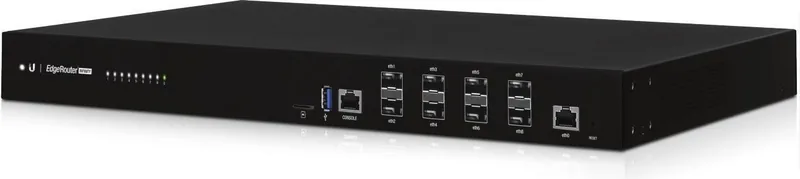
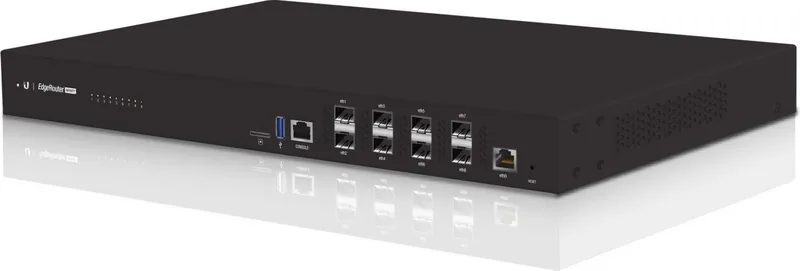
It provides eight hot-swappable 10G SFP+ ports for fiber connections and one RJ45 gigabit Ethernet port for management or copper connectivity. The console port is also available for CLI access.
Is this answer helpful?
Yes. The unit supports rack mounting and includes the needed brackets and hardware. It can also be mounted on a wall or placed on a flat surface, depending on the installation needs.
Is this answer helpful?
The router itself should be kept indoors or inside a protective enclosure. While cabling may run outdoors if properly rated, the unit is not meant to be exposed to rain or moisture.
Is this answer helpful?
Advantages and Disadvantages
Advantages

- Eight 10G SFP+ ports deliver strong fiber connectivity for high-throughput networks.
- Dual hot-swappable power supplies help improve uptime and reduce outage risk.
- 16-core CPU and 16 GB RAM support demanding routing and traffic management tasks.
- Rack, wall, and desktop mounting options make deployment flexible.
Disadvantages

- Requires compatible SFP+ modules, so setup may need extra hardware purchases.
- The router is intended for indoor use and needs good ventilation.
- Only one RJ45 gigabit port is available, so copper connectivity is limited.
- Advanced features and CLI access may feel complex for beginners.
Product Specification
Modem
N/A
WAN
1x 1000Base-T
LAN
8x SFP+
Power consumption
100W (consumption, operation), not specified (max. power supply output)
Additional ports
1x USB-A 3.0, 1x RJ-45 Management
Dimensions (WxHxD)
17.44x1.73x11.26in
Special features
IPv6, rack-mountable
Product Description
Ubiquiti EdgeRouter Infinity: High-Capacity Routing for Demanding Networks
The Ubiquiti EdgeRouter Infinity is a powerful networking solution designed for environments that need fast, reliable routing and flexible fiber connectivity. With eight 10G SFP+ ports and a dedicated RJ45 management port, it is built to handle heavy traffic while keeping the setup clean and organized. For businesses, labs, and advanced home networks, it offers the kind of performance that supports growth without feeling oversized or complicated.
If you're searching for the Ubiquiti EdgeRouter Infinity Manual, the main takeaway is simple: this router focuses on speed, stability, and practical deployment. It supports rack mounting, wall mounting, or desktop placement, and its dual hot-swappable power supplies add an important layer of resilience. That makes it a strong choice for network setups where uptime and service continuity matter.
Inside, the hardware is clearly aimed at serious workloads. A 16-core MIPS64 processor and 16 GB of DDR4 memory give the device enough room to manage advanced routing tasks, traffic segmentation, and multiple fiber links. The EdgeOS platform adds a familiar administrative layer, while the console port gives technical users direct CLI access for deeper configuration and troubleshooting.
The front panel is all about efficient access and visibility. Hot-swappable SFP+ ports support 10 Gbps connections, and the status LEDs help confirm link activity at a glance. The RJ45 port is useful for initial setup or a fallback management path, which makes installation less stressful when you're bringing the device online for the first time. Setup is centered on eth0 and the web interface at 192.168.1.1, giving administrators a straightforward starting point before moving into more advanced options.
This router is especially appealing in commercial or high-performance settings where fiber uplinks, virtualization hosts, or distributed switches need a central routing core. Its compact rackmount form factor, redundant power design, and multiple 10G ports make it a solid fit for network builders who want professional-grade capability without unnecessary bulk.
Dual power support and practical ventilation requirements reinforce the idea that this is a device built for dependable operation. Keep airflow clear, use compatible transceivers, and choose proper cabling, and the EdgeRouter Infinity can serve as a dependable foundation for a demanding network.
Notes
- Use compatible SFP+ modules for every fiber connection.
- Keep at least 20 mm of clearance near ventilation holes.
- Indoor protection is recommended for the router itself.
- Proper cabling and power setup improve long-term reliability.
Search for 67,706 Manuals online


Type-in Brand or Model