


Ubiquiti EdgeRouter 12 ER-12 Manual
PDF manual · 23 Pages
English



Quick check
Incorrect answer, please try again.
Chat with your Ubiquiti EdgeRouter 12 ER-12 manual using AI
Get instant AI answers from your Ubiquiti EdgeRouter 12 ER-12 manual
Ask anything about the Ubiquiti EdgeRouter 12 ER-12. Answers come from this manual, with the pages they are based on.
Ask a Question
Do you recommend EdgeRouter 12 ER-12?
Yes NoFrequently Asked Questions
By default, eth0 is 192.168.1.1 and eth1 uses DHCP. Connect a PC to eth0 (static 192.168.1.x) or to a DHCP-enabled LAN on eth1, then browse to https://192.168.1.1. Use username ubnt and password ubnt, and accept the license before logging in. Change the default password immediately.
Is this answer helpful?
In the Dashboard, choose Actions > PoE for the desired Ethernet port, select the appropriate passive PoE setting, and save. Ensure the powered device supports passive PoE at the supplied voltage and that Port 9 is enabled only for compatible devices to avoid damage.
Is this answer helpful?
Yes. The two SFP ports are hot-swappable and support gigabit fiber SFP modules for uplinks while RJ45 ports continue to handle LAN traffic. Use compatible SFP modules listed by Ubiquiti and follow grounding/shielding recommendations for fiber runs.
Is this answer helpful?
Runtime reset: with the EdgeRouter powered on, hold Reset ~10 seconds until eth9 LED flashes then becomes solid, then router reboots. Power-on reset: hold Reset while connecting power until the System LED flashes blue and white, then release to reset to factory defaults.
Is this answer helpful?
Install indoors or within protective enclosures; maintain at least 20 mm clearance near ventilation holes to prevent fire hazard; avoid exposure to moisture; ground the unit properly; use specified power adapter and follow local electrical codes to prevent shock or equipment damage.
Is this answer helpful?
Refer to Ubiquiti’s SFP and DAC compatibility lists at ubnt.link/SFP_DAC_Compatibility and download EdgeOS firmware and the EdgeOS User Guide from the Ubiquiti downloads site (downloads.ubnt.com). Keep firmware updated for LED and system behavior improvements.
Is this answer helpful?
The ER-12 is ideal for small business or advanced home networks requiring mixed copper/fiber connections, PoE passthrough, multi-segment routing, aggregation, ISP handoffs, or compact perimeter routing where robust EdgeOS feature sets and UNMS centralized management are beneficial.
Is this answer helpful?
Advantages and Disadvantages
Advantages

- Ten gigabit RJ45 ports plus two hot-swappable 1 Gbps SFP ports for flexible copper and fiber connectivity.
- Port 0 supports 24V passive PoE input and Port 9 can supply passive PoE passthrough for attached devices.
- Powerful 4-core 1 GHz CPU with 1 GB DDR3 and EdgeOS for advanced routing, firewall, VLANs, and management.
- Compact wall-mountable chassis with included hardware and industrial operating range (-10 to 50°C).
- UNMS support for centralized monitoring, firmware updates, backups and multi-device management.
Disadvantages

- Passive PoE requires matching voltage devices; incorrect use can damage equipment—Port 9 off by default.
- No built-in active PoE standard support (802.3af/at) limits compatibility with many modern PoE endpoints.
- Limited onboard storage (4 GB eMMC) and no user-serviceable internal components for hardware upgrades.
- Class A device may cause interference in residential environments and requires proper installation.
- Fans/ventilation constraints require 20 mm clearance; constrained mounting may impact cooling and lifespan.
Product Specification
Modem
N/A
WAN
2x SFP
LAN
10x 1000Base-T (1x passive PoE PD 24W/24V, 1x passive PoE 20W/24V, PoE passthrough max. 20W)
Power consumption
20W (Consumption, Operation), not specified (max. power supply output)
Additional ports
1x USB-A 3.0, 1x RJ-45 Management
Dimensions (WxHxD)
10.55x1.22x5.39in
Special features
IPv6, rack-mountable
Product Description
Ubiquiti EdgeRouter 12 Manual Overview
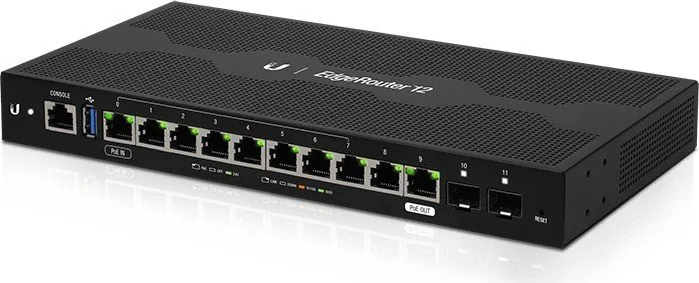
The Ubiquiti EdgeRouter 12 is a high-performance, compact gigabit router designed for advanced home and small business networks. Featuring ten 10/100/1000 RJ45 ports, two hot-swappable 1 Gbps SFP ports, PoE passthrough support, and a 1 GHz quad-core MIPS64 CPU with 1 GB DDR3 RAM, the ER-12 balances robust routing capability with flexible connectivity.
Key Features and Design
Engineered for reliability and versatility, the ER-12 supports Port 0 as a 24V passive PoE input and Port 9 as an optional passive PoE output (disabled by default). Ports 0–7 can be grouped or configured for switching, while SFP slots enable fiber uplinks for longer-distance or higher-isolation links. The device includes a console RJ45 for CLI management, a USB reserve port, and a simple front-panel reset button with two reset methods.
The EdgeOS management interface provides both DHCP and static-IP access, with default credentials and straightforward steps to log in and configure routing, VLANs, firewall rules, and PoE settings. UNMS support allows centralized monitoring, firmware upgrades, and backups across multiple devices.
Installation and Safety
Installation targets indoor environments with Category 5e or better cabling; shielded cabling and proper grounding are recommended for outdoor runs and ESD protection. Wall-mount hardware is included; ventilation clearance of at least 20 mm must be maintained. Power is provided via the included 24V, 1A adapter; the ER-12 supports a wide 9–30V DC range for passive PoE passthrough. Safety notices stress correct grounding, appropriate power sources, and adherence to local electrical codes.
Performance and Specifications
The ER-12’s 4-core 1 GHz processor and 4 GB eMMC/8 MB SPI flash deliver stable routing throughput and feature support while consuming up to 20W (excludes PoE output). Environmental ratings cover -10 to 50°C and 10–90% noncondensing humidity. Certifications include CE, FCC, and IC, and the unit conforms to RoHS/WEEE disposal directives.
Practical Use Cases
This router suits multi-segment small offices, branch sites, or prosumer networks needing mixed copper and fiber connectivity, passive PoE distribution, and advanced routing/firewall features without a large rack footprint. Its combination of SFP uplinks and configurable RJ45 ports makes it adaptable for ISP handoffs, aggregation, or secure perimeter routing.
Notes
- Default web login: ubnt/ubnt; update credentials immediately after setup.
- Port 9 PoE is disabled by default—enable only with compatible passive PoE devices and correct voltage.
- Keep firmware current (EdgeOS v1.10.7+ recommended) for LED/system behavior and security fixes.
Search for 67,706 Manuals online


Type-in Brand or Model