

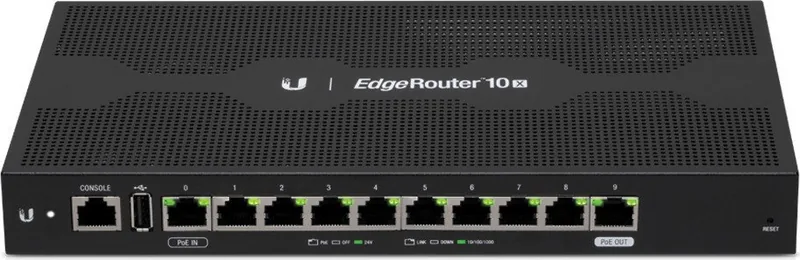

Ubiquiti EdgeRouter 10X ER-10X Manual
PDF manual · 20 Pages
English



Quick check
Incorrect answer, please try again.
Chat with your Ubiquiti EdgeRouter 10X ER-10X manual using AI
Get instant AI answers from your Ubiquiti EdgeRouter 10X ER-10X manual
Ask anything about the Ubiquiti EdgeRouter 10X ER-10X. Answers come from this manual, with the pages they are based on.
Ask a Question
Do you recommend EdgeRouter 10X ER-10X?
Yes NoVideo Manual
Beginner's Guide to EdgeRouter Devices - Upgrade EdgeMAX OS
Frequently Asked Questions
By default eth0 is set to static 192.168.1.1. Log in via https://192.168.1.1 (or via DHCP on eth1 if used). Default credentials are ubnt/ubnt; accept the license agreement at first login.
Is this answer helpful?
Port 0 supports 24V passive PoE input; port 9 can be configured for 24V passive PoE output (disabled by default). Ensure connected devices are compatible with passive 24V PoE before enabling.
Is this answer helpful?
Two methods: runtime reset—while running, hold the Reset button ~10 seconds until port 9 LED flashes then becomes solid, then router reboots; power-on reset—hold Reset while powering on until port 9 LED flashes and stops.
Is this answer helpful?
Yes. The device is compatible with UNMS (Ubiquiti Network Management System) for centralized configuration, monitoring, firmware updates and backups via the UNMS application.
Is this answer helpful?
Indoor operation is recommended with at least 20 mm clearance beside ventilation holes. Operating temperature is -10 to 45°C and humidity 10–90% noncondensing. Wall-mounting uses two screws 190 mm apart; vertical mounting is supported.
Is this answer helpful?
No. The ER-10X provides ten 10/100/1000 RJ45 ports only; there are no built-in SFP or fiber interfaces. Use media converters or other gateway devices for fiber connectivity.
Is this answer helpful?
EdgeOS user guides, downloads and firmware are available from Ubiquiti’s official support and download sites, such as ui.com/download/edgemax and help.ui.com.
Is this answer helpful?
Advantages and Disadvantages
Advantages

- Ten gigabit RJ45 ports provide robust wired connectivity for small networks and edge deployments.
- Low power consumption (max ~8W) with support for 24V passive PoE in/out reduces operational costs.
- EdgeOS and UNMS support enable flexible local and centralized configuration, monitoring, and backups.
- Compact metal enclosure and wall-mount options simplify installation in constrained spaces.
- Solid hardware: 880 MHz dual-core CPU and 512 MB RAM for reliable routing and basic services.
Disadvantages

- Passive PoE (24V) limits compatibility—many devices require standard 802.3af/at PoE support.
- No built-in SFP or fiber ports; connectivity is limited to copper RJ45 interfaces.
- PoE out on port 9 is disabled by default and must be explicitly configured and verified.
- Class A emissions caution: not ideal for sensitive residential RF environments without mitigation.
- Limited to 512 MB storage/memory—may restrict very large-scale or heavy service deployments.
Product Specification
Modem
N/A
LAN
10x 1000Base-T (1x PoE PD, 1x PoE)
Phone
N/A
Ports
1x USB-A 2.0, 1x RJ-45 Management Port
Power Consumption
8W (consumption, operation), no specification (max. power supply output)
Dimensions
10.55x5.35x1.22 in
Weight
1.32 lb
Special Features
IPv6, VPN passthrough (IPSec, PPTP, L2TP)
Manufacturer Warranty
one year
Product Description
Ubiquiti EdgeRouter 10X Manual — Product Overview
The Ubiquiti EdgeRouter 10X is a compact, high-performance gigabit router aimed at prosumers and small businesses that require reliable routing with flexible PoE options. Built around an 880 MHz dual-core MIPS processor with 512 MB DDR3 memory and 512 MB NAND storage, the ER-10X delivers wire-speed routing across ten 10/100/1000 RJ45 ports in a metal housing designed for durability and steady operation.
Out of the box the device supports advanced EdgeOS configuration via DHCP or a static IP interface (default 192.168.1.1), enabling quick setup for both managed networks and simple deployments. Port 0 supports 24V passive PoE input while port 9 can be configured as passive PoE out (disabled by default) for powering compatible devices. The unit consumes minimal power (typical max 8W) and accepts a wide input voltage range (9–30VDC), making it suitable for various site power conditions.
Hardware conveniences include an RJ45 serial console port for CLI access, LEDs for system, link/activity and PoE status, a reset button with runtime and power-on factory-reset options, and optional grounding points for enhanced ESD protection. The router’s cooling needs are modest but specific: maintain at least 20 mm clearance around ventilation holes to avoid overheating.
EdgeOS provides a browser-based configuration interface for DHCP, static IP assignment, PoE control and other advanced features. For centralized management, the ER-10X integrates with UNMS (Ubiquiti Network Management System) to monitor, update and back up devices from a single console. Official EdgeOS documentation and downloads are available from Ubiquiti resources.
Physical specs make the ER-10X easy to mount: wall-mount slots support vertical or horizontal installation, and the unit weighs roughly 600 g with compact dimensions (268.1 x 136.5 x 31.1 mm). Environmental ratings cover typical indoor deployments with operating temperature from -10 to 45°C and non-condensing humidity up to 90%.
Whether deploying a small office LAN, powering compatible devices with PoE passthrough, or integrating into a managed Ubiquiti ecosystem, the EdgeRouter 10X balances performance, low power draw, and versatile port configuration for cost-conscious professional networks.
Notes
- Port 9 PoE is disabled by default—verify connected devices support 24V passive PoE before enabling.
- Keep ventilation clearance (≥20 mm) to avoid thermal issues.
- Use shielded cabling and proper grounding for outdoor or high-ESD environments.
Search for 67,706 Manuals online


Type-in Brand or Model