

Trust Qoby Manual
PDF manual · 6 Pages
English



Quick check
Incorrect answer, please try again.
Chat with your Trust Qoby manual using AI
Get instant AI answers from your Trust Qoby manual
Ask anything about the Trust Qoby. Answers come from this manual, with the pages they are based on.
Ask a Question
Do you recommend Qoby?
Yes NoFrequently Asked Questions
The set typically includes a DE-layout keyboard, an ergonomic USB mouse, a wired headset with inline controls, and an additional accessory such as a webcam or speaker depending on the bundle. Exact contents may vary by package.
Is this answer helpful?
Yes. The kit uses USB connections and supports plug-and-play on Windows (including Windows 7/8/10) and most modern laptops. Drivers are generally not required, though audio or microphone settings can be adjusted in the OS sound control panel.
Is this answer helpful?
Open your system's sound control panel (Recording/Playback devices on Windows), select the Trust microphone or headset, and configure levels and properties. The manual provides step-by-step guidance for basic adjustments and troubleshooting.
Is this answer helpful?
Yes. The included keyboard uses the German (DE) layout, making it suitable for German-speaking users and conforming to regional key labels and placement.
Is this answer helpful?
Absolutely. The headset provides voice input and output for conferencing, while the keyboard and mouse support efficient typing and navigation. It’s a practical, budget-friendly choice for remote work and online meetings.
Is this answer helpful?
No special drivers are usually required. The devices are recognized by most operating systems via USB. If specific functionality is missing, consult the manual or Trust’s online support for driver or compatibility information.
Is this answer helpful?
The set is designed for everyday home and office use with materials that prioritize affordability and reasonable durability. While not built to professional or heavy-gaming standards, it should hold up well under normal daily workloads.
Is this answer helpful?
Advantages and Disadvantages
Advantages

- Complete 4-in-1 package (keyboard, mouse, headset, plus accessory) for immediate home office setup.
- DE keyboard layout and manual provided for German-speaking users.
- USB plug-and-play connectivity compatible with Windows and most laptops.
- Affordable materials that balance cost and everyday durability.
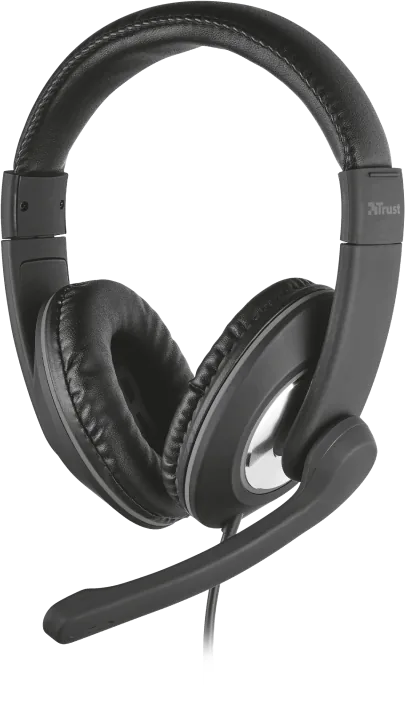
- Headset with inline controls and adjustable headband for comfortable calls.
Disadvantages

- Not a premium build — membrane keyboard and basic mouse limit advanced use.
- Limited customization or programmable features compared to gaming/performance sets.
- May lack high-end audio fidelity for audiophiles or professional recordings.
- Wired USB setup can be less flexible than wireless alternatives.
- Documentation may be brief and focused on basic troubleshooting only.
Product Specification
Package contents
Mouse, Keyboard, Headset, Webcam
Layout
DE
Connection
wireless (2.40GHz)
Tracking (Mouse)
LED-red/IR 1600dpi, reducible to 1200/800dpi
Special features
Numeric keypad
Product Description
Trust Qoby 4in1 Home Office Set, USB, DE Manual
The Trust Qoby 4in1 Home Office Set is a compact, practical kit designed to streamline everyday computing tasks for home and small-office users. This USB-powered set typically bundles essential peripherals — a keyboard, mouse, headset, and sometimes a webcam or speaker — optimized for easy plug-and-play use on Windows and common laptop platforms. The German (DE) layout and included manual make setup straightforward for German-speaking users.
A balanced set for everyday productivity
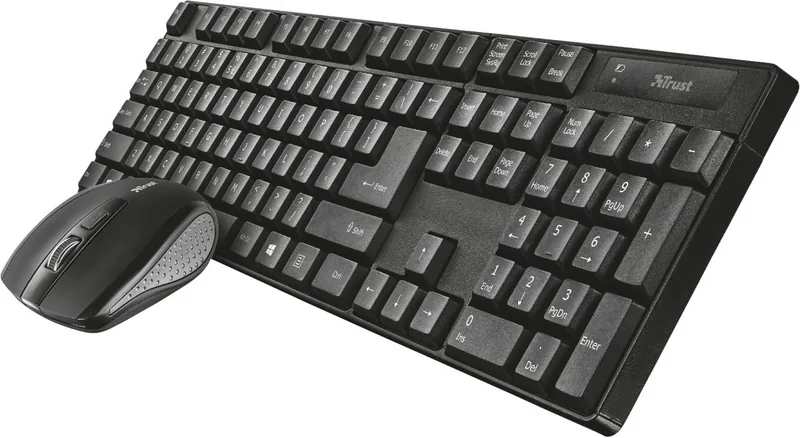
The keyboard features a full-size DE layout with familiar key spacing and multimedia shortcuts for quick access to volume, media playback, and other system controls. The mouse is ergonomically shaped for right-handed comfort, with responsive optical tracking ideal for web browsing, document editing, and basic graphic tasks. A headset in the set provides clear voice input and decent audio output for calls and online meetings. All devices connect via USB, ensuring broad compatibility and reliable power.
Simplicity and compatibility
Setup is plug-and-play: connect the USB cables and the devices are recognized by Windows 7/8/10 and modern laptops. The included manual (Trust Qoby 4in1 Home Office Set, USB, DE Manual) explains installation, audio/microphone settings, and basic troubleshooting. Sound and microphone properties adjustments are covered to help users optimize call quality and recording levels. For additional support, Trust provides online resources and FAQs.
Build and user experience
Materials are chosen to balance affordability and durability. The keyboard uses membrane switches for quiet typing, while the mouse offers standard DPI suitable for office tasks. The headset includes an adjustable headband and inline controls for mic mute and volume. While not premium, the set delivers dependable everyday performance and a neat, coordinated aesthetic for a tidy desk setup.
Ideal users
This set is ideal for students, remote workers, and families needing a reliable, low-complexity workspace. It’s particularly useful when a single package solution is desired to outfit a home office quickly, or as a spare setup for travel between home and office.
Notes
- Manual focuses on Windows compatibility and basic troubleshooting.
- USB connectivity ensures broad plug-and-play support.
- DE keyboard layout tailored to German users.
Search for 67,732 Manuals online


Type-in Brand or Model