


Trust Ody II Manual
PDF manual · 2 Pages
English



Quick check
Incorrect answer, please try again.
Chat with your Trust Ody II manual using AI
Get instant AI answers from your Trust Ody II manual
Ask anything about the Trust Ody II. Answers come from this manual, with the pages they are based on.
Ask a Question
Do you recommend Ody II?
Yes NoFrequently Asked Questions
Simply insert the small USB wireless receiver into an available USB port on your device. The keyboard will pair automatically upon pressing the power switch to the ON position. No software installation is required for basic functionality on Windows or Linux systems.
Is this answer helpful?
Yes, this wireless keyboard is generally compatible with MacOS machines. Some special function keys may require minor configuration in system settings depending on the OS version. The core typing functionality works seamlessly once plugged in.
Is this answer helpful?
Under normal usage conditions, the batteries typically last several months. Automatic sleep mode helps conserve energy when the device is idle. An indicator light alerts you when the power level is becoming low.
Is this answer helpful?
While functional for casual use, it is primarily designed for office work. Response times are adequate for general typing but may not meet high-speed gaming requirements. The silent mechanism prioritizes comfort over rapid actuation speed.
Is this answer helpful?
Standard keycap replacement tools are not officially recommended by the manufacturer. Attempting to remove them voids the warranty and risks damaging the underlying switches. Contact customer support for service advice if damage occurs.
Is this answer helpful?
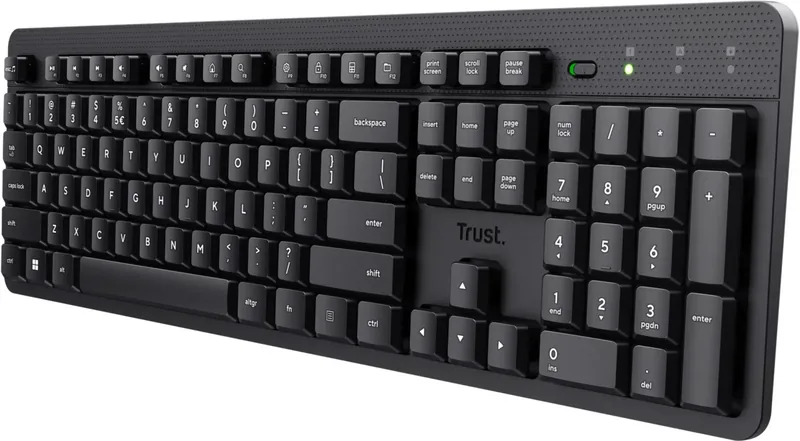
This version specifically features the Italian layout. It includes necessary accented characters and regional symbols for typing Italian text. Other European characters may map differently depending on the specific hardware revision.
Is this answer helpful?
Advantages and Disadvantages
Advantages

- Significantly reduced keypress noise for quieter environments
- Reliable USB wireless connection without lag
- Plug and play setup with no driver installation needed
- Durable build quality designed for long-term daily use
- Ergonomic layout supports efficient typing for extended periods
Disadvantages

- Requires replacement batteries rather than rechargeable option
- Fixed regional layout may not suit international travelers
- No backlight features for dark room usage
- Non-modular cable prevents easy replacement parts repair
- Average battery life compared to premium competitors
Product Specification
Layout
Italian
Type
Rubber Dome
Backlight
N/A
Keycap Level
Raised, Frameless
Keycap Style
Flat
Keycap Profile
Concave
Numeric Keypad
Standard
Arrow Keys
Standard
Control Keys
Standard
Function Keys
Standard (top row, indented downwards, in groups of 4)
Enter Key
Standard
Delete Key
Standard
LED Indicators
Caps Lock, Num, Scroll
Wrist Rest
N/A
Housing
Plastic
Housing Color
Solid, Black
Keycap Design
Solid, Black
Key Legend
Solid, White
Connectivity
Wireless (2.4GHz), USB (USB-A Receiver)
Power Source
2x AAA
Dimensions (WxHxD)
16.61 x 1.46 x 5.35 in
Weight
1.04 lbs
Features
FN Key
Product Description
Elevate Your Workspace Productivity with the Trust Ody II Silent Wireless Keyboard
Working in a modern office environment requires intense concentration. Ambient noise can disrupt flow and cause stress. The Trust Ody II Silent Wireless Keyboard addresses this problem by offering a typing solution that minimizes sound. Professionals rely on this device to maintain a quiet atmosphere during video calls or shared open-plan spaces. Investing in quality peripherals yields better long-term results for your home office setup.
Silence is not just about comfort; it is about respect for colleagues and sustained mental clarity. Every keystroke registers accurately without the sharp click common in older mechanical switches. This ensures that long hours spent typing data entry forms or writing detailed documentation do not become a source of irritation.
Seamless Connectivity and Range
Connection stability is crucial for uninterrupted workflow. This model utilizes a standard USB wireless receiver that plugs directly into your computer. There are no Bluetooth pairing issues or latency spikes to worry about. Once connected, the keyboard maintains a stable link even from across a typical room. This flexibility allows you to work comfortably from your couch or a distant chair.
The compact form factor saves valuable desk space while retaining all functional keys including F1 through F12. Users appreciate the immediate response time when launching applications or executing commands. Setting up the system takes less than a minute without needing additional software drivers on supported platforms.
Durability and Power Management
Built for longevity, the chassis withstands daily wear and tear. Keys are designed to endure millions of presses without degradation in performance. Power efficiency is another highlight, as the unit enters sleep mode automatically when idle to conserve battery life. This feature ensures the keyboard remains ready whenever you return to your tasks. Users can also check the indicator light to verify low power status before swapping batteries.
Energy conservation means fewer interruptions for battery replacements. Many users find they go months between changing power sources under normal usage conditions. Regular cleaning keeps contacts clean and prevents sticky buttons from forming due to debris accumulation over time.
Maintenance and Care Guidelines
To preserve the quality of your Trust keyboard, avoid exposure to extreme moisture. Use compressed air occasionally to clear dust from between keycaps. If spills occur, turn off the device immediately and let it dry completely before attempting reuse. These simple steps extend the lifespan of the hardware significantly.
Layout and Regional Specificity
For those in Italy or requiring an Italian layout, this version features the correct character mapping. Symbols for accents and specific letters are positioned correctly to support local typing standards. Switching regions is unnecessary since the hardware is preconfigured for these linguistic requirements. It streamlines the typing process for native speakers working locally.
Search for 67,732 Manuals online


Type-in Brand or Model