


Trust Mydo Manual
PDF manual · 2 Pages
English



Quick check
Incorrect answer, please try again.
Chat with your Trust Mydo manual using AI
Get instant AI answers from your Trust Mydo manual
Ask anything about the Trust Mydo. Answers come from this manual, with the pages they are based on.
Ask a Question
Do you recommend Mydo?
Yes NoFrequently Asked Questions
Simply insert the included USB receiver into an available USB port on your computer. The mouse will automatically pair and become ready for use without requiring additional driver software installation.
Is this answer helpful?
The mouse operates on two standard AA alkaline batteries. This ensures easy replacement and compatibility with common household power sources for consistent performance.
Is this answer helpful?
Yes, the specialized internal mechanisms reduce click noise significantly compared to standard mice. While not completely silent, the sound is minimized to prevent disturbance in quiet environments like libraries.
Is this answer helpful?
Absolutely. The device is plug-and-play compatible with both Windows and macOS operating systems. It functions correctly immediately upon connection without needing specific manufacturer drivers.
Is this answer helpful?
Battery life varies based on usage intensity but typically lasts several months on a single set of fresh AA batteries due to the efficient power management system.
Is this answer helpful?
It works best on opaque surfaces. Performance on highly reflective glass might be inconsistent. Placing a mouse pad ensures optimal tracking sensitivity and accuracy.
Is this answer helpful?
Advantages and Disadvantages
Advantages

- Ultra-quiet clicking mechanism reduces auditory distraction in shared spaces significantly
- Wireless connectivity removes cable clutter and improves desk organization
- High precision sensors ensure accurate cursor movement on various surfaces
- Energy efficient design extends battery life with standard AA cells
- Ergonomic shape prevents wrist strain during prolonged usage sessions
Disadvantages

- Requires two AA batteries for operation which can be a recurring cost
- Basic optical sensor may struggle on highly reflective glass surfaces
- No adjustable DPI settings for customizing speed sensitivity preferences
- Only includes a single USB receiver that must be stored carefully
- Lacks programmable side buttons for advanced shortcut customization
Product Specification
Suitability
both hands (left hand, right hand)
Buttons
4 (total), 2 (main), 1 (top), 1 (scroll wheel click)
Scroll Wheel
1x 2-way
Tracking
Red LED / IR
Resolution
1800 dpi, reduceable to 1400/1000 dpi
Lighting
N/A
Connection
Wireless (2.40GHz), USB-A (USB-A Receiver)
Power Source
2x AAA
Dimensions (W x H x D)
2.76 x 1.38 x 4.09 in
Approximate Volume
4.09 in^3 (approximate form)
Weight
2.96 oz
Features
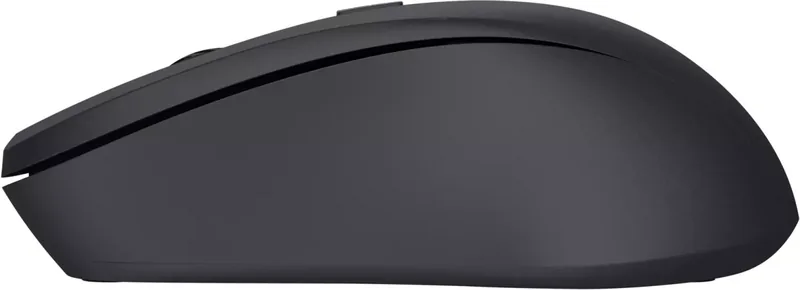
Thumb rest, reduced click noise, stowable receiver
Product Description
Discover the Trust Mydo Silent Wireless ECO Experience
In today's fast-paced digital environment, productivity relies heavily on having the right tools that minimize distractions. The Trust Mydo Silent Wireless ECO represents a step forward in peripheral design, focusing on comfort and discretion during long working sessions. When you search for a reliable input device, the Trust Mydo Silent Wireless ECO Manual provides essential guidance. Understanding the hardware capabilities opens up new possibilities for your daily workspace configuration. This device is engineered for users who value absolute peace and total quiet alongside practical functionality. This ensures seamless integration into your existing computer infrastructure without hassle and reliability.
One standout feature is the ultra-quiet clicking mechanism integrated into the build quality. Traditional mouse switches produce audible mechanical snaps that become annoying over time or disturb colleagues in open-plan offices. This model eliminates that background noise effectively, allowing you to navigate complex documents and click buttons without generating distracting sound waves. Furthermore, wireless connectivity ensures there are no messy cables trailing across your desk. This contributes greatly to a cleaner and more organized visual aesthetic. The signal range allows you to sit back comfortably while maintaining full remote control over your computer operations smoothly. High precision sensors track movement accurately on almost any surface you choose to use.
Sustainability is another core pillar of this product line. As the name implies, energy efficiency is prioritized through optimized low-power management systems. Users benefit from extended battery life periods using standard AA batteries, replacing frequency and minimizing electronic waste. This aligns well with modern environmental consciousness without sacrificing performance. Whether browsing the web, writing reports, or managing data spreadsheets, the optical motion tracking remains precise and responsive throughout every day of use.
Physical comfort is considered important, with a contoured ergonomic shape designed to fit natural hand movements perfectly. Long hours of use do not result in unnecessary strain or fatigue developing in the wrist. This makes this unit an ideal choice for students and professionals alike. Setting it up is straightforward, requiring just the included USB receiver plugged into any available port immediately. For further details on usage instructions, referencing the guidelines ensures you maximize the potential of your new accessory effectively. It works seamlessly with Windows and Mac operating systems without additional drivers. You will notice a difference in stress levels during busy project days. Embrace a quieter and more efficient workflow strategy today with this excellent choice.
Search for 67,732 Manuals online


Type-in Brand or Model