
Trust Iris Manual
PDF manual · 76 Pages
English



Quick check
Incorrect answer, please try again.
Chat with your Trust Iris manual using AI
Get instant AI answers from your Trust Iris manual
Ask anything about the Trust Iris. Answers come from this manual, with the pages they are based on.
Ask a Question
Do you recommend Iris?
Yes NoFrequently Asked Questions
The Trust Iris uses an 8.51-megapixel CMOS sensor with a maximum resolution of 3840 x 2160, also known as 4K UHD. It also includes ClearView image technology, noise reduction, and WDR and SDR light compensation.
Is this answer helpful?
The camera has a 120-degree diagonal field of view, with a 113-degree horizontal view and an 83-degree vertical view. This wide framing is intended to capture several people in a meeting room.
Is this answer helpful?
The video bar provides manual mode, participant mode, and speaker mode. Manual mode gives control over zoom and framing, participant mode is designed for groups, and speaker mode focuses on a single person.
Is this answer helpful?
Yes. Bluetooth 5.0 allows a phone or tablet to connect to Iris for audio calls. Bluetooth mode does not support video, and the device does not automatically reconnect after Bluetooth mode is switched off.
Is this answer helpful?
No. An extended microphone is available separately and connects to the USB port on the rear of the unit. It is recommended when the distance between speakers and the video bar exceeds 5 meters.
Is this answer helpful?
Connect the supplied USB-C cable to the Iris and a free USB port on a laptop or desktop computer. Then choose Iris as the default camera, microphone, and speaker in the conferencing application's device settings.
Is this answer helpful?
Advantages and Disadvantages
Advantages

- 4K UHD resolution, a 120-degree field of view, and light compensation support detailed group video.
- Integrated speaker and four-microphone beamforming array reduce the need for separate meeting-room audio gear.
- Manual, participant, and speaker modes offer flexible framing for different meeting formats.
- USB-C connectivity, remote control, included wall mount, and Bluetooth audio add deployment flexibility.
- Two camera presets and optional extended microphone support repeatable setups and larger rooms.
Disadvantages

- Microphone pickup is optimized for 5 meters; larger rooms may require the optional extended microphone.
- Bluetooth supports audio calls only, not video conferencing.
- Digital zoom is limited to 5x and is supported in manual mode.
- Custom camera presets disable automatic tracking modes.
- TV mounting hardware is optional and sold separately.
Product Specification
Type
Conference camera (video bar)
Image sensor
1x CMOS
Resolution
3,840 x 2,160 pixels (60 fps)
Lens
23.62 in
Field of view
120 degrees
Zoom function
Digital
Connections
1x USB-C 3.0 (5 Gbps, female), 1x USB-A (female)
Wireless
N/A
Focusing
Fixed focus
Microphone
Integrated, 16.4 ft range
Speaker
Integrated
Lighting
Present
Cable length
9.84 ft
Power supply
Mains power
Mount
Desktop stand
Dimensions
23.66 x 5.55 x 4.53 in
Package contents
Camera, remote control, wall mount, USB-C cable
Special features
Motion detection, face detection (face tracking), privacy zones
Product Description
Trust Iris 4K UHD Conference Camera, Video Bar - Read, Download & Print Free
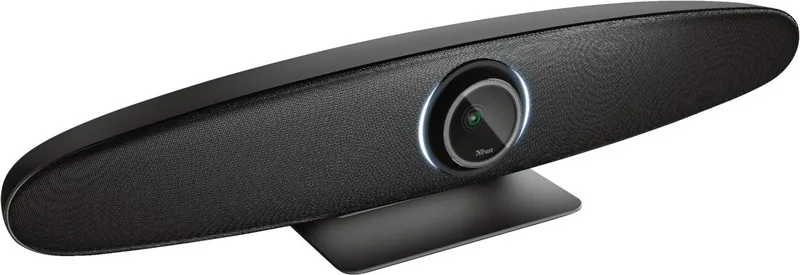
The Trust Iris 4K UHD Conference Camera, Video Bar is an all-in-one conferencing solution designed to make remote meetings feel clearer, more natural, and more productive. Combining a 4K UHD camera, integrated speaker, and four-microphone beamforming array in one streamlined bar, it helps teams equip meeting rooms without filling the desk with separate devices.
Clear Video for Collaborative Meetings
At the center of the system is an 8.51-megapixel CMOS sensor delivering 3840 x 2160 4K UHD resolution. Its 120-degree wide-angle lens captures a generous view of the room, making it suitable for small and medium group discussions. ClearView image technology, video-noise reduction, and WDR and SDR light compensation help maintain a balanced picture when lighting conditions are less than ideal.
The camera supports pan and tilt adjustments, plus up to 5x digital zoom in manual mode. Users can choose manual framing for direct control, participant mode to keep multiple people in view, or speaker mode to focus attention on one person. Two custom camera presets can also be saved with the included wireless remote for faster room setup.
Audio Built for Conversation
Trust Iris uses ClearSound audio technology with voice optimization and room optimization to support intelligible conversations. The built-in four-microphone beamforming array is optimized for a pickup range of up to 5 meters, while the integrated speaker reaches up to 96 dB peak volume at 0.5 meters. Anti-vibration technology further supports stable audio during active discussions.
For larger rooms, an optional extended microphone can be connected through the dedicated USB port. This is recommended when speakers are more than 5 meters away from the video bar, allowing the setup to adapt to a broader meeting environment.
Simple Connections and Flexible Placement
Connection is straightforward through USB-C, with the included 3-meter USB cable linking the unit to a laptop or desktop. In conferencing software, select Iris as the default camera, microphone, and speaker to use the system as a unified AV device. The LED ring provides useful status feedback, including successful connection, active use, muted microphone, Bluetooth mode, standby, and firmware updating.
The adjustable desk stand supports placement near a monitor, while a wall-mount bracket is included for a more permanent installation. A TV mounting kit is also available separately. For best results, position the unit as close to eye level as possible.
Extra Calling Flexibility
Bluetooth 5.0 lets the Trust Iris work as an audio device for phone or tablet calls. Video is not supported over Bluetooth, and reconnection must be started again from the mobile device settings after Bluetooth mode is turned off.
Note: Automatic tracking modes are disabled when a saved custom camera preset is selected. The remote control also offers mute, volume, pan, tilt, zoom, mirror, and camera reset functions.
Search for 67,732 Manuals online


Type-in Brand or Model