


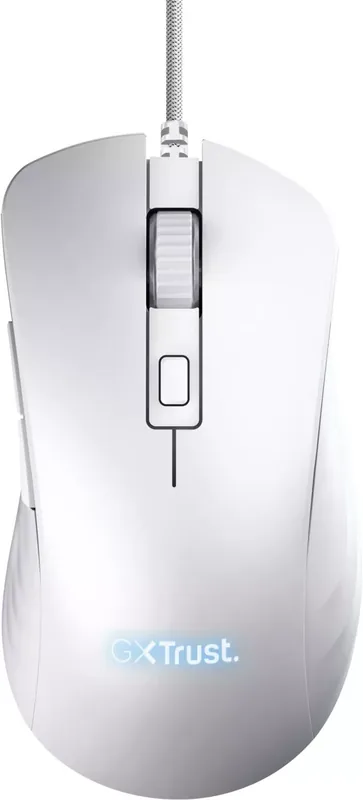
Trust GXT 924 YBAR+ Manual
PDF manual · 2 Pages
English



Quick check
Incorrect answer, please try again.
Chat with your Trust GXT 924 YBAR+ manual using AI
Get instant AI answers from your Trust GXT 924 YBAR+ manual
Ask anything about the Trust GXT 924 YBAR+. Answers come from this manual, with the pages they are based on.
Ask a Question
Do you recommend GXT 924 YBAR+?
Yes NoFrequently Asked Questions
Visit the official Trust support website and navigate to the download section for product 24890. Run the installer executable and follow the on-screen prompts to complete the setup process smoothly.
Is this answer helpful?
It works primarily with Windows and macOS. Linux support may vary and often requires manual configuration since dedicated drivers are typically provided for Microsoft platforms only.
Is this answer helpful?
The unit supports variable DPI settings that can be adjusted via the included software. Users can switch between low sensitivity for precision tasks and high sensitivity for rapid movements.
Is this answer helpful?
Yes, using the configuration tools found on the Trust website allows you to map specific functions to extra buttons. You can record simple macros for repeated actions within games.
Is this answer helpful?
The manual is available digitally on the Trust website at www.trust.com/24890/manual. Select your preferred language from the dropdown menu to view instructions.
Is this answer helpful?
Depending on the firmware version, some profiles may be stored locally. However, it is recommended to save settings directly on the PC to ensure consistency across sessions.
Is this answer helpful?
No, the cable is permanently attached to ensure stability and reduce failure points during vigorous gaming sessions. Portable users should wrap it neatly to prevent kinks.
Is this answer helpful?
Advantages and Disadvantages
Advantages

- Reliable USB-A connection ensures easy plug-and-play functionality
- Durable build quality withstands heavy usage and drops
- Suitable for multiple grip styles including palm and claw
- Easy setup process with clear documentation guidance
- Affordable price point compared to premium competitors
Disadvantages

- Wired design limits mobility and desk flexibility
- Basic RGB lighting options lack customization depth
- Software can feel generic compared to other brands
- Cable could be longer for better cable management
- Sensor may struggle on highly reflective surfaces
Product Specification
Handedness
Right-handed
Buttons
6 (total), 2 (main), 1 (top), 2 (left), 1 (scroll wheel click)
Scroll Wheel
1x 2-way
Tracking Method
Red LED / IR
Resolution
25600 dpi, adjustable
Sensor
PixArt PMW 3389
Polling Rate
1000 Hz (wired USB)
Lighting
RGB
Connection
Wired (5.91 ft), USB-A 2.0
Power Source
USB
Dimensions (WxHxD)
2.64 x 1.57 x 4.84 in
Approximate Volume
5.25 cu in (estimated shape)
Weight
4.83 oz
Features
Thumb rest, Braided cable
Product Description
Elevate Your Gameplay with the Trust Gaming GXT 924 YBAR+
The world of competitive gaming demands precision, speed, and reliability above all else. When you are searching for a peripheral that delivers on all fronts without compromising on budget constraints, the Trust Gaming GXT 924 YBAR+ stands out as a compelling choice for serious enthusiasts. This high-performance mouse is engineered specifically to handle the rigors of intense gaming sessions while maintaining supreme comfort during extended daily use. Whether you are navigating through fast-paced shooters where milliseconds count or managing complex strategies in multiplayer online battle arena games, having a reliable tool is absolutely essential for ultimate success.
Design and Comfort Factors
Ergonomics play a massive role in long-term user satisfaction and physical health during long streams. The YBAR+ features a sleek matte finish design that fits comfortably in any hand size. Its build quality suggests exceptional durability, ensuring that the device can withstand accidental drops and repetitive clicking over years of daily wear and tear. Many gamers prioritize weight distribution and balance significantly, and this unit aims to provide an optimal feel across various grip styles including palm, claw, and fingertip grips.
Connectivity and System Compatibility
One of the standout features involves its straightforward connectivity options using standard protocols. Utilizing a reliable USB-A interface ensures broad compatibility with most modern gaming rigs, office laptops, and powerful desktop setups without needing extra wireless dongles for power. You simply plug the cable into any port and begin playing immediately with minimal latency concerns regarding lag time.
Software Configuration and Setup
To fully unlock the potential of your hardware, access to proper configuration tools becomes vital for advanced users. People often refer to the Trust Gaming GXT 924 YBAR+ Manual when initially setting up their peripherals or troubleshooting specific function keys. This documentation guides you through installing necessary drivers or applying software updates securely. Downloading the latest firmware version ensures that minor bugs are patched quickly and overall performance remains at peak efficiency standards. Visit the official support portal today to find detailed instructions tailored specifically for your Windows or Mac operating system needs.
Final Verdict on Performance Worthiness
Investing in quality gaming gear truly matters immensely for your professional reputation in competitive ranked matches worldwide. The combination of robust construction elements and thoughtful ergonomic design makes this mouse a very strong contender against significantly more expensive competitors currently available on the market today. Always consult trusted external resources like the official user guide to maximize full utility and minimize potential technical issues during initial setup phases before major tournaments occur. Enjoy every precise click and fluid movement with absolute confidence knowing your specialized equipment supports your absolute best possible gameplay moments consistently over extended periods of time. Remember to visit the download page for driver installation if needed for custom macros or DPI adjustments during live sessions.
Note: Ensure you download software regularly from the official source to maintain security.
Search for 67,732 Manuals online


Type-in Brand or Model