
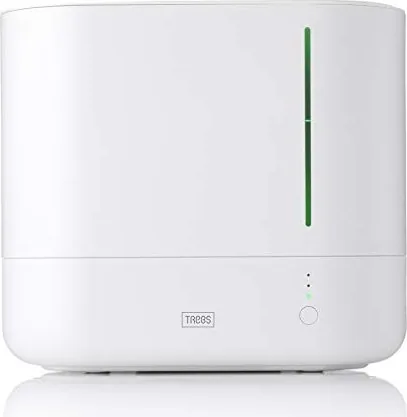
Trebs 49300 Manual
PDF manual · 25 Pages
English



Quick check
Incorrect answer, please try again.
Chat with your Trebs 49300 manual using AI
Get instant AI answers from your Trebs 49300 manual
Ask anything about the Trebs 49300. Answers come from this manual, with the pages they are based on.
49300 Maintenance Schedule
Turn off and unplug. Empty water from tank and base. Clean base unit, water tank, and top lid with a clean cloth for hygiene.
Inspect the mains cord regularly for any signs of damage. If damaged, it must be replaced by the manufacturer or supplier.
Ask a Question
Do you recommend 49300?
Yes NoFrequently Asked Questions
It is highly recommended to use clean distilled or descaled water. Using regular hard water may cause the mist to contain limescale particles that can affect the surface of furniture and floors around the unit.
Is this answer helpful?
Download the Smart Life app and register an account. Long press the button for 7 seconds to activate WiFi. Select the device in the app via auto scan or manual entry to complete the pairing process.
Is this answer helpful?
For proper hygiene, the manual recommends cleaning the unit thoroughly every three days. This prevents mold and ensures the device remains safe for your household environment and effective operation.
Is this answer helpful?
Trebs provides a warranty of 24 months for this product starting from the purchase date. It covers faults related to production or materials but excludes damages from improper handling or usage.
Is this answer helpful?
No, this appliance does not remove Carbon Monoxide or Radon. It functions as a humidity enhancer and is not a safety device for chemical hazards or ventilation.
Is this answer helpful?
You must not overfill the device. Fill the tank only up to the MAX level indicator to ensure safe operation and prevent water leakage into the base unit during operation.
Is this answer helpful?
This product is intended for household use. Commercial use is only covered under warranty if the device is not subjected to heavier strain than in a household situation, but generally it is for home use.
Is this answer helpful?
Advantages and Disadvantages
Advantages

- Smart integration with the Smart Life app for remote control and monitoring.
- Very low noise level of 32dB, perfect for bedrooms or libraries.
- Uses cold water vaporization which is gentle on the air and furniture.
- Compact design with dimensions suitable for rooms under 40m2.
- 24-month warranty provided for coverage against manufacturing defects.
Disadvantages

- Must use distilled or descaled water to prevent limescale buildup.
- Does not filter air or remove Carbon Monoxide or Radon gases.
- Setup requires a 2.4GHz WiFi network which might not be universal.
- User cannot replace parts internally; requires professional repair or disposal.
- Water tank indicator must be manually toggled to show fill levels.
Product Specification
Type
Operation Principle (Ultrasonic)
Color
White
Recommended Room Size
Up to 430.56 sq ft / 3531.47 cu ft
Speed Levels
3
Humidification Output
1.90 gal / 24h
Water Tank Capacity
1.19 gal
Display
No
Features
Auto-Off (Empty Tank)
Smart Home
App Control (Wi-Fi), Voice Assistant (Amazon Alexa, Google Assistant)
Noise Level
25-45 dB
Dimensions
12.60 x 11.42 x 5.91 in (WxHxD)
Weight
6.15 lbs
Product Description
Experience Perfect Air Quality with the Trebs Smarter Humidifier
The Trebs Smarter Humidifier represents a significant leap forward in household climate control technology. This device is designed to maintain optimal humidity levels within your home, ensuring comfort throughout the year. By utilizing cold water vaporization, the model ensures a cool mist that spreads effectively across your living space without creating condensation issues. It is particularly useful for areas with dry air or during winter months.
The Importance of Reading the Documentation
Before diving into operation, it is crucial to consult the Trebs Smarter Humidifier Manual. Adhering to the instructions found within this document ensures safety and longevity for your appliance. The manual covers essential safety regulations regarding electrical usage and proper placement on flat surfaces. It highlights the absolute necessity of using distilled water in the tank to prevent mineral deposits. This detail is vital because regular hard water can release limescale particles that might affect furniture surfaces nearby.
Smart Connectivity and App Integration
One of the standout features is its integration with the Smart Life app available for download on major app stores. Users can monitor and adjust settings remotely via their smartphone or tablet. The process to set up the WiFi connection is straightforward, with support for both automatic scanning and manual entry for those who prefer control. The device supports 2.4GHz WiFi networks, which is standard for most residential setups globally. This connectivity allows you to control humidity levels from the comfort of your bed.
Maintenance and Hygiene Protocols
Proper maintenance is essential for longevity and hygiene. The Trebs Smarter Humidifier Manual advises cleaning the unit every three days to ensure proper operation. This routine prevents mold and bacteria growth within the water tank and base unit. Using a clean cloth to wipe down surfaces after emptying the tank keeps the device hygienic. Regular checks of the power cord and placement stability are also recommended by the manufacturer to prevent accidental electrical hazards or tipping.
Performance Specifications and Dimensions
The unit measures 318 x 150 x 290 mm and weighs 2.1 kg, making it a compact addition to any room on a desk or floor. It is rated for work areas under 40 square meters and operates at a very low noise level of 32dB. This quiet operation ensures it does not disturb sleep or work environments where silence is preferred. The water tank capacity allows for extended use before needing a refill, providing a consistent mist output across the specified coverage area.
Safety and Warranty Information
Finally, the Trebs Smarter Humidifier Manual outlines critical safety warnings and warranty details. The product includes a 24-month warranty starting from the date of purchase for manufacturing faults. Users must ensure the device is unplugged before cleaning and never submerge it in water. Following these guidelines protects your investment and ensures the device functions as intended for years to come.
Search for 67,732 Manuals online


Type-in Brand or Model