
Trebs 49200 Manual
PDF manual · 50 Pages
English


Quick check
Incorrect answer, please try again.
Chat with your Trebs 49200 manual using AI
Get instant AI answers from your Trebs 49200 manual
Ask anything about the Trebs 49200. Answers come from this manual, with the pages they are based on.
49200 Maintenance Schedule
Regularly check the power cord for any damage. If damaged, it must be replaced by the manufacturer or supplier.
The HEPA filter (SKU: 49201) requires replacement approximately every 2200 hours of operation. The indicator light flashes red when needed.
Ask a Question
Do you recommend 49200?
Yes NoFrequently Asked Questions
Connect Bluetooth on your phone, long press Timer button for 5 seconds until WiFi icon appears. Open Smart Life app, scan or add device to link via 2.4GHz WiFi.
Is this answer helpful?
The UV/HEPA filter indicator light will keep flashing red. You should replace the HEPA filter and long press the button for 7 seconds to reset the timer.
Is this answer helpful?
No. This product is designed for household use only. Use in commercial situations voids the warranty unless strain is not heavier than household use.
Is this answer helpful?
No. The appliance does not remove Carbon Monoxide or Radon and cannot be used as a safety device for combustion accidents or hazardous chemicals.
Is this answer helpful?
The warranty is 24 months from the date of purchase. It covers production faults and material issues reported within 14 days of delivery.
Is this answer helpful?
Yes. Long press the Timer button for 7 seconds until the WiFi icon blinks slowly to activate AP/Manual mode if Auto Scan fails.
Is this answer helpful?
The model 49200 works in areas under 50 square meters. Ensure the air inlet and outlet are not blocked for optimal performance.
Is this answer helpful?
Advantages and Disadvantages
Advantages

- Smart Life app integration allows remote control via WiFi and Bluetooth connectivity for modern convenience
- HEPA H13 filter system effectively traps particles and includes UV sterilization for enhanced air hygiene
- Very quiet operation at 32 decibels ensures it works well even during sleep mode in quiet rooms
- Child lock feature prevents accidental changes to settings, providing better safety for households with kids
- Multiple speed modes including automatic and sleep options adapt to different air quality needs seamlessly
Disadvantages

- Filter must be replaced every 2200 hours which leads to recurring maintenance costs and tracking requirements
- Warranty excludes damage from improper handling, commercial use, or transport damages causing potential issues
- Device does not remove carbon monoxide or radon gases, limiting utility in specific hazardous chemical scenarios
- Not suitable for children under 8 years old, restricting placement options in rooms accessible to younger kids
- Cable damage requires replacement by a qualified person rather than a simple user fix, adding repair logistics
Product Specification
Color
White
Recommended Room Size
up to 828.83 sq ft / 6780.42 cu ft
Air Circulation
235.43 CFM
Filtration
HEPA Filter (H13, 99.95%), Activated Carbon Filter
Display
Yes
Features
Touch Control operation, Night mode, Timer, UV Disinfection
Smart Home
App Control (Wi-Fi), Voice Assistant (Amazon Alexa, Google Assistant)
Noise Level
25-45 dB
Dimensions
10.63x19.57x11.93 in (WxHxD)
Weight
10.30 lbs
Product Description
Trebs Smarter Air Purifier Overview
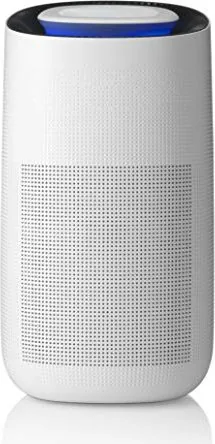
The Trebs Smarter Air Purifier (Model 49200) represents a significant leap in home air quality management. Designed for households, this device integrates seamlessly with the Smart Life application, allowing users to control the air purity from their smartphones. When consulting the guidance for this equipment, one discovers a robust set of features geared toward convenience and safety. The unit operates on a standard 802.11b/g/n WiFi interface at 2.4GHz, supported by Bluetooth for easier initial pairing. This connectivity ensures that adjustments can be made remotely without disturbing the household peace.
Health consciousness is central to the 49200 design. It utilizes a high-efficiency HEPA H13 filter. The device features a sterilization function with UV light. It runs quietly at 32 decibels. There are four distinct speed settings ranging from sleep mode to automatic mode, ensuring the right level of purification is engaged based on needs. The automatic mode adjusts to the environment. Read the Trebs Smarter Air Purifier Manual for more details.
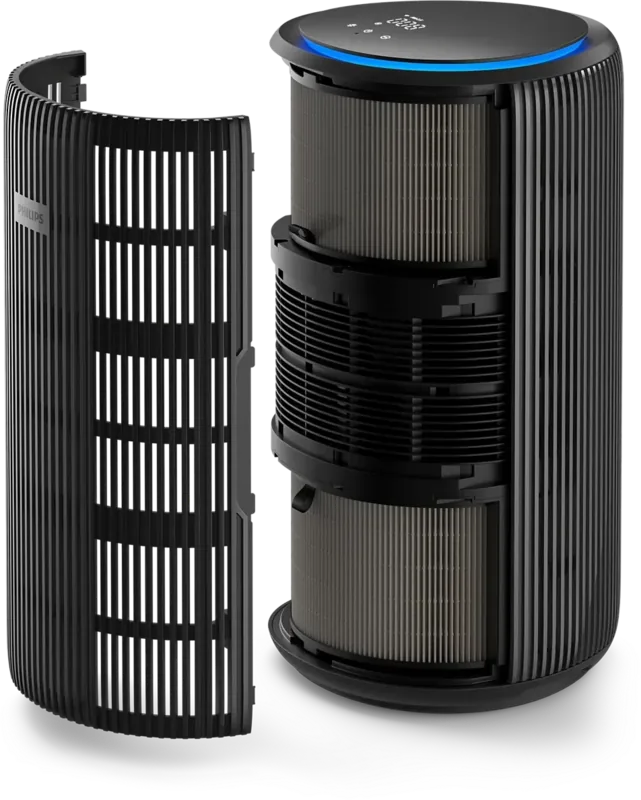
Safety protocols are clearly prioritized within the user guide. A child lock mechanism prevents accidental setting changes, which is vital for families with young ones. However, safety warnings state the product is not suitable for children under eight years old due to safety components and moving parts. The appliance is strictly for household use and does not replace the need for proper ventilation or vacuuming. Additionally, it is important to note that the device does not remove carbon monoxide or radon, so it cannot serve as a safety device for combustion accidents. For maintenance, the HEPA filter replacement is straightforward but necessary every 2200 hours. The indicator light flashes red to alert users about the change. Users must unplug the device before opening the back cover to install the filter.
The physical dimensions and power consumption are designed for efficiency in areas under 50 square meters. At 50 watts, it is gentle on electricity bills while maintaining performance. The device weighs 4.6 kg and fits most standard room layouts. If issues arise, the warranty is 24 months from purchase, covering manufacturing faults. Proper disposal is also highlighted, as old devices contain harmful substances and should not be mixed with non-recyclable waste. Users should contact local services for recycling options.
During setup, the Smart Life app requires an email or telephone registration. Once the app is open, the user selects to add a device and allows the system to scan for compatible hardware. This process makes installation faster compared to manual entry. Timer functions can be set to 2, 4, or 8 hours, allowing for scheduled operation. Ultimately, this smart purifier offers a blend of tech and health, making air quality control accessible and easy for homeowners.
Search for 67,732 Manuals online


Type-in Brand or Model