
Togu Challenge Disc 2.0 Manual
PDF manual · 4 Pages
English



Quick check
Incorrect answer, please try again.
Chat with your Togu Challenge Disc 2.0 manual using AI
Get instant AI answers from your Togu Challenge Disc 2.0 manual
Ask anything about the Togu Challenge Disc 2.0. Answers come from this manual, with the pages they are based on.
Ask a Question
Do you recommend Challenge Disc 2.0?
Yes NoFrequently Asked Questions
The Disc is used to improve balance, coordination and proprioception while training ankle, knee, hip and spinal stability. It is suitable for rehabilitation, athletic conditioning and general fitness with controlled, low-impact movements.
Is this answer helpful?
The Disc supports a maximum user weight of 120 kg (approx. 270 lbs). It is suitable for ages roughly 4 to 100 depending on fitness and supervision; children must be supervised by an adult.
Is this answer helpful?
Briefly tap or move the Disc to activate the sensor, start the companion software or app, and ensure the Disc lies flat on the floor for automatic calibration. Do not stand on the Disc during calibration; re-start the app to recalibrate after any repositioning.
Is this answer helpful?
No. The Disc is designed for slow, controlled, and mindful movements. It is not intended for jumping, high-impact or dynamic exercises that could damage the device or increase injury risk.
Is this answer helpful?
Train on a firm, dry, non-slip, level surface; wear athletic shoes or go barefoot (no socks); clear the fall area and use mats if needed. Inspect the Disc before each use for damage and secure fittings. Use under trainer supervision when appropriate.
Is this answer helpful?
Keep the Disc clean and dry, avoid alterations or repainting, and check for damage before use. Replace the Bluetooth sensor battery with a Varta CR2032 (3V) when needed. Follow manufacturer guidance and applicable standards such as DIN EN 50419.
Is this answer helpful?
Free software and apps are available from the manufacturer’s website and via the App Store or Google Play. Visit the product pages on the official Togu or Challenge Disc sites for downloads and support.
Is this answer helpful?
Advantages and Disadvantages
Advantages

- Improves coordination and proprioception for ankles, knees, hips and spine.
- Simple Bluetooth integration with free app and automatic calibration.
- Suitable for broad age range (approx. 4–100) and no special skills required.
- Low-impact design ideal for rehab, stability training, and controlled workouts.
- Compact, portable unit with straightforward maintenance and battery replacement.
Disadvantages

- Maximum user weight limited to 120 kg (approx. 270 lbs).
- Not suitable for jumping or high-impact exercises.
- Requires a firm, dry, level surface — limited outdoor/uneven use.
- Children require adult supervision; trainer guidance recommended.
- Repositioning during a session forces recalibration and interrupts training.
Product Specification
Type
Stability trainer
Colors
grey, red
Dimensions
17.32 in
Weight
8.60 lb
Product Description
Togu Challenge Disc 2.0 Stability Trainer Manual
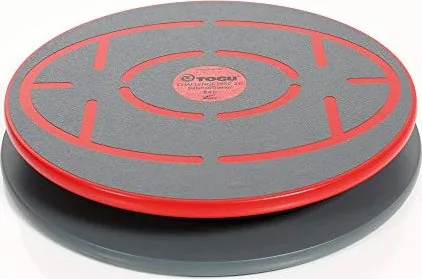
The Togu Challenge Disc 2.0 Stability Trainer is a compact balance device engineered to improve coordination, proprioception, and joint stability across ankles, knees, hips, and the spine. Designed for a wide age range—from children (under supervision) to seniors—the Disc supports controlled, low-impact training suitable for rehabilitation, athletic conditioning, and general fitness. It accepts up to 120 kg (approx. 270 lbs) and requires no special skill to begin. Use on a firm, dry, level, non-slip surface and avoid socks or slippery footwear; training may be done barefoot or with athletic shoes.
The Disc integrates a Bluetooth BalanceSensor 4.0 for connected training experiences via free downloadable software or apps (available on the manufacturer site, App Store, and Google Play). Activation is simple: briefly tap or move the Disc to wake the sensor, start the software, and ensure the Disc lies flat on the floor for automatic calibration. Do not stand on the Disc during calibration; maintain the Disc’s position throughout each session or recalibrate after repositioning. The correct orientation is indicated by the Bluetooth sticker or USB cable pointing toward the connected device.
Built for guided use, the Challenge Disc is best utilized under the supervision of a trained instructor who can tailor exercises to the user’s fitness and safety needs. The product is meant for slow, controlled movements rather than dynamic jumping. Safety guidance emphasizes clearing the fall zone and, if required, placing protective mats around the training area. Children must be supervised by adults. Regular pre-use inspections are recommended to check for damage and secure fittings. Modifying the Disc—such as repainting or altering structural elements—is not permitted.
Maintenance is straightforward: keep the device clean and dry, replace the BalanceSensor battery with a Varta CR2032 lithium cell when needed, and observe applicable standards (e.g., DIN EN 50419). The manufacturer and distributors provide support information and software downloads through their websites.
Notes:
- Suitable for ages ~4–100 depending on fitness and supervision.
- Max user weight: 120 kg (approx. 270 lbs).
- Not intended for jumping or high-impact moves.
- Keep the Disc clean; avoid slippery surfaces and footwear.
- Bluetooth sensor requires periodic battery replacement (CR2032).
Search for 67,706 Manuals online


Type-in Brand or Model