

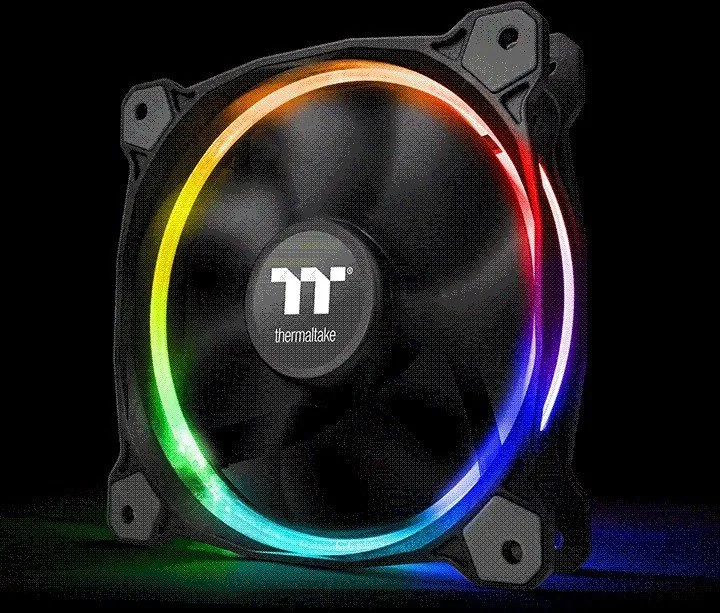

Thermaltake Riing 12 LED RGB Sync Edition Manual
PDF manual · 1 Pages
English


Quick check
Incorrect answer, please try again.
Chat with your Thermaltake Riing 12 LED RGB Sync Edition manual using AI
Get instant AI answers from your Thermaltake Riing 12 LED RGB Sync Edition manual
Ask anything about the Thermaltake Riing 12 LED RGB Sync Edition. Answers come from this manual, with the pages they are based on.
Ask a Question
Do you recommend Riing 12 LED RGB Sync Edition?
Yes NoFrequently Asked Questions
The sync edition includes a mainboard sync cable that allows direct connection to compatible motherboards. This enables centralized control of RGB lighting and fan speeds without additional hubs.
Is this answer helpful?
These fans are capable of displaying 256 different colors, allowing for a wide range of visual effects and personalization options for your PC build.
Is this answer helpful?
Installation is relatively simple if you follow the guide. You must connect the PWM cable to the motherboard and link the fans in series using the provided cables.
Is this answer helpful?
Yes, you can operate them as standard PWM fans, but you will lose the synchronized RGB lighting effects unless you have an external RGB controller.
Is this answer helpful?
Always power off your PC before installing. Check the positive and negative ends on connectors carefully to avoid damaging the controller or motherboard.
Is this answer helpful?
Advantages and Disadvantages
Advantages

- Supports 256 colors for extensive customization options
- Includes mainboard sync cable for direct controller integration
- Compact 120mm size fits well in tight radiator spaces
Disadvantages

- Requires careful handling of polarized connectors to avoid damage
- May need specific motherboard compatibility for full sync features
- Installation requires powering off the system completely
Product Specification
Fan connector
4-Pin PWM + 4-Pin RGB (+12V/G/R/B)
Dimensions
4.72x4.72x0.98 in (WxHxD)
Speed
800-1500rpm
Airflow
22.14-40.6 CFM
Static pressure
0.02-0.08 inH2O
Noise level
18.5-26.4dB(A)
Fan bearing
hydrodynamic bearing (HDB)
Voltage range
9-12V
Power consumption
2.4W
Lighting
RGB
Color
black (frame), black (rotor)
Features
vibration dampers
Product Description
Elevate Your Cooling with Thermaltake Riing 12 LED RGB Radiator Fan Sync Edition
The Thermaltake Riing 12 LED RGB Radiator Fan Sync Edition transforms the way you manage system cooling and aesthetics. This 3-pack set is designed for enthusiasts who demand both high-performance airflow and stunning visual customization. Each fan features a sleek 120mm profile, making it ideal for mounting on radiators or chassis fans where space is at a premium but performance cannot be compromised.
Seamless Synchronization and Lighting
One of the standout features of this product line is its advanced synchronization capabilities. The included mainboard sync cable allows users to connect the fans directly to compatible motherboards. This setup enables precise control over lighting effects without needing extra controllers. The fans support 256 distinct colors, ensuring that your build can match any theme or mood you desire. By connecting the PWM cable to the motherboard and linking the fan power cables in series, users achieve a unified lighting experience across all three units.
Installation and Performance
Installing these fans is straightforward when following the provided guide. The package includes necessary hardware such as short screws, long screws, and specific cables for PWM and mainboard synchronization. It is crucial to power off the PC before installation to prevent electrical damage. Users must carefully check the positive and negative ends on connectors before attaching them to the mainboard. Proper installation ensures longevity and optimal airflow through your radiator system.
Visual Impact
The Riing 12 fans bring a modern aesthetic to any computer case. With their ability to display vibrant RGB patterns, they serve as a focal point for custom PC builds. The design emphasizes durability and efficiency, utilizing high-quality materials to maintain structural integrity during operation. Whether you are gaming, rendering, or simply browsing, these fans provide silent yet powerful cooling while adding a layer of style to your machine.
Important Notes
- Always verify connector polarity before plugging into the motherboard.
- Ensure the mainboard supports the specific RGB protocol used by the sync cable.
- Use the included installation guide for step-by-step assembly instructions.
Search for 67,732 Manuals online


Type-in Brand or Model