
Thermaltake Massive 12 Max Manual
PDF manual · 1 Pages
English


Quick check
Incorrect answer, please try again.
Chat with your Thermaltake Massive 12 Max manual using AI
Get instant AI answers from your Thermaltake Massive 12 Max manual
Ask anything about the Thermaltake Massive 12 Max. Answers come from this manual, with the pages they are based on.
Ask a Question
Do you recommend Massive 12 Max?
Yes NoFrequently Asked Questions
The cooler requires a minimum of 0.55 Amps to activate the LED lights. If your USB port provides less power, use the included extra USB plug for stability.
Is this answer helpful?
Yes, the device includes a built-in controller function that allows you to adjust fan speeds between different levels to suit your cooling needs.
Is this answer helpful?
The package contains the notebook cooler, one USB cable, a warranty card, and a detailed installation manual for setup guidance.
Is this answer helpful?
The Massive 12 Max is designed to fit most standard notebook sizes, offering versatile compatibility for various laptop models.
Is this answer helpful?
The extra USB plug ensures sufficient power delivery when the laptop's native USB port cannot meet the 0.55 Amp requirement for LED activation.
Is this answer helpful?
Advantages and Disadvantages
Advantages

- Dual-fan system provides superior cooling performance for high-end laptops
- Adjustable fan speed controller allows customization for different usage scenarios
- Includes extra USB plug to ensure proper power delivery for LED activation
- Comprehensive package includes all necessary cables and documentation
- Robust design supports a wide range of laptop sizes
Disadvantages

- Requires higher amperage than standard USB ports for full LED functionality
- Extra USB adapter may be inconvenient if no additional ports are available
- Large size might not fit well on smaller desks or limited spaces
Product Specification
Type
Notebook Cooler
Compatibility
10-17"
Cooling
1x 120mm, 1200rpm, 3854cfh, 0.02inH2O; 4x 80mm, 2200rpm, 3675cfh, 0.12inH2O;
Dimensions
16.54x11.42x1.57in
Features
2x USB 3.0
Noise Level
28dB(A)
Product Description
Thermaltake Massive 12 Max Notebook Cooler Review
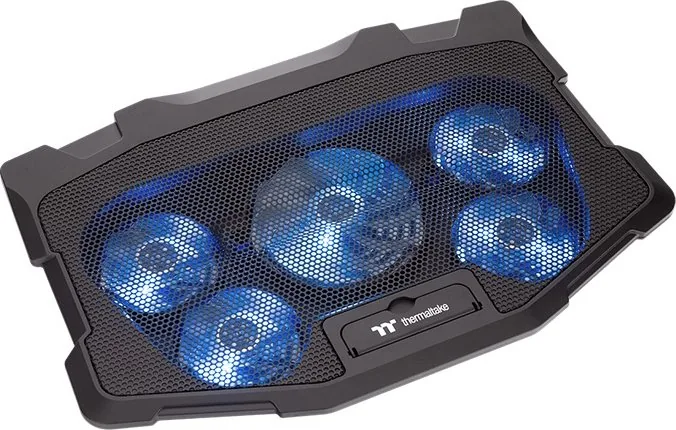
The Thermaltake Massive 12 Max Notebook Cooler stands out as a premium cooling solution designed for high-performance laptops that demand effective heat dissipation. This device features a massive dual-fan system specifically engineered to maintain optimal operating temperatures during intense gaming sessions or heavy multitasking tasks. The cooler utilizes advanced airflow technology to ensure that your laptop remains cool and efficient even under prolonged stress.
One of the standout features of this model is its robust build quality and user-friendly design. The unit includes a dedicated controller that allows users to adjust fan speeds according to their specific needs. Whether you require silent operation for quiet environments or maximum airflow for demanding applications, the speed control options provide the flexibility needed. The installation process is straightforward, requiring only a standard USB connection to function effectively.
Power requirements are an important consideration for this device. To fully activate the LED lighting effects included in the design, the cooler requires a minimum power output of 0.55 Amps from the USB port. If your laptop's USB port cannot supply sufficient power, the package includes an extra USB plug to ensure stable performance and full illumination of the aesthetic features. This attention to detail ensures that users can enjoy both functional cooling and visual appeal without compromise.
The packaging contains all necessary components for immediate use, including the notebook cooler unit, a high-quality USB cable, a warranty card, and a comprehensive manual. The manual provides clear instructions on assembly and usage, making it accessible for users of all technical skill levels. With dimensions carefully calculated to fit most standard laptop sizes, the Massive 12 Max offers a versatile cooling experience that adapts to various hardware configurations.
Key Notes
- Requires 0.55Amp for LED activation
- Includes extra USB plug for power stability
- Dual-fan system for enhanced airflow
- Adjustable fan speed controller included
- Compatible with most standard notebooks
Search for 67,732 Manuals online


Type-in Brand or Model