
Thermaltake Core P3 Manual
PDF manual · 12 Pages
English



Quick check
Incorrect answer, please try again.
Chat with your Thermaltake Core P3 manual using AI
Get instant AI answers from your Thermaltake Core P3 manual
Ask anything about the Thermaltake Core P3. Answers come from this manual, with the pages they are based on.
Ask a Question
Do you recommend Core P3?
Yes NoFrequently Asked Questions
It is an open-frame mid-tower chassis designed for showcase-style builds, flexible layouts, and strong cooling support.
Is this answer helpful?
The Core P3 supports Mini ITX, Micro ATX, and ATX motherboards, giving builders a wide range of platform options.
Is this answer helpful?
Yes. It is Tt LCS certified and built to work well with advanced liquid-cooling setups, including large radiator configurations.
Is this answer helpful?
Yes. It can be used vertically, horizontally, or wall-mounted, which makes it suitable for custom desk or display setups.
Is this answer helpful?
The CPU cooler height limit is 180 mm. GPU length is limited to 280 mm with a reservoir or 450 mm without one, and PSU length is limited to 200 mm.
Is this answer helpful?
It includes USB 3.0, USB 2.0, and HD audio connections, offering practical support for everyday peripherals and accessories.
Is this answer helpful?
Advantages and Disadvantages
Advantages

- Open-frame design makes the build visually striking and easy to work on.
- Flexible placement options support vertical, horizontal, and wall-mounted setups.
- Strong liquid-cooling focus with Tt LCS certification and large radiator support.
- Front I/O includes USB 3.0, USB 2.0, and HD audio for modern connectivity.
Disadvantages

- CPU cooler height is limited to 180 mm, so very tall air coolers may not fit.
- GPU clearance drops to 280 mm when a reservoir is installed.
- Wall-mounting needs proper hardware, and the bracket is not included.
- Audio wiring must match AC'97 or HD Audio standards to avoid damage.
Product Specification
Internal
2x 2.5"/3.5"
PCI Slots
8
Fan (front)
N/A
Fan (rear)
N/A
Fan (top)
N/A
Fan (bottom)
N/A
Fan (other)
N/A
Radiator sizes
4.72"/5.51"/9.45"/11.02"/14.17"/16.54" right
Motherboard
up to ATX
Supported Motherboards
Mini-ITX (6.7"x6.7")/uATX (9.6"x9.6")/ATX (12"x9.6")
Power supply position
bottom
CPU cooler
max. 7.09" height
Graphics cards
max. 11.02" (17.72" without reservoir)
Lighting
without lighting
Dimensions (WxHxD)
13.11"x20.16"x18.50" (standing)
Case type
Benchtable
Front
open
Top
open
Bottom
open
Right
partially closed, fan grille front
Front I/O Position
Case side: Front, Height: middle, Position: right
VESA
2.95"x2.95"/3.94"x3.94"/7.87"x3.94"
Product Description
Thermaltake Core P3 Manual: An Open-Frame Case Made for Showcase Builds
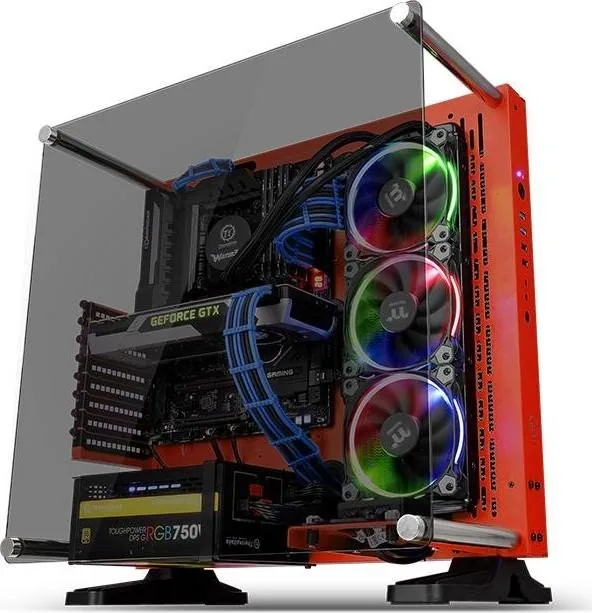
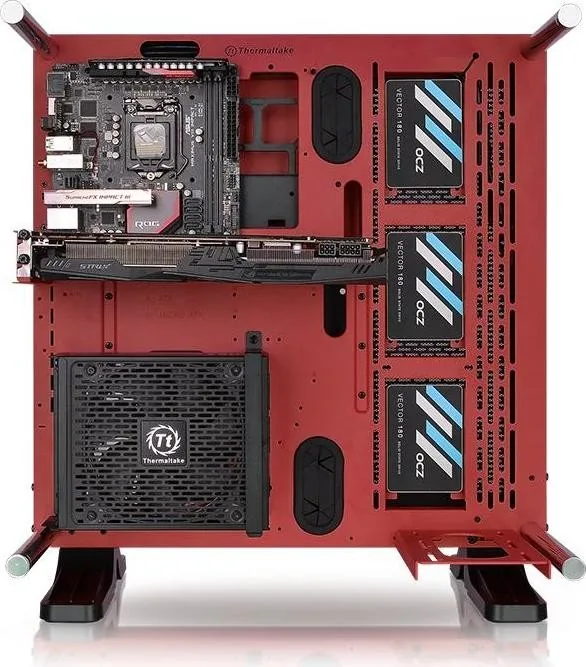
The Thermaltake Core P3 stands out as a case that treats PC building like a display project as much as a hardware project. The Thermaltake Core P3 Manual points to a design focused on flexibility, easy access, and strong cooling potential, making it especially appealing to enthusiasts who want their system to look as good as it performs. Its open-frame structure gives builders a clean canvas for custom loops, themed interiors, and carefully routed components.
Built for flexible layouts
One of the most attractive qualities of the Core P3 is how adaptable it is. It can be used vertically, horizontally, or even wall-mounted, giving users more freedom than a typical mid-tower. That versatility makes it a smart choice for showcase desks, testing setups, or living-room builds where the system becomes part of the room’s visual style. The chassis also supports Mini ITX, Micro ATX, and ATX motherboards, which broadens its appeal across different build sizes.
Cooling-focused and enthusiast-friendly
Cooling support is clearly a major strength. The Core P3 carries Tt LCS certification, signaling that it was designed with liquid-cooling users in mind. It supports large radiator configurations and multiple fan options, which is ideal for builders who want to push thermal performance without sacrificing presentation. At the same time, the case offers practical limits that help guide part selection, such as CPU cooler, GPU, and PSU clearance requirements.
Practical features that matter
Beyond the bold appearance, the Core P3 includes useful everyday touches. Front-panel connectivity includes USB 3.0, USB 2.0, and HD audio support, making it easy to connect modern accessories and peripherals. Drive mounting is also straightforward, with support for both 2.5-inch and 3.5-inch storage devices. The manual emphasizes careful installation and compatibility checks, especially for audio headers and component dimensions, which helps builders avoid common setup issues.
The result is a chassis that combines style with purpose. It rewards users who enjoy planning their builds, choosing components carefully, and highlighting custom cooling or high-end hardware. If your goal is a case that looks unique and offers room for creativity, the Core P3 delivers a strong balance of form and function.
Notes
- Best suited for showcase builds and custom cooling setups.
- Check cooler, GPU, and PSU dimensions before buying parts.
- Audio header compatibility should match the motherboard standard.
- Wall-mount use may require extra mounting hardware.
Search for 67,732 Manuals online


Type-in Brand or Model