

TFA Dostmann Multi-Color 60.2548.01 Manual
PDF manual · 50 Pages
English



Quick check
Incorrect answer, please try again.
Chat with your TFA Dostmann Multi-Color 60.2548.01 manual using AI
Get instant AI answers from your TFA Dostmann Multi-Color 60.2548.01 manual
Ask anything about the TFA Dostmann Multi-Color 60.2548.01. Answers come from this manual, with the pages they are based on.
Multi-Color 60.2548.01 Maintenance Schedule
Use a soft, slightly damp cloth. Do not use scouring agents or solvents.
Change batteries when the battery symbol appears on the outdoor temperature display line.
Change batteries when the battery symbol appears on the indoor temperature display line.
Take out all batteries if the products will not be used for a long period of time.
Ask a Question
Do you recommend Multi-Color 60.2548.01?
Yes No
ea63
5 months ago
Does this clock automatically adjust for daylight saving time changes?
Frequently Asked Questions
The clock uses DCF radio signals transmitted from Mainflingen, Germany. It automatically updates the time daily at 1:00, 2:00, and 3:00 AM. If the signal is lost, it switches to quartz mode until reception resumes.
Is this answer helpful?
Yes. You can press the AUTO COLOR button to enable automatic transitions through 70 hues. Alternatively, use the LEFT and RIGHT buttons to select specific static colors manually.
Is this answer helpful?
The wireless transmission range is approximately 60 meters in open fields. Performance may decrease near metal structures or thick concrete walls due to signal interference.
Is this answer helpful?
No. Continuous illumination requires the device to be connected to the mains adapter. On battery power, the light activates for 13 seconds when the sensor button is pressed.
Is this answer helpful?
Hold the AL.SET button for three seconds to enter setting mode. Use UP and DOWN buttons to adjust hours and minutes, confirming each step with the AL.SET button before activating the switch.
Is this answer helpful?
Yes, the USB Type A port provides a 5V output with a maximum current of 1A. Ensure your device supports this charging standard before connecting.
Is this answer helpful?
If the sensor is lost or batteries die, the indoor unit will show dashes. You must perform a manual search by holding the DOWN button for two seconds to re-establish the connection after replacing batteries.
Is this answer helpful?
Advantages and Disadvantages
Advantages

- Automatic time synchronization via DCF signal ensures exact accuracy without manual setting
- Display features 70 color variations and an auto-color mode for personalized ambiance
- Includes wireless outdoor temperature sensor for real-time weather monitoring
- Built-in USB port allows charging of mobile devices directly from the clock
- Multi-language support makes it suitable for diverse European households
Disadvantages

- Outdoor transmitter requires separate AAA batteries which are not included
- Base station requires AA batteries which are also sold separately
- Continuous backlight operation only works when plugged into mains power
- Signal reception can be weak in buildings with thick concrete walls
- USB charging cable is not included in the package
Product Specification
Type
Alarm clock
Power source
Mains, Battery (2x AA battery)
Display
Digital
Housing material
Plastic
Dial color
Black
Housing color
Black
Alarm method
Alarm
Features
Snooze, Date display, Day of week, Thermometer, USB
Special features
Radio
Dimensions
8.46x2.95x1.18 in (WxHxD)
Product Description
Discover the TFA Dostmann Multi-Color Radio Alarm Clock
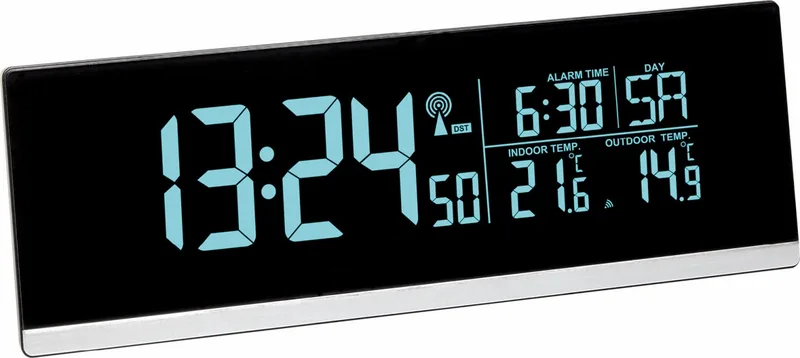
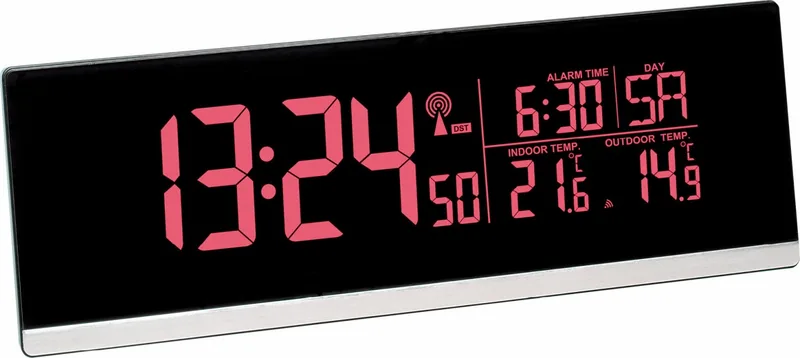
The TFA Dostmann TFA 60.2548.01 is more than just a timepiece; it is a vibrant addition to any bedside table that combines precision with visual flair. This radio-controlled alarm clock features a dynamic display capable of changing colors, offering over 70 different hue options to suit your mood or room decor. Whether you prefer a soothing blue during the night or a bright red for a morning wake-up call, this device adapts to your needs effortlessly.
At the heart of its functionality lies advanced DCF radio technology, ensuring your time and date are always accurate without manual intervention. The clock automatically receives signals from atomic clocks in Germany, adjusting for daylight saving time changes on its own. Beyond keeping perfect time, it serves as a comprehensive weather station for your home. It includes an outdoor temperature sensor that wirelessly transmits data to the base unit, allowing you to monitor external conditions from the comfort of your bedroom.
The user experience is enhanced by intuitive controls and a versatile backlight system. With a dedicated snooze function and adjustable brightness levels, waking up is made gentle and customizable. The device also offers a practical USB charging port, enabling you to power up your mobile devices while they rest on the clock. Safety is paramount, with clear warnings regarding battery handling and electrical connections found throughout the setup process. The inclusion of multiple language options ensures accessibility for users across Europe, making this a truly international product designed for reliability and style.
Search for 67,706 Manuals online


Type-in Brand or Model
Amy Kennedy
5 months ago
Is the clock display readable in direct sunlight?
Manual.ly
5 months ago
Thank you for your inquiry. While the digital radio alarm clock features large, clear numbers and adjustable backlight colors to suit various moods and room decors, please note that visibility may be reduced when exposed to direct sunlight. The display is optimized for indoor use and standard lighting conditions.