
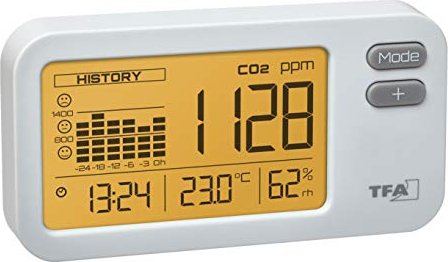
TFA Dostmann AirCO2ntrol Coach CO2 air monitor white Manual
PDF manual · 38 Pages
English



Advantages and Disadvantages
Advantages

- Clear real-time CO2, temperature and humidity display with 24-hour history for context.
- Multicolor backlight and configurable alarm provide immediate visual alerts for poor air quality.
- Compact, lightweight housing with USB power makes placement flexible and easy.
- NDIR dual-beam sensor ensures reliable CO2 measurement and 10-second update intervals.
- ECO LIGHT and customizable alarm thresholds improve usability for night or shared spaces.
Disadvantages

- Requires continuous USB power; no internal battery for portable or off-grid use.
- Not intended for outdoor or high-humidity environments; must remain dry.
- Measurements can be affected by strong electromagnetic fields (e.g., microwaves, induction).
- Limited button interface (MODE and +) may make complex configuration slower.
- Manufacturer disclaims liability for incorrect readings; professional calibration may be needed for critical applications.
Ask a Question
Frequently Asked Questions
Connect the supplied micro-USB cable to a suitable USB power source (DC 5V, ≥300mA). After successful connection the display briefly shows "Auto" then "- - - -" and the backlight will turn on while the device initializes.
Is this answer helpful?
In Auto mode the backlight indicates CO2 levels: green = under 800 ppm (optimal), yellow = 800–1400 ppm (moderate), red = above 1400 ppm (poor). You can also set a fixed color or alarm mode via settings.
Is this answer helpful?
Press and hold MODE for three seconds to enter setting mode. Use + to select SEL COL (choose a color for "on" mode), confirm with MODE, then configure AL to set the alarm limit from 400 to 3000 ppm in 100 ppm steps, and confirm again.
Is this answer helpful?
HISTORY displays CO2 averages for 0 (current), -3, -6, -12, -18 and -24 hour periods. The current value updates every 10 seconds; the averaged bars (-3 to -24) are recalculated and updated every 10 minutes.
Is this answer helpful?
Wipe the housing with a soft, slightly damp cloth. Do not use solvents or abrasive cleaners, protect the device from moisture, extreme temperatures and shocks. Do not remove the protective cover or insert objects into ventilation slots.
Is this answer helpful?
If there's no display, check the USB connection and power source. For incorrect readings or a 9999 display, restart the device by reconnecting power. If issues persist, consult support or the manufacturer’s guidance.
Is this answer helpful?
No. The device is designed for dry indoor environments only. Exposure to water, high humidity or extreme temperatures may damage the unit and invalidate readings.
Is this answer helpful?
Product Description

TFA Dostmann AirCO2ntrol Coach CO2 air monitor white
The TFA Dostmann AirCO2ntrol Coach is a compact, white CO2 monitor designed for indoor air-quality monitoring in schools, offices and public spaces. It measures CO2 concentration using NDIR technology and displays real-time readings alongside temperature, humidity and a 24-hour history graph. The device is USB-powered (micro-USB, DC 5V ≥300mA) and features a multifunctional colored backlight that visualizes air quality: green for optimal (<800 ppm), yellow for moderate (800–1400 ppm) and red for poor (>1400 ppm). An alarm mode can trigger a red light when a user-defined threshold (400–3000 ppm) is exceeded.
Setup is straightforward: connect the included USB cable, wait for the initial "Auto" startup sequence and set the clock. Two buttons (MODE and +) let you switch display modes, choose a fixed backlight color from seven options, configure alarm limits in 100 ppm steps, enable an ECO LIGHT dimming schedule (22:00–06:00) and set time. The HISTORY display shows averaged CO2 values for 0, 3, 6, 12, 18 and 24-hour intervals, updated every 10 minutes, with the current reading refreshed every 10 seconds.
Built for indoor use, the monitor should be kept dry and protected from extreme temperatures, shocks and electromagnetic interference (e.g., induction cookers, microwaves). The unit is lightweight and small (approx. 105 x 32 x 55 mm, 86 g) and uses a dual-beam NDIR sensor for accurate CO2 detection. Routine maintenance is minimal: clean with a soft, slightly damp cloth and avoid solvents. Troubleshooting is simple — reconnect power or restart the device if the display is blank, shows 9999 or gives incorrect values.
This energy-efficient monitor helps users proactively manage indoor air quality by providing clear visual cues, historical context and customizable alarms. It’s a practical tool for improving ventilation habits and reducing CO2-related fatigue or concentration issues in shared spaces.
Notes:
- Power: Micro-USB DC 5V ≥300mA (USB cable included).
- Measurement update: every 10 seconds; HISTORY averages recalculated every 10 minutes.
- Sensor: Non-Dispersive Infrared (NDIR); CO2 range 0–9999 ppm; typical accuracy specifications apply.
- Disposal: device subject to WEEE regulations — do not discard with household waste.
Search for 385 Manuals online


Type-in Brand or Model