
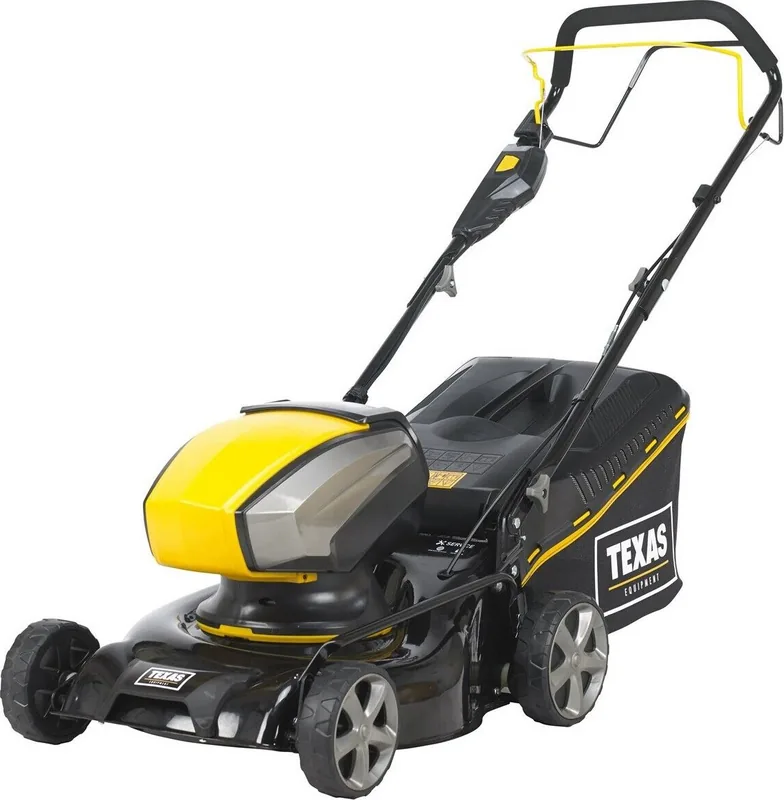
Texas Razor 4220TR-Li Manual
PDF manual · 24 Pages
English



Quick check
Incorrect answer, please try again.
Chat with your Texas Razor 4220TR-Li manual using AI
Get instant AI answers from your Texas Razor 4220TR-Li manual
Ask anything about the Texas Razor 4220TR-Li. Answers come from this manual, with the pages they are based on.
Razor 4220TR-Li Maintenance Schedule
Charge the battery at least every 3 months to maintain its capacity for as long as possible, even during periods of non-use.
Take the lawn mower to an authorized service dealer for a professional annual inspection and maintenance check.
Remove grass and dirt from the underside of the deck and keep the motor unit free from debris. Always remove the safety key before cleaning.
Inspect all bolts, screws, and nuts to ensure they are securely fastened. Retighten if necessary to maintain machine integrity.
Check cable adjustment by activating handles fully. Tighten or loosen cables as needed to ensure optimal activation and prevent stretching issues.
Spray silicone lubrication into cables and move them. Oil metal parts with a cloth to prevent rust during storage.
Free maintenance reminders
Timed to your purchase date. Always free, unsubscribe anytime.
Ask a Question
Do you recommend Razor 4220TR-Li?
Yes NoFrequently Asked Questions
Yes. The Razor 4220TR-Li has a self-propelled drive controlled by a handlebar lever. It moves the mower forward while you guide its direction, reducing the amount of pushing required.
Is this answer helpful?
The mower includes a 40V 2.5Ah lithium-ion battery with 90 Wh capacity. A compatible charger is also included.
Is this answer helpful?
It can mow up to about 200 m2 per charge when self-propulsion is used. When pushed manually, capacity can reach up to about 300 m2. Results depend on lawn conditions and cutting settings.
Is this answer helpful?
A full charge of the included 2.5Ah battery takes approximately 75 minutes. Charge the battery indoors in a dry, ventilated area between 10 and 25 degrees C.
Is this answer helpful?
Yes. Insert the mulching plug to finely cut and return clippings to the lawn. Do not use the grass collector while the mulching plug is installed.
Is this answer helpful?
The mower has six cutting-height settings ranging from 25 mm to 75 mm. This lets you choose a closer finish or leave grass longer during dry periods.
Is this answer helpful?
Clean the deck and motor area after use, remove the safety key, and store the mower in a dry indoor area. For winter storage, keep the battery partially charged and stored at 10 to 20 degrees C.
Is this answer helpful?
Advantages and Disadvantages
Advantages

- Self-propelled drive reduces the effort required to mow lawns up to 200 m2 per charge.
- 42 cm cutting width offers a useful balance between coverage speed and garden maneuverability.
- Six cutting heights from 25 mm to 75 mm suit different lawn conditions and seasonal preferences.
- 45 L collector and mulching capability provide flexible grass-clipping management.
- Included 2.5Ah battery and charger provide a ready-to-use cordless mowing setup.
Disadvantages

- Self-propelled operation can reduce coverage to about 200 m2 per charge.
- The 2.5Ah battery needs around 75 minutes for a full charge.
- There is no side-discharge function.
- At 22 kg, it may be less convenient to lift or carry frequently.
- Battery performance varies with grass length, density, cutting height, and mowing method.
Product Specification
Type
Lawn mower
Battery
1x battery (40 V, 2.5 Ah, lithium-ion)
Cutting width
16.54 in
Cutting height
1.1-2.95 in, height-adjustable (central), 6 settings
Collection capacity
11.89 gal
Drive
Wheel drive
Transmission
Forward gear
Features
Mulching function, rear discharge, manual grass box emptying
Charging time
75 min
Noise level
96 dB(A)
Weight
48.50 lb
Included
Charger, 1x battery
Product Description
Texas Razor 4220TR-Li Cordless Lawn Mower incl. 2.5Ah Battery - Read, Download & Print Free
The Texas Razor 4220TR-Li Cordless Lawn Mower incl. 2.5Ah Battery is designed for homeowners who want a practical, cable-free way to maintain a medium-sized lawn. Powered by a 40V lithium-ion battery, this mower combines the convenience of cordless operation with self-propelled drive, helping reduce the physical effort needed when covering larger areas or working on gentle slopes.
Cordless mowing with self-propelled support
A 2.5Ah battery and charger are included, giving you the essentials needed to begin mowing. Under suitable conditions, the mower can cover up to 200 m2 per charge with self-propulsion engaged, or up to 300 m2 when pushed manually. Actual runtime will vary with grass length, density, selected cutting height, and whether grass is collected or mulched.
The self-propelled function is controlled from the handlebar, allowing the mower to move forward while you guide it. This feature is particularly useful for users who prefer less pushing effort. The variable motor speed automatically responds to cutting load, increasing or reducing blade speed as grass conditions change to use battery energy more efficiently.
Flexible cutting and grass management
With a 42 cm cutting width, the Razor 4220TR-Li balances maneuverability with productive coverage. Six cutting-height settings from 25 mm to 75 mm make it easy to adapt the finish for a close trim or a longer, lawn-friendly cut. Avoid starting directly in tall grass, and raise the deck for the first pass when tackling overgrown areas.
The mower includes a 45 L grass collector for a tidier result and supports mulching with the supplied mulching plug. Mulching finely cuts clippings and returns them to the lawn, which can help feed the turf and reduce trips to empty the collector. Remember to remove the mulching plug before fitting the grass collector.
Practical battery and safety features
The battery has an LED charge indicator, while the charger uses status lights to show charging progress, completion, or a temperature-related warning. A full charge for the included 2.5Ah battery takes approximately 75 minutes. For long battery life, store it dry and warm, recharge it at least every three months, and avoid restarting the mower after its low-battery protection has stopped the motor.
A removable safety key helps prevent unintended starts during storage, cleaning, maintenance, and blockage removal. The blade brake system stops the motor and blade within approximately three seconds after the control handle is released. Always wait for all moving parts to stop before inspecting the deck.
Notes
- Clean grass and debris from the underside after each use.
- Store the mower indoors in a dry location.
- Check the blade, fasteners, and cables regularly.
- Use original Texas batteries, chargers, and replacement parts for best compatibility.
Search for 67,732 Manuals online


Type-in Brand or Model