
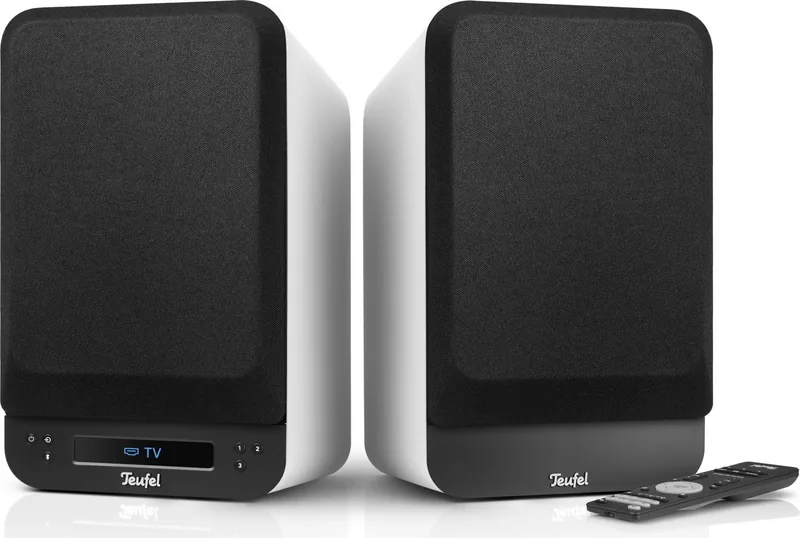
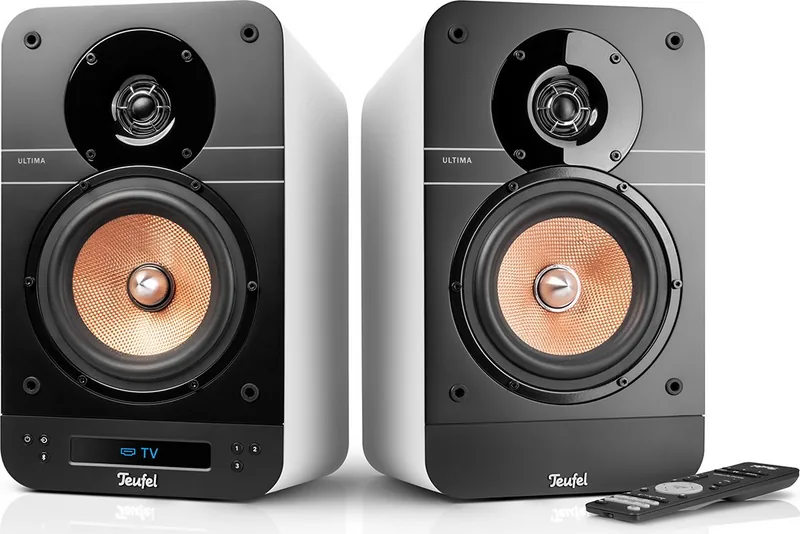
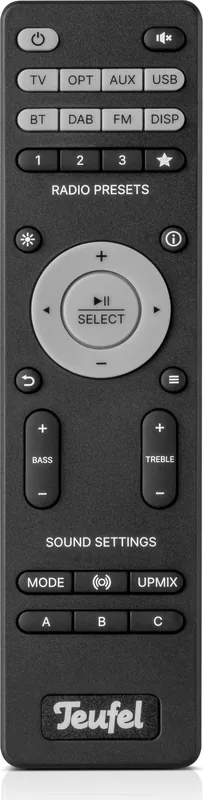
Teufel Ultima 25 Aktiv Manual
PDF manual · 42 Pages
English



Quick check
Incorrect answer, please try again.
Chat with your Teufel Ultima 25 Aktiv manual using AI
Get instant AI answers from your Teufel Ultima 25 Aktiv manual
Ask anything about the Teufel Ultima 25 Aktiv. Answers come from this manual, with the pages they are based on.
Ultima 25 Aktiv Maintenance Schedule
Remove dust with a dry leather cloth. Use a slightly damp cloth with mild soapy water for stubborn stains, then dry immediately.
Slide open the battery compartment, remove old batteries, and insert new ones of the same type (2x LR03 AAA).
Ask a Question
Do you recommend Ultima 25 Aktiv?
Yes NoFrequently Asked Questions
Press the SOURCE button on the remote or unit. Select TV, Bluetooth, USB, or Radio from the display panel.
Is this answer helpful?
Yes, pair optional subwoofer wirelessly via the Speaker menu pairing option.
Is this answer helpful?
Download file to PC, connect unit via USB, select Update in menu, confirm start.
Is this answer helpful?
It simulates a center loudspeaker to make voices and dialogue clearer during movie playback.
Is this answer helpful?
Yes, use the brightness buttons or navigate to System Display menu to set levels.
Is this answer helpful?
Go to System menu, select Reset, then Full Reset to delete user data.
Is this answer helpful?
No, it can be activated or deactivated via the Vol.-Slider menu setting.
Is this answer helpful?
Advantages and Disadvantages
Advantages

- Integrated DAB+ and FM radio tuner for seamless station streaming without additional hardware requirements.
- Versatile connectivity including HDMI ARC, Bluetooth, USB, and optical inputs for various devices.
- Dynamore Center technology simulates a center speaker to enhance dialogue clarity significantly.
- Wireless pairing capability for optional rear speakers or subwoofer for 5.1 surround sound.
- Customizable sound profiles and modes to match different content types and user preferences.
Disadvantages

- Setup process may require reference to the manual for optimal wiring and configuration details.
- Passive speakers included require correct polarity wiring to ensure quality does not suffer.
- Optional wireless expansion speakers sold separately add to the overall cost of the system.
- Menu system navigation can be complex for new users without prior experience.
- Touch slider deactivation is only possible via menu settings not physical button.
Product Specification
Type
Compact speaker
Design
2-way
Tweeter
1x 1 inch
Woofer
1x 6.5 inch
Frequency Range
41 Hz - 20 kHz
Power Handling
50 W RMS
Impedance
4 Ohm
Features
active, Bluetooth 5.0, aptX, AAC, USB-C, HDMI, Digital Audio In (optical), Stereo Line In (RCA), remote control
Dimensions (WxHxD)
8.46 x 14.37 x 9.84 inches
Weight per unit
13.23 lbs
Product Description
Discover the Sound of Home Entertainment with Teufel Ultima 25 Active
When seeking high-quality audio for your living space, the Teufel Ultima 25 Active stands out as a powerful solution for immersive listening. This active loudspeaker set combines sleek design with robust functionality, making it an ideal centerpiece for music lovers and cinephiles alike. Understanding the full potential of this equipment often requires referring to the comprehensive Teufel Ultima 25 Active Manual to unlock every feature available to you without missing setup nuances.
Versatile Connectivity Options
One of the strongest aspects of this system is its diverse connectivity options. Users can easily connect external players via cable or harness the convenience of Bluetooth playback. The integrated DAB+ and FM radio tuner allows for seamless station streaming without additional hardware. Furthermore, the HDMI ARC port enables direct audio retrieval from compatible televisions, simplifying your home theater setup. The system manages multiple inputs automatically, switching sources. Whether you prefer wired connections or wireless freedom, the setup process adapts to your needs, provided you follow the guidance found in the instructions for optimal wiring and configuration.
Sound Customization and Control
Audio enthusiasts appreciate the level of control offered by this system. The remote control and touch slider provide intuitive operation for volume and source switching. The touch slider allows for swipe gestures to adjust volume or skip tracks, while dedicated buttons handle power and source input. Inside the system menu, users can adjust bass and treble levels to match room acoustics. The Dynamore Center technology simulates a center speaker, enhancing dialogue clarity in movies significantly. Additionally, preset sound modes like Music, Movie, Voice, and Night cater to different content types efficiently. Users can even tailor their sound into three custom profiles labeled A, B, and C for personalized listening experiences.
System Expansion and Calibration
The set includes an active and passive loudspeaker, capable of forming a stereo image. For those wanting more, optional passive rear speakers or a subwoofer can be paired wirelessly to create a full 5.1 surround sound experience. The menu system guides users through calibration to set speaker distances and levels accurately. This ensures sound waves arrive at the listening position simultaneously, creating a balanced surround effect that eliminates echo issues. Regular maintenance, such as software updates via USB connection, keeps the device future-proof against new audio standards.
Installation and Care
Proper placement is crucial for audio performance. Loudspeakers should be positioned on stable surfaces with sufficient ventilation to prevent overheating. Protecting the surface during installation helps reduce unwanted vibrations. For cleaning, a dry soft cloth is recommended to avoid moisture damage. Replacing batteries in the remote control is straightforward, ensuring long-term usability. By utilizing the detailed instructions available, you ensure longevity and peak performance. Whether upgrading an existing setup or building a new one, this speaker set delivers consistent quality and reliability for years of enjoyment.
Search for 67,706 Manuals online


Type-in Brand or Model