
Tesla Smart Plug Manual
PDF manual · 56 Pages
English



Quick check
Incorrect answer, please try again.
Chat with your Tesla Smart Plug manual using AI
Get instant AI answers from your Tesla Smart Plug manual
Ask anything about the Tesla Smart Plug. Answers come from this manual, with the pages they are based on.
Ask a Question
Do you recommend Smart Plug?
Yes NoFrequently Asked Questions
The device supports a maximum power consumption of 3680 Watts with a current limit of 16 Amps. Do not connect devices exceeding this rating to avoid overheating or fire hazards.
Is this answer helpful?
No, the device exclusively connects to 2.4GHz Wi-Fi networks. Please verify your router settings ensure two-line capability if needed.
Is this answer helpful?
Hold the power button for five seconds until lights blink rapidly indicating setup mode readiness. Follow app prompts to reconnect after resetting settings completely.
Is this answer helpful?
Never wet the unit. Clean only with a soft dry cloth. Water exposure causes electric shock or equipment damage risk significantly.
Is this answer helpful?
No. Operate only indoors within 0 to 35 degree Celsius range. High humidity or rain leads to dangerous malfunctions.
Is this answer helpful?
Recycle at designated e-waste points. Follow Directive 2012/19/EU. Do not trash with regular waste.
Is this answer helpful?
Tesla Global Limited based in Hong Kong. Visit tsl.sh/doc for EU conformity documents.
Is this answer helpful?
Advantages and Disadvantages
Advantages

- High power capacity of 3680 watts handles heavy appliances.
- Simple 2.4GHz Wi-Fi setup with app guidance.
- Compact design fits standard wall outlets easily.
- Supports WPA2 encryption for secure data.
- Multi-language manual available for global users.
Disadvantages

- Only supports 2.4GHz networks excluding faster bands.
- Requires mandatory account registration to operate fully.
- Strict temperature limits prevent outdoor winter use.
- Cannot be repaired if internal components fail.
- Disposal requires special e-waste facility processing.
Product Specification
Type
Sensor, Actuator
Standard
WiFi (802.11b/g/n)
Function
Switched Outlet (on/off), Power Measurement
Dimensions
2.05 x 2.05 x 3.23 in
Features
App controllable (Android, iOS), Voice Assistant (Amazon Alexa, Google Assistant)
Product Description
Revolutionizing Modern Living Spaces with Intelligent Power Control
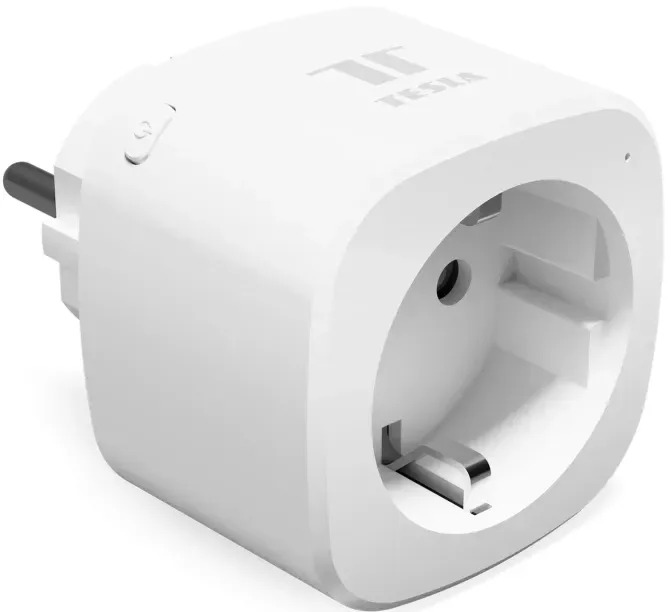
Smart home technology continues to evolve rapidly providing homeowners with unprecedented control over their daily living environments today. The Tesla Smart Plug 3680W Type F Smart Socket Manual guides users through setting up this powerful device effectively every single time. This unit stands out due to its high power handling capabilities reaching up to 3680 watts maximum load rating consistently. Such strength allows connection of demanding appliances without risk of tripping breakers immediately upon activation safely. Integrating this tool into your routine brings enhanced convenience alongside potential energy savings through scheduled automation features managed remotely via smartphone applications easily.
Seamless Installation Process Overview
Connecting the hardware requires downloading a specific companion app from trusted online marketplaces like Google Play or Apple Store regularly. Once installed users create an account using either email address or registered mobile phone number credentials provided securely. A vital step involves confirming your wireless router supports the 2.4GHz band since newer 5GHz networks may not pair successfully always. Simply press the front button for five seconds until flashing lights confirm readiness for pairing mode clearly. The software then scans automatically and requests confirmation to bind the new gadget securely within minutes fast. This intuitive workflow eliminates complex networking knowledge requirements for average consumers seeking basic functionality improvements quickly now.
Detailed Operational Parameters Explained
Internal components function best when ambient temperatures stay between zero and thirty five degrees celsius continuously day and night. Relative humidity levels should remain below sixty five percent to prevent internal corrosion or short circuit formation over time permanently. Security features include standard WEP WPA and WPA2 encryption algorithms protecting data packets transmitted across local area networks effectively. Wireless signals operate efficiently on channels one through thirteen providing flexible placement options even near other electronics interference zones smoothly. Ventilation slots must never be blocked ensuring heat dissipates correctly during peak load scenarios preventing fire hazards effectively everywhere.
Cleaning Protocols and Safe Disposal
Routine upkeep demands gentle wiping using only soft dry materials avoiding liquid contact entirely on surfaces aggressively. Aggressive chemical solvents can degrade plastic housings leading to premature failure requiring replacement sooner than expected unfortunately. When reaching end of useful life proper recycling procedures apply under European Union waste electrical directives strictly prohibiting landfill dumping alone always. Contact authorized service centers for correct drop off locations minimizing environmental harm while retaining valuable raw materials responsibly together. Referencing the Tesla Smart Plug 3680W Type F Smart Socket Manual periodically ensures all safety warnings remain fresh in memory preventing accidents during long term usage cycles involving thousands of switch events annually consistently.
Important Notes
Always read safety warnings before connecting power to avoid shock. Keep away from children and pets to prevent accidental touching. Update firmware regularly if supported by manufacturer updates posted online for security patches. Consult customer support for warranty claims regarding defects found during purchase period. Do not expose to extreme cold or direct sunlight ever. Ensure plug is fully inserted before turning on appliance. Unplug before cleaning sockets thoroughly to stop electricity flow. Save user manual for future reference and troubleshooting assistance needed later.
Search for 67,732 Manuals online


Type-in Brand or Model