
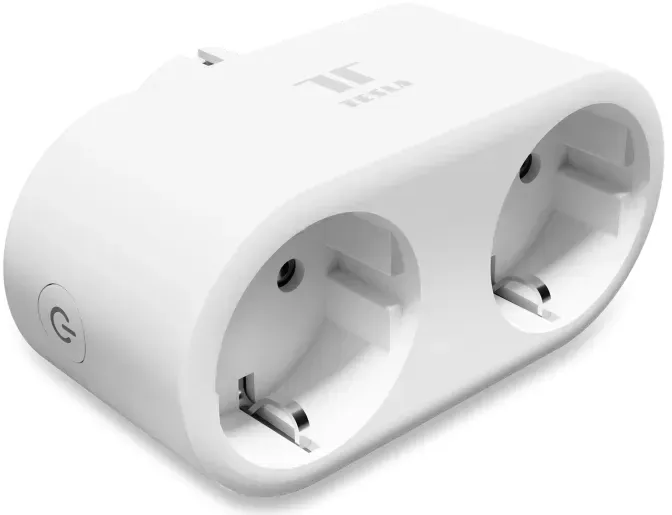
Tesla Smart Plug Dual Manual
PDF manual · 56 Pages
English



Quick check
Incorrect answer, please try again.
Chat with your Tesla Smart Plug Dual manual using AI
Get instant AI answers from your Tesla Smart Plug Dual manual
Ask anything about the Tesla Smart Plug Dual. Answers come from this manual, with the pages they are based on.
Ask a Question
Do you recommend Smart Plug Dual?
Yes NoFrequently Asked Questions
This device supports a maximum power load of 3680 watts under standard conditions with a single outlet current rating of 16 amps.
Is this answer helpful?
Download the app from stores, register an account, and hold the power button for over five seconds until the LED flashes fast. Select the device in the app and confirm.
Is this answer helpful?
No, the specification indicates support covers 2.4 gigahertz networks exclusively. Ensure your router broadcasts on 2.4GHz for successful linking.
Is this answer helpful?
Avoid using it in high-humidity environments or near water. Keep the unit dry and do not operate with wet hands to prevent electrical shock.
Is this answer helpful?
Do not discard in general municipal trash bins. Use designated recycling centers authorized for technical equipment to minimize negative environmental impacts.
Is this answer helpful?
Discontinue usage immediately if unusual smells or heat arise. Thermal protection mechanisms may trigger, but contacting customer support is recommended for safety.
Is this answer helpful?
Yes, once paired, the integration creates a responsive smart ecosystem tailored to your schedule allowing centralized control through the application list.
Is this answer helpful?
Advantages and Disadvantages
Advantages

- High power capacity supporting up to 3680 watts for heavy appliances.
- Easy mobile app setup with automatic Wi-Fi password fetching.
- Robust safety features including thermal protection mechanisms.
- Compatible with 2.4GHz networks for stable connectivity.
- Environmentally compliant for recycling and proper disposal.
Disadvantages

- Requires 2.4GHz Wi-Fi which excludes some 5GHz routers.
- Not waterproof or suitable for outdoor damp locations.
- Manual installation required for initial network pairing.
- Limited color options for matching home decor themes.
- No built-in energy meter visible in standard display.
Product Specification
Type
Sensor, Actuator
Standard
Wi-Fi (802.11b/g/n)
Function
Switchable Socket (on/off), Power Measurement Function
Features
App Controlled (Android, iOS), Voice Assistant (Amazon Alexa, Google Assistant)
Product Description
Tesla Smart Plug Overview
Transform your home environment into a fully automated system using the Tesla Smart Plug Dual 2-Way, 3680W, Type F, Smart Socket. This versatile gadget allows you to manage electricity consumption effectively while enjoying modern lifestyle conveniences. You can control lighting and small appliances from your mobile phone without physical interaction. The unit provides reliable performance across a wide voltage range compatible with European standards. Maximizing your power efficiency starts here.
Power Capacity and Usage Scenarios
The device supports a maximum power load of 3680 watts under standard conditions. With a single outlet current rating of 16 amps, it accommodates many common household items. Suitable applications include lamps, fans, and low-power heating elements. However, exceeding these limits may trigger thermal protection mechanisms. Always check the specifications of connected gear before plugging them in. This prevents circuit overloads and protects your investment.
Seamless Connectivity and Application Control
Connecting involves downloading the Tesla Smart App from major digital marketplaces. Registration uses either email or phone number verification. To pair the device, hold the power button for more than five seconds until LEDs flash twice per second. Select the device type in the menu interface and confirm settings. The app fetches your Wi-Fi password automatically for faster linking. Support covers 2.4 gigahertz networks exclusively. Many users appreciate the instant feedback provided by the application regarding connection status. Integration with existing home networks does not require additional hubs or gateways typically. Firmware updates push improvements directly over the wireless link without interruption.
Operational Safety Guidelines and Maintenance Protocols
User safety must remain paramount during daily operations. Never operate wet hands near electrical components or liquids. Avoid direct sunlight exposure and humid environments to extend lifespan. Clean surfaces with dry cloths only, avoiding chemical solvents. Discontinue usage immediately if unusual smells or heat arise. Contact customer support services for troubleshooting assistance rather than attempting repairs yourself.
Environmental Responsibility and Disposal Instructions
Electronic waste management requires adherence to local directives. The symbol indicates separate collection is mandatory for proper handling. Do not discard in general municipal trash bins. Utilize designated recycling centers authorized for technical equipment. Correct disposal minimizes negative impacts on human health and nature. Further details are available via official websites or vendor support channels to ensure compliance.
Useful Configuration Notes
Keep the unit dry and clean continuously during active periods. Recommended storage temperatures range from minus ten degrees to plus forty degrees celsius. Operational humidity should not exceed sixty-five percent relative air moisture. Verify your internet router broadcasts on the correct frequency band. Regular updates maintain security standards for connected networks. These factors contribute to optimal reliability throughout the device life cycle. Automate morning routines by turning on coffee makers automatically. Turn off unused chargers overnight to save phantom power costs. The integration creates a responsive smart ecosystem tailored to your schedule.
Search for 67,732 Manuals online


Type-in Brand or Model