
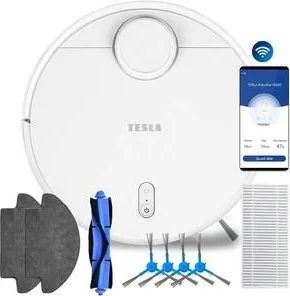
Tesla RoboStar iQ600 Manual
PDF manual · 85 Pages
English



Quick check
Incorrect answer, please try again.
Chat with your Tesla RoboStar iQ600 manual using AI
Get instant AI answers from your Tesla RoboStar iQ600 manual
Ask anything about the Tesla RoboStar iQ600. Answers come from this manual, with the pages they are based on.
RoboStar iQ600 Maintenance Schedule
Clean by tapping or using a dust brush. Do not clean with fingers or brushes. Allow to dry thoroughly before reinstallation.
Wipe cliff sensors, wall following sensor, and laser signal transmitter with a soft, dry cloth. Ensure front bumper is not blocked.
Remove hair and debris from the main central brush and both side brushes. Check air intake opening for blockages.
Keep free of hair and dust. Remove the center guide, clean the wheel axis, and reinstall it.
Disconnect station from power. Clean robot and base contacts with a soft cloth.
If the device is not used for a long time, charge the battery once every three months to prevent complete discharge.
Replace the HEPA filter at least every 6 months. Replace sooner if wear or dirt is detected.
Empty the dust tank into a trash can after each use. If washed with water, dry thoroughly before reinstalling.
Free maintenance reminders
Timed to your purchase date. Always free, unsubscribe anytime.
Ask a Question
Do you recommend RoboStar iQ600?
Yes NoFrequently Asked Questions
No, this device is designed strictly for indoor use on flat surfaces. Using it outside or on balconies without barriers poses safety risks.
Is this answer helpful?
Download the TESLA app, enable Bluetooth and GPS, place the robot near your router, and follow the pairing instructions in the app settings.
Is this answer helpful?
Yes, the laser sensor meets Class 1 safety standards (IEC 60825-1), making it safe for humans and animals.
Is this answer helpful?
Black surfaces can confuse optical sensors. Ensure good lighting or create a virtual wall in the app to avoid these areas.
Is this answer helpful?
It is recommended to replace the HEPA filter every six months or sooner if it appears worn or heavily soiled.
Is this answer helpful?
No, only rinse the filter with clean water. Detergents can damage the filtration material and void the warranty.
Is this answer helpful?
Advantages and Disadvantages
Advantages

- Advanced laser navigation for precise mapping
- Smart app control with virtual wall features
- High-capacity Li-Ion battery for extended use
- Effective HEPA filtration improves air quality
- Seamless transition between vacuuming and mopping
Disadvantages

- Not suitable for outdoor or commercial use
- Laser sensors may struggle with very dark surfaces
- Requires strong WiFi signal for full functionality
- Mop module must be removed before vacuuming carpets
- Battery warranty limited to six months capacity
Product Specification
Cleaning Robot
Battery
1x Battery (6.4Ah)
Color
white
Capacity
300ml dust, 230ml fresh water
Cleaning Modes
Vacuum, Vacuum & Mop
Navigation
Obstacle sensor, Drop sensor, Wall-following sensor, Laser sensor, Virtual wall
Filtration
Washable HEPA filter
Display
No
Features
1x Floor brush (rubber+bristles), 2x Side brushes, 1x Mopping attachment, programmable cleaning times, brushless motor
Smart Home
App control (Wi-Fi)
Runtime
220min
Charging System
Automatic
Dimensions
14.0x3.7in (DxH)
Weight
7.72lbs
Package Contents
Station, Mopping mop attachment, 2x replacement brushes, microfiber cloth
Station
Station Color
white, black
Station Display
No
Station Features
Automatic charging function
Product Description
Experience the Future of Cleaning with Tesla RoboStar iQ600
The Tesla RoboStar iQ600 Vacuum and Mop Robot White represents a significant leap in home automation technology. Designed for the modern household, this sleek device combines powerful suction with intelligent wet mopping capabilities to deliver a spotless floor without lifting a finger. Its white finish complements any interior decor while hiding dust effectively during operation.
Equipped with advanced laser navigation and ultrasonic sensors, the iQ600 maps your home with precision, ensuring no corner is missed. The robot intelligently identifies obstacles, avoids drops from stairs or balconies, and creates virtual walls via the dedicated TESLA app to protect sensitive areas like rugs or pet bowls. The high-capacity Li-Ion battery ensures long-lasting performance, automatically returning to its charging dock when power runs low.
Maintenance is straightforward thanks to the 2-in-1 dust and water tank system. Users can easily empty debris after every run and refill the water reservoir for mopping sessions. The HEPA filtration system traps fine dust particles, improving indoor air quality. Whether you have hard floors, tiles, or sealed wood, the Tesla RoboStar iQ600 adapts its cleaning strategy to provide optimal results. It operates quietly enough not to disturb daily life yet powerfully enough to tackle deep-seated dirt. With seamless smartphone integration, you can schedule cleanings, monitor progress in real-time, and control the robot from anywhere.
Important Maintenance Notes
Regular care is essential for peak performance. Clean the side brushes and main roller weekly to prevent hair tangles. Wipe the sensors monthly to ensure accurate navigation. Always dry the HEPA filter completely before reinstalling it to maintain suction power. Avoid using harsh chemicals on the unit, as they may damage the plastic casing.
Search for 67,732 Manuals online


Type-in Brand or Model