
TerraMaster F2-221 Manual
PDF manual · 13 Pages
English


Quick check
Incorrect answer, please try again.
Chat with your TerraMaster F2-221 manual using AI
Get instant AI answers from your TerraMaster F2-221 manual
Ask anything about the TerraMaster F2-221. Answers come from this manual, with the pages they are based on.
Ask a Question
Do you recommend F2-221?
Yes NoFrequently Asked Questions
The F2-221 is powered by an Intel Celeron J3355 dual-core processor and comes with 2GB of RAM preinstalled, providing efficient performance for file serving, backups, and light media tasks.
Is this answer helpful?
The unit has two Gigabit Ethernet ports that support link aggregation to increase bandwidth or failover for higher availability, useful for small office setups or when improved throughput and redundancy are needed.
Is this answer helpful?
The F2-221 supports 2.5" and 3.5" SATA HDDs and 2.5" SATA SSDs. Drive trays simplify installation and, depending on configuration, the device supports hot-swap operations so drives can be replaced without shutting down in compatible setups.
Is this answer helpful?
It runs TerraMaster Operating System (TOS). Initialisation is performed via the TNAS PC app which discovers the NAS on the local network, guides TOS installation (online or manual), runs drive checks, sets admin credentials, and configures RAID and file systems.
Is this answer helpful?
The F2-221 supports Btrfs (default) and EXT4 file systems. During initialisation you can create RAID arrays — choose the RAID type appropriate for the number of drives; formatting will erase existing data, so back up beforehand.
Is this answer helpful?
Yes. TerraMaster provides a TNAS mobile app for iOS and Android. After initial setup and creating user credentials, you can log into the app to browse files, stream media, and manage basic NAS functions remotely on the same network or via proper remote access configuration.
Is this answer helpful?
Yes. TerraMaster advises using only the supplied power adapter. Using third-party adapters can damage the device or cause safety issues and may void warranty coverage.
Is this answer helpful?
Advantages and Disadvantages
Advantages

- Efficient Intel Celeron J3355 CPU for low-power everyday NAS tasks.
- Dual Gigabit LAN for link aggregation and network redundancy.
- Compact two-bay design with hot-swap capable drive trays.
- TOS ecosystem with app store, Samba/AFP support, and mobile access.
- Supports Btrfs (default) and EXT4 with RAID configuration options.
Disadvantages

- 2GB RAM may limit performance for heavy multitasking or many apps.
- Not intended for enterprise virtualization or very high I/O workloads.
- Single USB 3.0 port and one USB 2.0 port limit direct peripheral expansion.
- Requires compatible, high-quality drives for long-term reliability.
- Relies on supplied power adapter; third-party adapters may cause damage.
Product Specification
Hard Drive
N/A
Internal
2x 2.5"/3.5", SATA 6Gb/s, Hot-Swap
External
2x Gb LAN
Additional Ports
2x USB-A 3.0
RAID Level
0/1/JBOD
CPU
Intel Celeron J3355, 2C/2T, 2.00-2.50GHz, 2MB Cache, 10W TDP, Codename "Apollo Lake" (Goldmont, Intel 14nm)
RAM
2GB DDR3L (2GB soldered, 1 slot free, max. 10GB)
Fan
1x 3.15in, 18.6dB(A)
Power Consumption
25.6W (operation), 2W (idle)
Dimensions
4.69x8.94x5.24in (WxHxD)
Weight
3.22 lbs
Special Features
256bit AES encryption, FTP Server, iSCSI, WebDAV, DLNA, iTunes Server, 4K Transcoding
Warranty
24 Months
USB Notation
Link
Product Description
TerraMaster F2-221 — Compact, Reliable Two-Bay NAS
The TerraMaster F2-221 combines efficient hardware and user-friendly software in a compact two-bay NAS designed for home and small office use. Powered by an Intel Celeron J3355 dual-core processor and 2GB of RAM, the F2-221 delivers solid everyday performance for file storage, backups, media streaming, and light virtualization tasks. Dual Gigabit Ethernet ports provide flexible network configurations, link aggregation, or failover for improved throughput and redundancy.
Design and Hardware
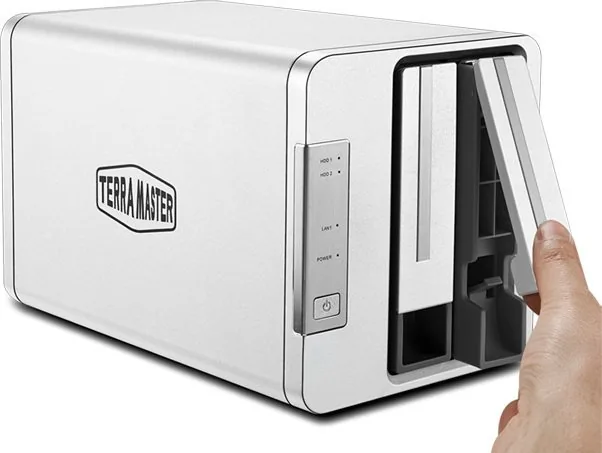
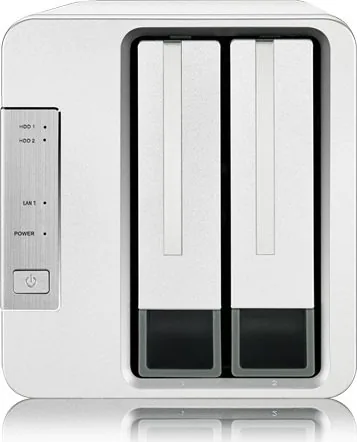
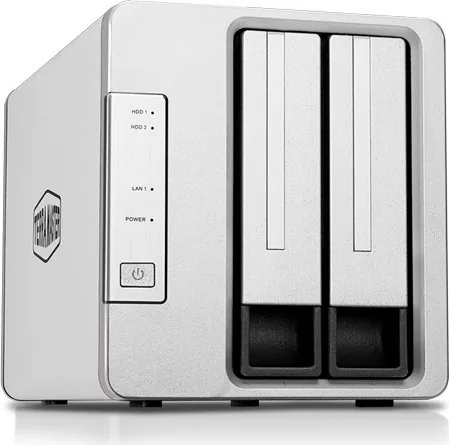
The F2-221 is built around a slim chassis that accepts 2.5" or 3.5" SATA drives (HDD or SSD). Drive trays simplify installation and support hot-swap operations on compatible setups. The unit includes front drive indicators and rear ports such as one USB 3.0 and one USB 2.0 host, plus a DC 12V power input. TerraMaster recommends using their supplied power adapter and consulting the hard drive compatibility list to ensure longevity and reliability.
Performance and Networking
The Intel Celeron J3355 provides efficient, low-power compute for routine NAS tasks. With 2GB RAM preinstalled, the device handles file serving, media transcoding at modest levels, and common NAS applications well. The two Gigabit LAN ports support link aggregation for increased bandwidth or failover for improved uptime, making the F2-221 a practical choice for small teams or power users who need steady networked storage.
Software: TOS Ecosystem
TerraMaster Operating System (TOS) is the platform powering the F2-221. Initial setup uses TNAS PC to discover the device on the local network, install TOS (online or manual), and guide users through drive checks, RAID creation (EXT4 or Btrfs), and administrator setup. TOS includes an app store for additional services, supports Samba and AFP for file sharing, drive mapping on Windows, and mobile access through the TNAS mobile app for iOS and Android.
Setup and Maintenance
Setup is straightforward: mount drives, connect network and power (use the supplied adapter), boot the unit, and run the TNAS PC to initialise. Initialisation walks through hard drive health checks, TOS installation, admin credentials, and RAID configuration. Indicators and buzzer signals help diagnose drive or system issues; the unit reports drive health, network status, and boot/shutdown events.
Who Should Choose the F2-221?
This model suits home users, creatives, and small offices needing a reliable, affordable NAS with basic redundancy, network flexibility, and an extensible app ecosystem. It’s not aimed at heavy virtualization or enterprise-scale workloads but excels for centralized backups, media libraries, and collaborative file storage.
Notes
- Default file system is Btrfs; EXT4 is also supported.
- Use the official power adapter to avoid damage.
- Back up data before RAID creation or drive formatting.
- Consult TerraMaster’s compatibility list for recommended drives.
Search for 67,706 Manuals online


Type-in Brand or Model