
TerraMaster D8 Thunderbolt 3 Manual
PDF manual · 9 Pages
English


Quick check
Incorrect answer, please try again.
Chat with your TerraMaster D8 Thunderbolt 3 manual using AI
Get instant AI answers from your TerraMaster D8 Thunderbolt 3 manual
Ask anything about the TerraMaster D8 Thunderbolt 3. Answers come from this manual, with the pages they are based on.
Ask a Question
Do you recommend D8 Thunderbolt 3?
Yes NoFrequently Asked Questions
It is used as a high-speed external storage enclosure for building RAID arrays, expanding storage capacity, and managing large files more efficiently. It is well suited for backups, media work, and data-heavy tasks.
Is this answer helpful?
Mac users may be able to proceed more directly, but Windows users often need Thunderbolt 3 and RAID drivers before the device is properly recognized. The required software should be installed from the manufacturer’s support area or the computer maker’s site.
Is this answer helpful?
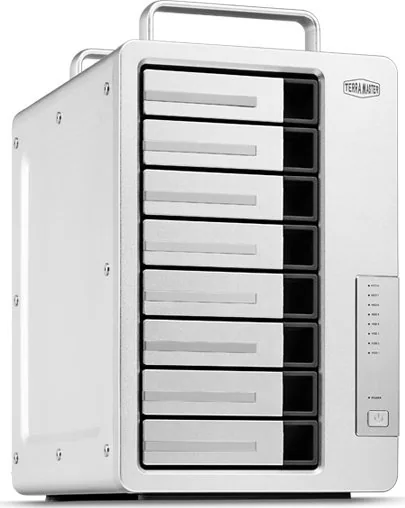
It supports 3.5-inch SATA enterprise hard drives, NAS drives, SSHD hybrid drives, and 2.5-inch SSDs that meet the SATA compatibility requirements. This gives users flexibility when choosing speed, capacity, or cost efficiency.
Is this answer helpful?
Install the drives, connect the unit, power it on, and open RAID Manager Pro. After logging in, choose the array type, select the target drives, and create the array. Existing array data may need to be deleted first.
Is this answer helpful?
After creating the array, you must initialize and format it before storing data. On Mac, this is done through Disk Utility. On Windows, use Disk Management to initialize and format the unallocated disk.
Is this answer helpful?
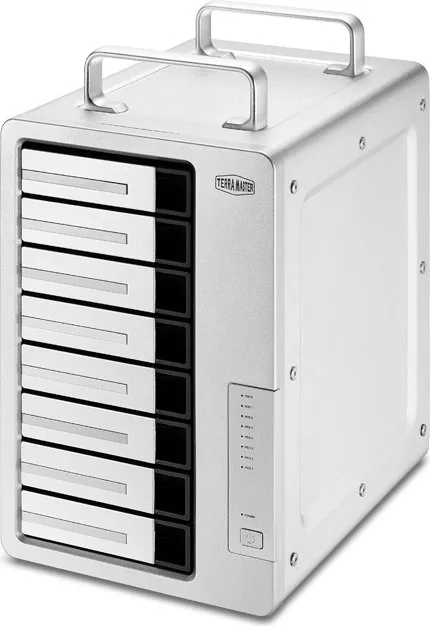
The indicators show drive activity, power status, sleep mode, and fault conditions. For example, flashing activity usually means data is being read or written, while red alerts can indicate drive failure or array damage.
Is this answer helpful?
Advantages and Disadvantages
Advantages

- Fast Thunderbolt 3 connectivity supports high-speed data transfer for demanding storage tasks.
- Compatible with multiple drive types, including HDDs, SSDs, and enterprise-grade SATA media.
- RAID Manager Pro simplifies array creation, management, and storage optimization.
- Clear status indicators help users monitor power, activity, sleep mode, and drive health.
Disadvantages

- Windows users may need to install Thunderbolt and RAID drivers before the device is recognized.
- RAID setup and formatting add extra steps compared with a basic plug-and-play enclosure.
- The original power adapter must be used, which limits replacement flexibility.
Product Specification
Form factor
3.5"
Internal connection
8x SATA 6Gb/s (3.5"/2.5")
External connection
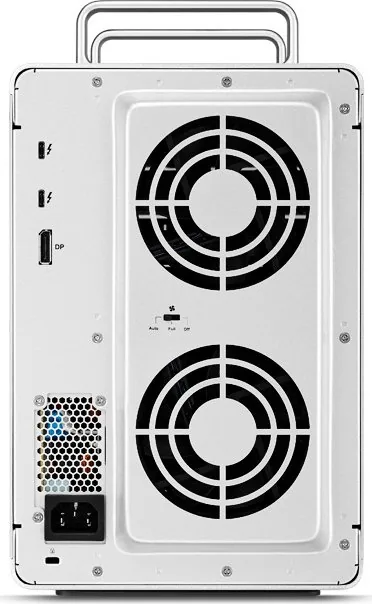
2x Thunderbolt 3 (40Gb/s), 1x DisplayPort 1.2
RAID level
0/1/5/6/10/JBOD
Fan
2x 3.54 in
Dimensions
12.40x10.47x7.24in
Color
silver
Special features
Aluminum housing
Manufacturer's warranty
two years
Product Description
TerraMaster D8 Thunderbolt 3: A Practical High-Speed Storage Enclosure for Creative Workflows
The TerraMaster D8 Thunderbolt 3 is built for users who need fast, flexible storage with straightforward setup. Designed around Thunderbolt 3 connectivity, it aims to deliver the speed and reliability needed for large media files, backups, and RAID-based storage workflows. With support for multiple drive types, it can fit a range of use cases, from general file storage to more demanding professional environments.
One of the standout qualities of the TerraMaster D8 Thunderbolt 3, 2x Thunderbolt 3 Manual setup is its emphasis on usability. The enclosure supports both Windows and Mac systems, with clear guidance for installing the required Thunderbolt and RAID drivers when needed. That makes it easier for users to get started, especially if they are new to external RAID hardware or are moving from single-drive storage to a more advanced solution.
Hardware connection is simple: install the drives, connect the Thunderbolt 3 cable, attach power, and turn the unit on. The front panel indicators help users quickly check drive activity, power state, and potential faults, while the rear panel includes Thunderbolt 3 and DP connectivity. This creates a practical balance between performance and convenience for users who may want to connect storage and display equipment in the same workflow.
For storage management, the device works with RAID Manager Pro, which helps users create arrays, manage disks, and maintain data organization. This is especially useful for anyone prioritizing speed, redundancy, or efficient storage expansion. The manual also highlights the need to initialize and format arrays before use, making the setup process clear from start to finish.
In everyday use, the TerraMaster D8 Thunderbolt 3 is a strong fit for content creators, office teams, and technical users who want dependable external storage with advanced RAID options. Its broad compatibility with SATA hard drives and SSDs adds flexibility, while the Thunderbolt 3 interface keeps performance responsive for large transfers.
Notes
- Use only the original power adapter.
- Install drivers first on Windows if required.
- Initialize and format arrays before storing data.
- RAID Manager Pro is the key tool for array creation and management.
Search for 67,706 Manuals online


Type-in Brand or Model