
Technoline WS 9215 Manual
PDF manual · 171 Pages
English



Quick check
Incorrect answer, please try again.
Chat with your Technoline WS 9215 manual using AI
Get instant AI answers from your Technoline WS 9215 manual
Ask anything about the Technoline WS 9215. Answers come from this manual, with the pages they are based on.
WS 9215 Maintenance Schedule
Recommended to ensure optimum accuracy. Use recommended alkaline battery types.
Remove immediately to avoid leakage and damage. Do not use solvents or scouring agents for cleaning.
Free maintenance reminders
Timed to your purchase date. Always free, unsubscribe anytime.
Ask a Question
Do you recommend WS 9215?
Yes NoFrequently Asked Questions
The station receives outdoor temperature data every four seconds automatically. This ensures real-time monitoring of changes in the weather environment. Users will see updates on the display screen rapidly.
Is this answer helpful?
You can find compatible AA and AAA alkaline batteries at any local retailer. The manual recommends using high quality alkaline cells for best longevity. Replace them when the low battery icon appears on the screen.
Is this answer helpful?
Yes, the DCF 77 signal includes time zone and DST updates automatically. The station synchronizes its internal clock to the atomic broadcast. Manual setting remains possible if signal reception fails completely.
Is this answer helpful?
The maximum transmission range is approximately 100 meters in open fields. Walls and interference reduce this distance significantly. Keep the sensor and base within reasonable proximity for best results.
Is this answer helpful?
You can manually reset all min and max memory values using the reset key. Holding the button for three seconds clears the stored data to current readings. This allows the cycle to start fresh for tracking new trends.
Is this answer helpful?
Both options are supported by the design including a hanging hook and stand. Ensure the wall mount location is sheltered from rain if it is the base. The sensor can also be mounted on a wall bracket provided.
Is this answer helpful?
The system relies on air pressure changes to update forecast icons. If pressure is stable, the icons will remain static even if weather is sunny. Absolute precision is not guaranteed for all climates.
Is this answer helpful?
Advantages and Disadvantages
Advantages

- Radio controlled time syncs automatically to atomic standard for perfect accuracy.
- Wireless outdoor transmitter works up to 100 meters with clear visibility.
- Tracks minimum and maximum temperatures for historical indoor and outdoor data.
- Simple four button interface allows easy setup and manual adjustments.
- Weather trend indicators predict pressure changes before weather worsens or improves.
Disadvantages

- Battery reset required if units are opened while transmitting security codes active.
- Weather forecast is based on pressure only and may vary in accuracy.
- Outdoor transmitter range reduces significantly near metal structures or concrete.
- Only accepts one outdoor transmitter signal at a time for pairing.
- LCD display icons do not show calendar during normal daily viewing mode.
Product Specification
Type
digital
Temperature
indoor and outdoor
Humidity
No
Weather Forecast
Icons
Forecasting Technology
Barometer
Additional Displays
Time (Radio Controlled), Recorded min./max. Values, Battery Replacement Indicator
Alarms
Wake-up Time
Placement
Desktop Device, Wall Mounting Possible
Power Source
2x AAA Battery (Outdoor Sensor), 2x AAA Battery (Base Station)
Color
Silver, Black
Package Contents
1 Outdoor Sensor
Product Description
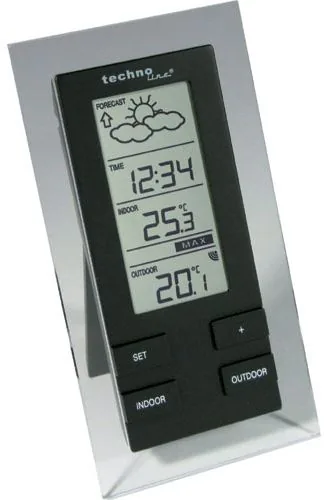
Discover Precision Weather Tracking with the WS 9215
Enhance Your Home Environment Control
Keeping track of environmental conditions is easier than ever with the technoline WS 9215 Digital Wireless Weather Station. This innovative device brings professional meteorological data right to your desktop or wall. The unit features a wireless 868 MHz transmitter that communicates outdoor temperatures reliably up to 300 feet under ideal conditions. Users appreciate the dual temperature monitoring that tracks indoor and outdoor climates simultaneously.
Accurate Timekeeping with Automated Updates
One standout feature is the DCF 77 radio controlled clock. Instead of manually checking the time against a phone, this station syncs automatically to an atomic clock signal. This ensures precise time even during daylight saving changes. The display offers clear 24-hour formats and calendar functions. You can also adjust time zones manually if needed for specific regions.
Weather Predictions Based on Pressure
The weather forecast section uses barometric pressure trends to predict changes. Icons indicate sunny, cloudy, or rainy conditions alongside arrows showing improving or worsening trends. While not perfect, the accuracy exceeds 70 percent in most stable climates. It is best used for planning daily activities rather than severe storm warnings. Users should allow a calibration period after initial setup.
Easy Setup and Maintenance
Detailed instructions for configuration are available via the technoline WS 9215 Digital Wireless Weather Station Manual to ensure optimal configuration. The setup process requires minimal effort. Simply install the provided alkaline batteries into the base and remote sensor. Although we advise reading the guide for best results, the interface is intuitive with only four buttons.
Versatile Placement Options
You can hang the main unit from a wall or stand it on a table using the detachable base. The outdoor sensor also offers flexible mounting in the garden or on the opposite wall. It is weather-resistant and designed to withstand rain or snow for long periods. Just ensure there is a clear path for the signal between both units to avoid interference from metal frames. Regular battery replacement maintains optimal performance for years without constant intervention. The low battery icons alert you well before power loss occurs. Plus, the device stores historical min and max temperatures for deeper analysis of climate patterns. This added data helps you understand extreme fluctuations in heat or cold throughout your daily routine. Ultimately, this system provides reliable data for gardening, health monitoring, or general curiosity. It combines functionality with aesthetic design suitable for modern homes. Enjoy accurate climate insights without complex installations or subscriptions.
Search for 67,706 Manuals online


Type-in Brand or Model