
Technoline WS 9140-IT Manual
PDF manual · 94 Pages
English



Quick check
Incorrect answer, please try again.
Chat with your Technoline WS 9140-IT manual using AI
Get instant AI answers from your Technoline WS 9140-IT manual
Ask anything about the Technoline WS 9140-IT. Answers come from this manual, with the pages they are based on.
WS 9140-IT Maintenance Schedule
Replace batteries in all units regularly to ensure optimum accuracy. Battery life is approximately 12 months.
Clean only with a soft damp cloth. Do not use solvents or scouring agents.
Free maintenance reminders
Timed to your purchase date. Always free, unsubscribe anytime.
Ask a Question
Do you recommend WS 9140-IT?
Yes NoFrequently Asked Questions
This station supports only one outdoor temperature transmitter. You must ensure the single sensor is powered and paired correctly within thirty seconds of the base station activation to sync the security code.
Is this answer helpful?
The main station uses two 1.5 V AA batteries. The outdoor transmitter uses two 1.5 V AAA batteries. Replace them when the low battery icon appears on the display.
Is this answer helpful?
Press and hold the MIN/MAX RESET key for three seconds. This action simultaneously clears all stored minimum and maximum values for both indoor and outdoor data.
Is this answer helpful?
Yes. You can manually set the hour and minute using the function keys. However, the unit will continue attempting to receive the DCF signal in the background.
Is this answer helpful?
The range is typically up to 100 meters in open space. Distances can be shorter due to walls or metal obstructions affecting the 433 MHz signal.
Is this answer helpful?
Yes. When the alarm sounds, pressing the MIN/MAX RESET key activates snooze. It will sound again after ten minutes if not fully stopped.
Is this answer helpful?
The alarm duration is approximately 85 seconds before it stops, unless snooze is used or keys are pressed to disable it.
Is this answer helpful?
Advantages and Disadvantages
Advantages

- Radio controlled DCF 77 clock ensures accurate time
- Wireless data transmission up to 100 meters distance
- Built-in alarm with snooze function for convenience
- LCD display shows MIN/MAX temperature values clearly
- Low battery indicator prevents unexpected power failure
Disadvantages

- Only accepts one outdoor transmitter at a time
- Battery life depends on alkaline battery quality
- Strong interference can block 433 MHz signals
- Setup requires specific timing for pairing codes
- LCD may be hard to read in direct sunlight
Product Specification
Type
digital
Temperature
indoors and outdoors
Other Indicators
Time (Radio Clock), Date, stored min./max. values
Alarms
Alarm
Mounting
Wall mounting possible
Power Supply
2x AA batteries (Outdoor sensor), 2x AA batteries (Base station)
Color
silver, black
Package Contents
1 outdoor sensor
Product Description
Discover Precision with the Technoline WS 9140-IT Wireless Weather Station Digital
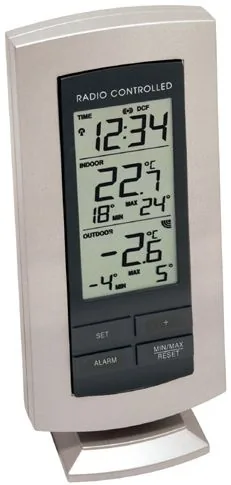
Are you looking to keep your home climate perfectly controlled? The Technoline WS 9140-IT Wireless Weather Station Digital offers a sophisticated solution for monitoring both indoor and outdoor conditions. This innovative device utilizes advanced wireless technology to provide real-time data right at your fingertips. Whether placed in a busy office or a cozy living room, this station ensures you are always informed about the changing weather. It represents the perfect intersection of functionality and modern design for household management.
The core of this system is its reliable wireless transmission. Operating on a 433 MHz frequency, the outdoor temperature transmitter sends data up to 100 meters away without interruption. This allows for versatile placement options. You can mount the outdoor sensor on a wall or set it up on a flat surface while keeping the main station indoors. The indoor unit displays current temperatures, along with recorded minimum and maximum values, helping you track trends over time. It measures indoor range from -9 to +38 degrees Celsius and outdoor from -50 to +70.
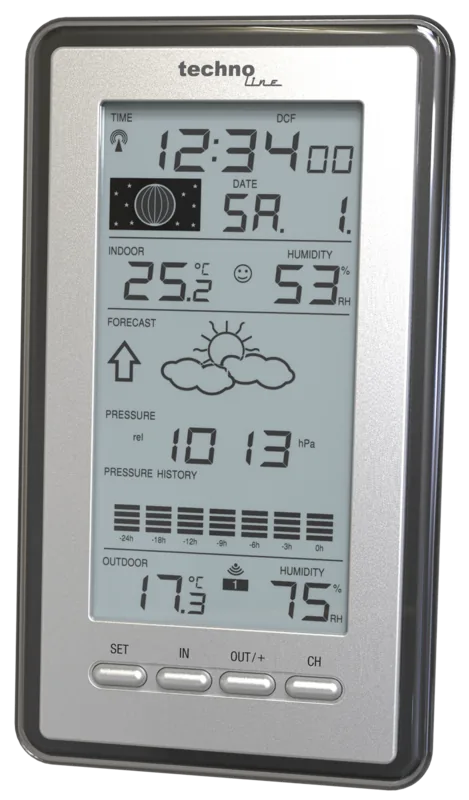
Time accuracy is another standout feature. Equipped with a DCF 77 radio-controlled clock, the station receives precise time signals automatically. If signals are weak, you can set the time manually without hassle. The display is intuitive, featuring a clear LCD screen divided into three sections for time, indoor data, and outdoor data. A low battery indicator ensures you know when it is time to replace powers, maintaining optimal performance. The station runs on AA batteries while the sensor uses AAA.
User convenience is paramount. The alarm function includes a snooze feature to delay the alert, perfect for busy mornings. With four simple function keys, adjusting settings like temperature zones or alarm times is straightforward. The alarm sounds for approximately 85 seconds to ensure attention. The device also supports wall mounting or standing on a desk thanks to a fold-out stand. Ensuring accuracy and longevity is easy with regular battery maintenance and proper placement away from interference sources like TVs or computers.
Care and maintenance are simple but crucial. Clean the casing with a soft damp cloth. Do not use chemicals. Avoid water immersion. Extreme shocks can damage the unit. Follow these guidelines to maintain warranty and functionality. The setup requires inserting the sensor batteries first, then the station within 30 seconds to sync. This ensures security codes are exchanged correctly.
Search for 67,706 Manuals online


Type-in Brand or Model
Karli Barton
8 months ago
How reliable is the signal range between the outdoor sensor and the indoor station? Does it work through walls or multiple floors?
Manual.ly
8 months ago
Based on customer feedback, the connection is very reliable. One user reported the signal reaches over two floors in an old house. Another noted perfect connectivity at approximately 4 meters through a window. The sensors are designed to establish a stable link even with obstructions like walls or windows.