
Technoline WS 9123 Manual
PDF manual · 4 Pages
English



Quick check
Incorrect answer, please try again.
Chat with your Technoline WS 9123 manual using AI
Get instant AI answers from your Technoline WS 9123 manual
Ask anything about the Technoline WS 9123. Answers come from this manual, with the pages they are based on.
Ask a Question
Do you recommend WS 9123?
Yes NoFrequently Asked Questions
It combines a clock, alarm, calendar, and indoor temperature and humidity display. This makes it a compact all-in-one unit for daily home use.
Is this answer helpful?
Press the MODE button to cycle through the different display modes. Each press moves you to the next screen in the sequence.
Is this answer helpful?
Yes. You can change the temperature display between °C and °F using the SET or C/F button while the normal time screen is shown.
Is this answer helpful?
Press ADJUST or MIN/MAX during normal time display to view stored high and low values for temperature and humidity. Hold ADJUST to clear the memory.
Is this answer helpful?
The temperature range is 0°C to 50°C, and the humidity range is 20% to 90%. Below or above that humidity range, the display may show LL or HH.
Is this answer helpful?
It uses 2 AA Mignon LR06 batteries. They are not included, and the instructions recommend alkaline batteries rather than rechargeable ones.
Is this answer helpful?
No. The unit is intended for indoor use only. It should be kept away from water, strong sunlight, dust, and extreme temperatures.
Is this answer helpful?
Advantages and Disadvantages
Advantages

- Combines time, alarm, calendar, temperature, and humidity in one display.
- Easy button-based setup with clear switching between modes.
- Supports both Celsius and Fahrenheit for flexible reading.
- Stores minimum and maximum climate values for quick review.
Disadvantages

- Designed for indoor use only, so it is not meant for outdoor monitoring.
- Batteries are not included, which adds a small extra purchase.
- Uses alkaline batteries only; rechargeable batteries are not recommended.
- Feature set is practical but basic compared with advanced weather stations.
Product Specification
Type
digital
Temperature
indoor
Humidity
indoor
Weather forecast
Symbols
Forecast technology
Barometer
Other displays
Time, Date, Day of the week, stored min/max temperature/humidity, Moon phases
Alarms
Alarm time, Snooze function
Placement
Tabletop device, Wall mounting possible
Power supply
2x AA battery
Color
silver
Product Description
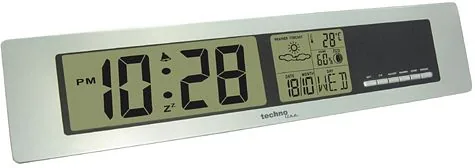
Technoline WS 9123 Digital Wireless Weather Station
The Technoline WS 9123 Digital Wireless Weather Station is a practical home companion for anyone who likes to keep an eye on daily conditions without complicated setup. Designed with a clean display and straightforward button controls, it combines timekeeping, alarm functions, calendar display, and indoor climate readings in one compact unit. For a blog-style look at the technoline WS 9123 Digital wireless weather station manual, this model stands out for its ease of use and everyday usefulness.
A simple way to monitor the room
One of the strongest points of the WS 9123 is how quickly it lets you switch between key screens. With the MODE button, you can move between time, alarm, and calendar views. The SET and ADJUST controls make adjustments easy, whether you want to change the clock format, set an alarm, or update the date. This makes the station approachable even for users who prefer simple, direct controls over complex menus.
Climate readings at a glance
Beyond time and date, the unit also displays indoor temperature and humidity. The temperature range spans from 0°C to 50°C, while humidity is measured from 20% to 90%. You can also switch between Celsius and Fahrenheit, which is useful for different preferences and regions. Another handy feature is the memory for maximum and minimum readings, allowing you to review recent highs and lows and reset them when needed.
Built for everyday indoor use
The design is meant for indoor spaces only, making it a good fit for living rooms, bedrooms, offices, or kitchens. Its slim size helps it sit neatly on a shelf or desk without taking up much space. Powered by two AA batteries, the station is also portable and easy to place wherever you want a quick environmental check.
Notes
- Use only alkaline batteries for best performance.
- Keep the unit away from moisture, heat, and direct sunlight.
- Resetting the min/max memory helps track fresh readings over time.
- Ideal for users who want a simple weather and clock display in one device.
Search for 67,706 Manuals online


Type-in Brand or Model