
Technoline WS 9121 Manual
PDF manual · 3 Pages
English



Quick check
Incorrect answer, please try again.
Chat with your Technoline WS 9121 manual using AI
Get instant AI answers from your Technoline WS 9121 manual
Ask anything about the Technoline WS 9121. Answers come from this manual, with the pages they are based on.
Ask a Question
Do you recommend WS 9121?
Yes NoFrequently Asked Questions
Press SET or C/F key during normal time display to toggle between Celsius and Fahrenheit.
Is this answer helpful?
Operated by 2x AA batteries, not included in the box for purchase separately.
Is this answer helpful?
It supports a range from -50 degrees Celsius to +70 degrees Celsius.
Is this answer helpful?
Press ADJUST or MAX/MIN key during the normal time display to view stored values.
Is this answer helpful?
Hold ADJUST key for 2 seconds during normal time display to clear MAX/MIN memory.
Is this answer helpful?
Press MODE once to enter alarm status, then SET key twice to set hour and minute.
Is this answer helpful?
Press MODE twice to enter calendar setting mode where you can set year, month, and day.
Is this answer helpful?
Advantages and Disadvantages
Advantages

- Wide temperature measuring range supports extreme conditions from -50C to +70C.
- Includes stored MAX and MIN history for tracking temperature and humidity trends.
- Supports both Celsius and Fahrenheit units with easy C/F key switching.
- Features an adjustable alarm with hourly chime options for daily wake up.
- Mode buttons allow quick navigation between time, alarm, and calendar views.
Disadvantages

- Batteries are required for operation but are not included in the package.
- No outdoor sensor is mentioned in the text so indoor measurements only.
- Setting the calendar requires a specific sequence of button presses to enter.
- Humidity range lower limit starts at 20% RH which misses lower dryness issues.
- Display only shows current and MAX/MIN levels rather than real-time graphs.
Product Specification
Type
digital
Temperature
indoor
Humidity
indoor
Weather Forecast
Symbols
Forecasting Method
Barometer
Other Displays
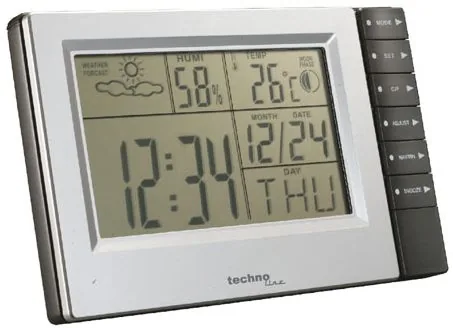
Time, Date, Day of week, Moon phases, stored min./max. values
Alarms
Alarm time
Placement
Table-top unit, wall mounting possible
Power Supply
2 x AA batteries
Color
silver
Product Description
Exploring the Technoline WS 9121 Weather Station
Welcome to the world of precise home meteorology with the technoline WS 9121 Weather Station Digital. It is perfect for maintaining awareness of your local climate conditions. This device offers a comprehensive solution for monitoring environmental conditions within your living space. It combines functionality with ease of use, ensuring you have access to real-time data whenever you need it. The interface allows users to switch seamlessly between time, alarm, and calendar displays using the mode button. This flexibility ensures that the device remains central to your daily routine. Many modern households find value in maintaining consistent climate control, and this unit serves as a good starting point for that goal.
One of the standout features is the ability to track temperature and humidity levels accurately. You should also check the display regularly to ensure accuracy in your readings. The measurement range extends from -50 degrees Celsius to +70 degrees Celsius. For those preferring imperial units, -58 degrees Fahrenheit to +158 degrees Fahrenheit is supported. Humidity levels are tracked from 20% RH up to 99% RH. The system indicates if readings fall below or above these thresholds with clear indicators. You can also monitor historical data by accessing maximum and minimum stored values for temperature and hygrometer readings. This helps in understanding trends over specific periods without needing complex data logging tools. Users can clear this memory simply by holding the adjust button for a specific duration during the time display status.
Time management is handled with precision. Configuring these modes is essential for getting the most from the unit. Users can switch between 12-hour and 24-hour formats simply by pressing the set button during configuration. The alarm function is equally robust. Setting an alarm involves navigating the menu to adjust hours and minutes. You can also choose between a beep sound for the alarm and an hourly chime. The calendar mode allows for setting the year, month, and day. Adjustments are made via the adjust button, providing clear control over dates. Temperature units can be toggled between Celsius and Fahrenheit using the C/F key, catering to diverse user preferences. The setup process is designed to be intuitive across different language regions, with instructions available to help users configure the device correctly.
Powering this efficient device requires two AA batteries. While convenient, users should note that these are not included in the box. The display unit is battery-operated, making installation straightforward without the need for external wiring. Whether you are a weather enthusiast or simply want to know if you need a coat, this station provides the necessary information. Regular checks ensure your home remains comfortable throughout the changing seasons. It remains a reliable tool for those seeking basic yet effective environmental monitoring solutions.
Notes
All features are designed for indoor environments. Batteries must be purchased separately.
Search for 67,706 Manuals online


Type-in Brand or Model